Hello
What type of meta filter are you using?
Thank you for the support.
I’m not too sure what you mean. One of the meta fields is labeled “meta:_stock_at_139” when I export it. The meta fields I am trying to use are stock numbers for different locations. I currently have it set to checkbox > number in the meta data tab of the woof settings. On the structure tab search option is set to value exists and the search value is set to 0.
I have tried many different combinations of options. Including drop down and listing the values manually. When I listed them manually, 0 would not show up but all the other numbers would. If I set it to search by text, I can search for values (like 32 or 12) but I cannot search for 0. I even tried filtering by 0 on a taxonomy but it would not work if the taxonomy slug was also 0.
-
This reply was modified 4 years, 8 months ago by
 nickdill.
Hello
I mean: drop-down, checkbox … etc
Try to use drop-down
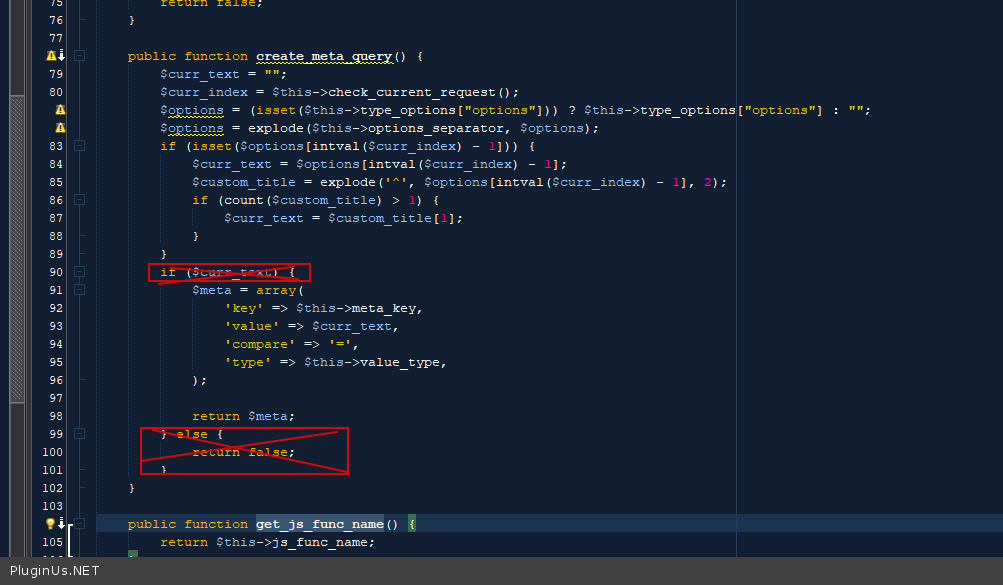
In file -\wp-content\plugins\woocommerce-products-filter\ext\meta_filter\html_types\select\index.php
Delete this code – https://c2n.me/4dCoYvn.png
and do a test
Hello,
I tried drop down as number and drop down as string. I removed the code you suggested and nothing changed. If I list the values “-1,0,1,2,3,4” the 0 does not show up in the drop down.
Hello
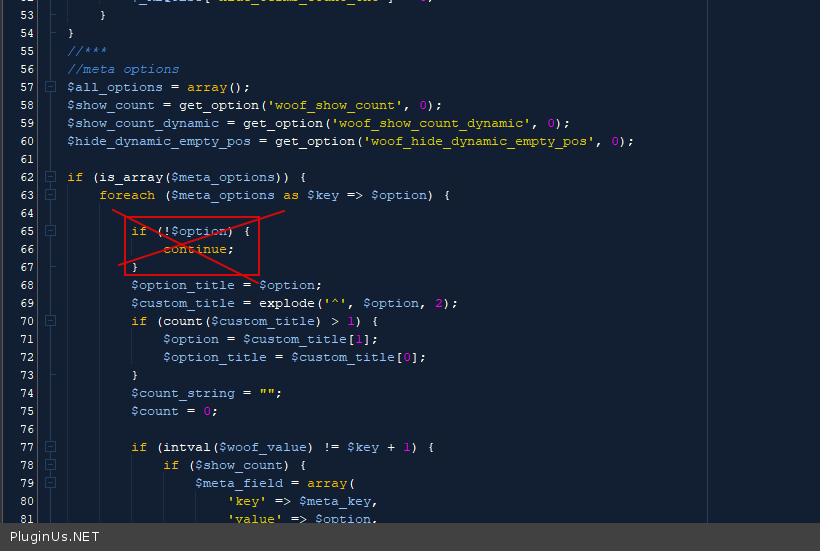
Try in file -\wp-content\plugins\woocommerce-products-filter\ext\meta_filter\html_types\select\views\woof.php delete thid s code – https://c2n.me/4dDSRab.png
When I deleted the code you referenced in -\wp-content\plugins\woocommerce-products-filter\ext\meta_filter\html_types\select\views\woof.php, I could see the 0 values as drop down options in the front end. When I click on the 0, it puts the slug in the URL too but the results are still as if I didn’t click anything. So that fixed the selection in the frontend and added it to the URL but it still does not show correct filter results.
I tried leaving that code and removing that code in combination with removing the code from \wp-content\plugins\woocommerce-products-filter\ext\meta_filter\html_types\select\views\woof.php. Nothing gives proper results but when I remove that if statement with the continue line from the woof.php file, the 0 option at least shows up as an option. When I select the 0 value the results are still not accurate.
I went ahead and looked at the line from the index.php file you referenced and changed the the if($curr_text){ to if($curr_text || $curr_text === '0'){ and it began working as intended. So changing that if statement and removing the continue; from the woof.php file fixed the issue. The drop down is working but I really need to use checkbox instead. What changes would need to be applied to get this working with checkbox?
Hello
checkbox will only work for one value. And use this option – https://share.stackovergo.com/image/i20211018145940.png