Can you please provide us the export of your AMP options panel, We will import it and let you know.
For reference please follow this tutorial: https://ampforwp.com/tutorials/article/how-to-import-and-export-the-amp-option-panel-settings/
Thread Starter
 qut1
qut1
(@qut1)
Thanks for your plugin, but there are so many updates and I feel like they are untested. I often get search console errors the next day.
Today it’s serious or even catastrophic for my site, and I’m not the only one apparently.
Here is the request file: https://tilien.fr/ptgGye
Thx for you help !
The issue is occurring because you have added some code in ‘Enter HTML in body’of AMP option panel>Settings>Advance Settings. May I know why did you add this code?
Thread Starter
qut1
(@qut1)
Hello Ahmed,
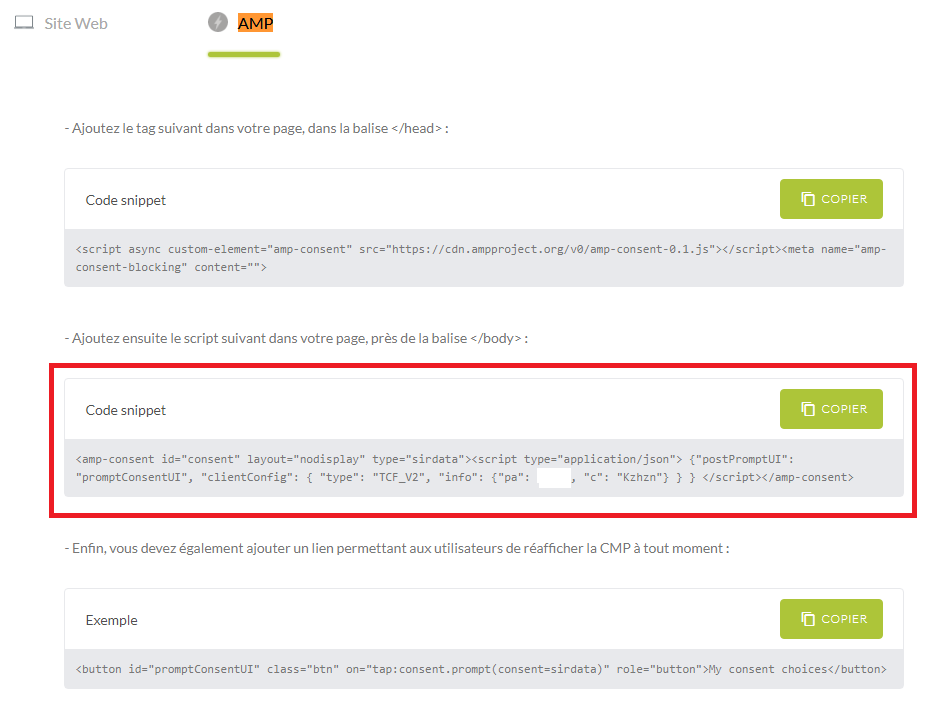
Its for my CMP : https://www.sirdata.com/
2 code, 1 in head, 1 in body : https://i.postimg.cc/BQcw5zxN/cmp.png
In this regard I am each time obliged to edit the file: components-core.php
Because otherwise the code is not high enough for rgpd in head and I have adsense error, you can see what edit I need to do all time here : https://tilien.fr/pt8pcg
We checked your site and can’t find any error https://prnt.sc/vdari8, It seems like you have added meta code which is required for it work properly. Can you please check at your end and let me know.
-
This reply was modified 5 years, 7 months ago by
 Ahmed Kaludi.
Thread Starter
qut1
(@qut1)
Yes, I put the CMP head code back in the head of the options instead of directly in the code. It’s not high enough (top) in the head page anymore, and suddenly I have an adsense error, but at least no more AMP error.
Very good day to you, thank you again for this plugin!
hi
i have same probleme, can’t put sirdata cmp code in AMPforWP.
just to be clear, i have to add 2 lines in amp header to work fine:
<script async custom-element=”amp-consent” src=”https://cdn.ampproject.org/v0/amp-consent-0.1.js”></script>
<meta name=”amp-consent-blocking” content=””>
the first line of code disappears because this tag :custom-element=”amp-consent”
Any solutions ?
Thx for you help !
-
This reply was modified 5 years, 6 months ago by
 rez0rat.
rez0rat: As per the forum guidelines please create a new topic.