• Resolved kevbud

    (@kevbud)


    After normal site login username and password, the 2FA screen appears and I enter the code from my google authentication app. I got a Wordfence message that I was locked out. I had the email sent to try again and the same thing happened. So I used a recovery code to log in successfully. The log showed that my user name had been locked out, but the username had the authentication code added to the user name as one word. I deleted my account from google authentication app and turned off the 2 factor authentication on my website, reenabled the 2 factor authentication and recreated the account with the QR code. I then logged off my site and tried reloading in. This time I got a WordPress message that the user did not exist, but the user name had the first 3 numbers of the authentication code appended to my username. A second attempt allowed my to log in. Not sure I trust the 2FA at this point. Scary to be locked out of your own site, when you are the only user.

Viewing 7 replies - 1 through 7 (of 7 total)
  • Plugin Support WFAdam

    (@wfadam)

    Hello @kevbud and thanks for reaching out to us!

    If you wouldn’t mind, I would like to take a deeper look at this issue.

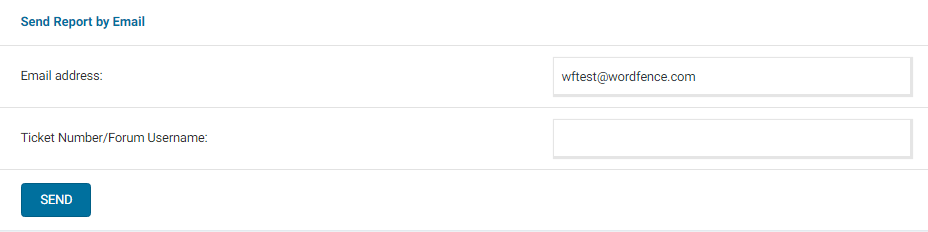
    Can you send a diagnostic report to wftest @ wordfence . com? You can find the link to do so at the top of the Wordfence > Tools > Diagnostics page. Then click on “Send Report by Email”. Please add your forum username where indicated and respond here after you have sent it.

    NOTE: It should look as follows – Screenshot of Tools > Diagnostic > Send by Email

    Thanks again!

    Thread Starter kevbud

    (@kevbud)

    I just sent the report.

    Thread Starter kevbud

    (@kevbud)

    I issue seems to be mainly happening with the Safari browser. Firefox works more often for a successful login with the 2FA code, but not always. The recovery codes always work.

    Plugin Support WFAdam

    (@wfadam)

    That would make sense. I think it might be a password manager that is adding the 2FA code to the username, which in turn is causing the lockout.

    I would recommend checking your Safari Password Manager and make sure that the correct username and password is stored there for your site.

    Let me know if this fixes the issue for you.

    @wfadam

    I use Safari and am dealing with this problem a lot. I just posted another thread here because I didn’t notice this one in time.

    It’s hard to know for sure whether the 2FA code is getting added to the username or password field… I assume it’s the password, but I haven’t really dug into it. But the reason this is happening is clear. The 2FA field is coming up, but the browser is not switching focus to it. The focus is (presumably) still in the now-hidden field the user was last typing in, in my case the password field.

    Anyway… it should be a simple matter of updating the JavaScript that is switching the page to display the 2FA field to make sure it also switches focus to that field.

    Thread Starter kevbud

    (@kevbud)

    I was able to complete the login with 2FA code using Safari today without making any changes. The list of failed logins show my username with the previous 2fa codes as part of the failed username at the end. For example “username315247”. Perhaps someone has fixed the issue, hopefully.

    @kevbud Ah, yes, you’re right, it is getting added to the username field. I just noticed when I deliberately entered the 2FA code without manually clicking into the field, that when it went back to the main login fields, the code was appended to my username.

Viewing 7 replies - 1 through 7 (of 7 total)

The topic ‘2FA login is adding authentication code to username’ is closed to new replies.