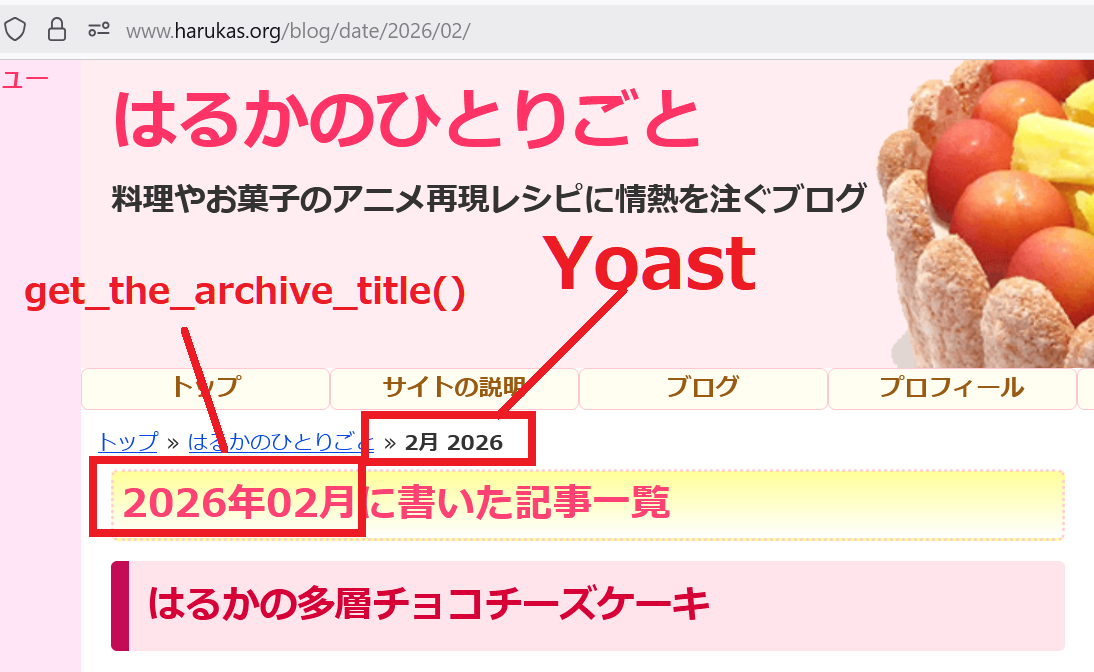
Hello @haruka_suzuki
To customize the breadcrumbs path, use the filter below and place it in your child theme’s functions.php file: wpseo_breadcrumb_links
We also have some examples of how to edit and remove breadcrumbs. If you are not sure how to use them, where your functions.php file is, or what a child theme is, please contact your theme developer for more information.
Thank you for your reply.
I haven’t managed to resolve the following two points.
The date archives are set to noindex. (This isn’t a major issue.)
1) The date format differs from WordPress’s default setting.
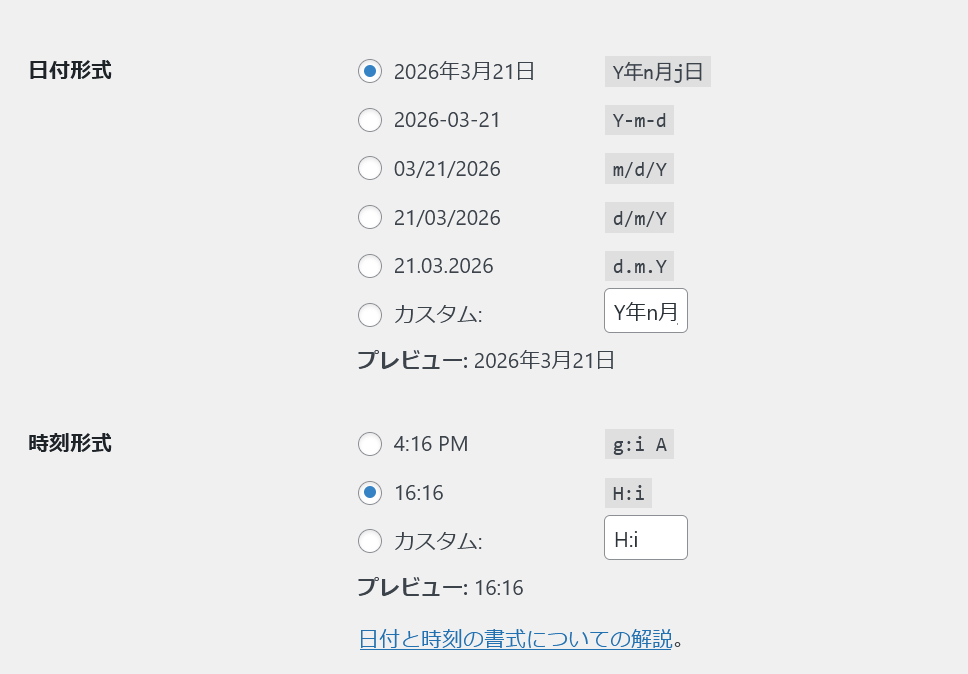
Even though WordPress has an option to set the date format in its standard features,
Yoast doesn’t reference it.
I am Japanese.
I have specified the date format as “2026年3月”.
However, Yoast’s breadcrumb list
returns “March 2026”.
I know about hooks and am using them.
I just don’t know which parameter to modify.
2) I want to add text to the date archive.
I can add a prefix, but I want to add text after it.
I want to insert specific characters after this string.
Those are the two points.
Thank you for providing such a great plugin.
I’ve addressed your concerns below, @haruka_suzuki.
The date archives are set to noindex
Date archives (e.g. https://yourdomain.com/2026/) are based on publication dates. From an SEO perspective, the posts in these archives have no real relation to the other posts except for their publication dates, which doesn’t say much about the content. They could also lead to duplicate content issues. This is why we recommend disabling it. When it’s disabled, it has a noindex. However, you can enable it at WordPress > Yoast SEO > Settings > Advanced > Date Archives.
The date format differs from WordPress’s default setting
Please provide us with screenshots that highlight the issue you are experiencing. You can use any image-sharing service like https://pasteboard.co/, https://snag.gy/, https://snipboard.io/, or even upload the screenshot to your own website. Once you upload it to an image-sharing service, please share the link to the image here.
I want to add text to the date archive
The settings are in WordPress > Yoast SEO > Settings > Advanced > Date Archives
Hello.
Thank you for your response.
I fully understand the “noindex” setting, and there are no issues with it.
1) As shown in the image
https://www.harukas.org/1.png
The breadcrumb navigation does not follow WordPress’s standard format, and I cannot customize it.
This can be a problem in countries like Japan.
2) WordPress settings
https://www.harukas.org/2.png
These are configured correctly.
3) Regarding preposition settings
Of course, I understand.
As explained, the option settings can only be placed before the date.
I want to add text after the date.
Thank you for your assistance.