Plugin Support
 qtwrk
qtwrk
(@qtwrk)
Hi,
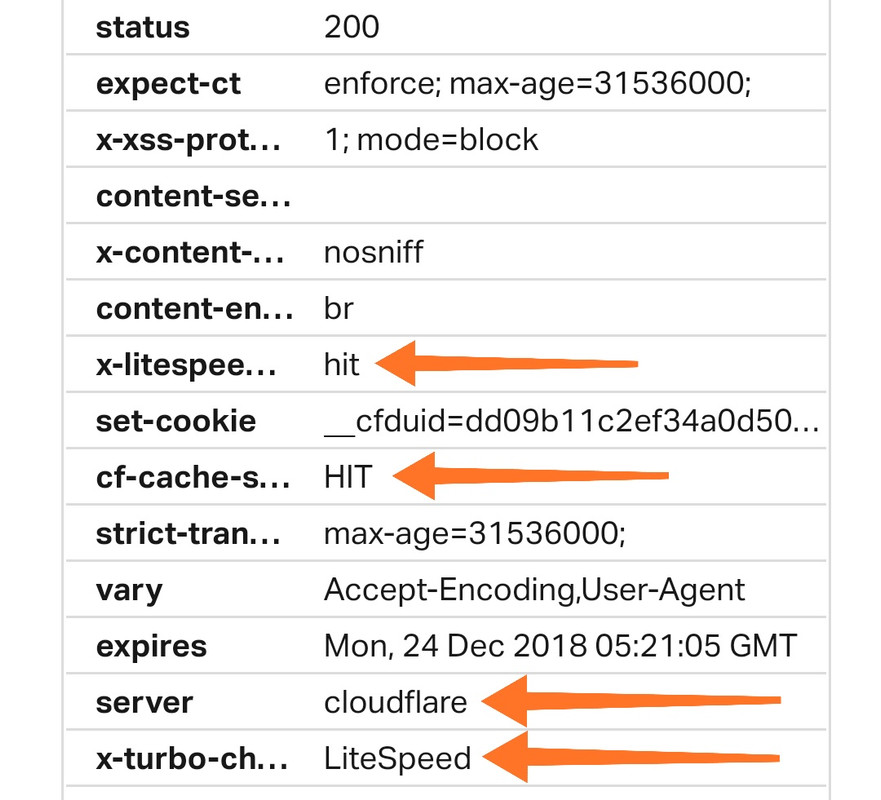
x-litespeed-cache hit , it can be enabled WITHOUT plugin , just advance control will requires plugin.
cf-cache hit , this part is on static files where it serves from CF edge node.
Best regards,
So, when both cache statuses are HIT, then cache process is ->
website -> cached by LiteSpeed cache -> then that result will be cached and served by Cloudflare to visitors
Am I right?
-
This reply was modified 7 years, 5 months ago by
 angoraspace.
Plugin Support
qtwrk
(@qtwrk)
Hi,
Not exactly x-litespeed-cache hit means the page is cached by LSWS, which is not necessarily means also cached by CF, you will need to something in page rule in CF, like “cache everything” , to force cache the main page , by default CF should only cache the static resources.
By that means ,
main page are cached by your server
statics are cached and served by CF
Best regards,
@angoraspace ,
May I know what site you check the cache?
Plugin Support
qtwrk
(@qtwrk)
Hi,
You can use Chrome dev tool to check HTTP header to see cache status.
Best regards,
Please check this -> https://angora.me
I check it on Pingdom and both statuses (LiteSpeed and Cloudflare) are hit. But I can’t sure if it really works because I activate it via htaccess without installing LiteSpeed plugin.
By the way, I’ve activated cache everything on Cloudflare page rule before I activate LiteSpeed cache via htaccess.
Plugin Support
qtwrk
(@qtwrk)
Hi,
If you see x-litespeed-cache: hit/miss , means LS cache is working.
Best regards,
Dear @qtwrk
LiteSpeed cache on my homepage is active with hit status. But on another page, the status is not there. Is that mean installing LiteSpeed cache through htaccess limited for homepage only?