Add field by user
-
i want to desplay some field by defeult and as requredment by user add some field and calculate afte all the fulfillment .It is possible in the plugin

-
Hello @ajaysingh121
To display additional files in the form as the users need them, you have multiple alternatives. You can insert buttons to add new fields or remove existing ones. Please, read the following blog post. It describes a possible use case (you have the form described in the post as a template in the plugin you can select from the “Add Form” section):
https://cff.dwbooster.com/blog/2021/07/06/optional-fields
Best regards.
https://allfeescalculator.com/?cff-form=60
Please check the url and please tell how button work like add course button press add four colum ad designe the abobe table and delet button work delet the colum
below have the add semestar button i want to andy user press the button open the table same tabel automatically as firts semeste tabel this is the possible
Hello @ajaysingh121
First, you should check your equations because you are using fieldnaem, like fieldnaem8, but the correct is fieldname (fieldname8, …)
About the form structure, you have no followed the post instructions.
You must insert a div field for every row (For example, a div field that contains the fieldname10, fieldname5, fieldname6, and fieldname23 fields), and enter the
additional-product ignorefieldclass names through their “Add CSS Layout Keywords” attributes.Finally, enter the following piece of code as the onclick event in the “Add Course” button:
ACTIVATEFIELD(jQuery('.additional-product.ignorefield:eq(0)'));
if(!jQuery('.additional-product.ignorefield').length) jQuery(this).hide();
Best regards.
currect all the equition but the button not working
and other calculaton also not working the furmula is Σ(credit*Grade)/Total Credt
and my Grede in the drowdown form with value
Hello @ajaysingh121
The buttons do not work because you have not followed my instructions. I visited your form again, and you did not include a DIV field per row with the class names I indicated to you.
Also, you have not fixed the typos in the equations. Please, look at the screenshot below:
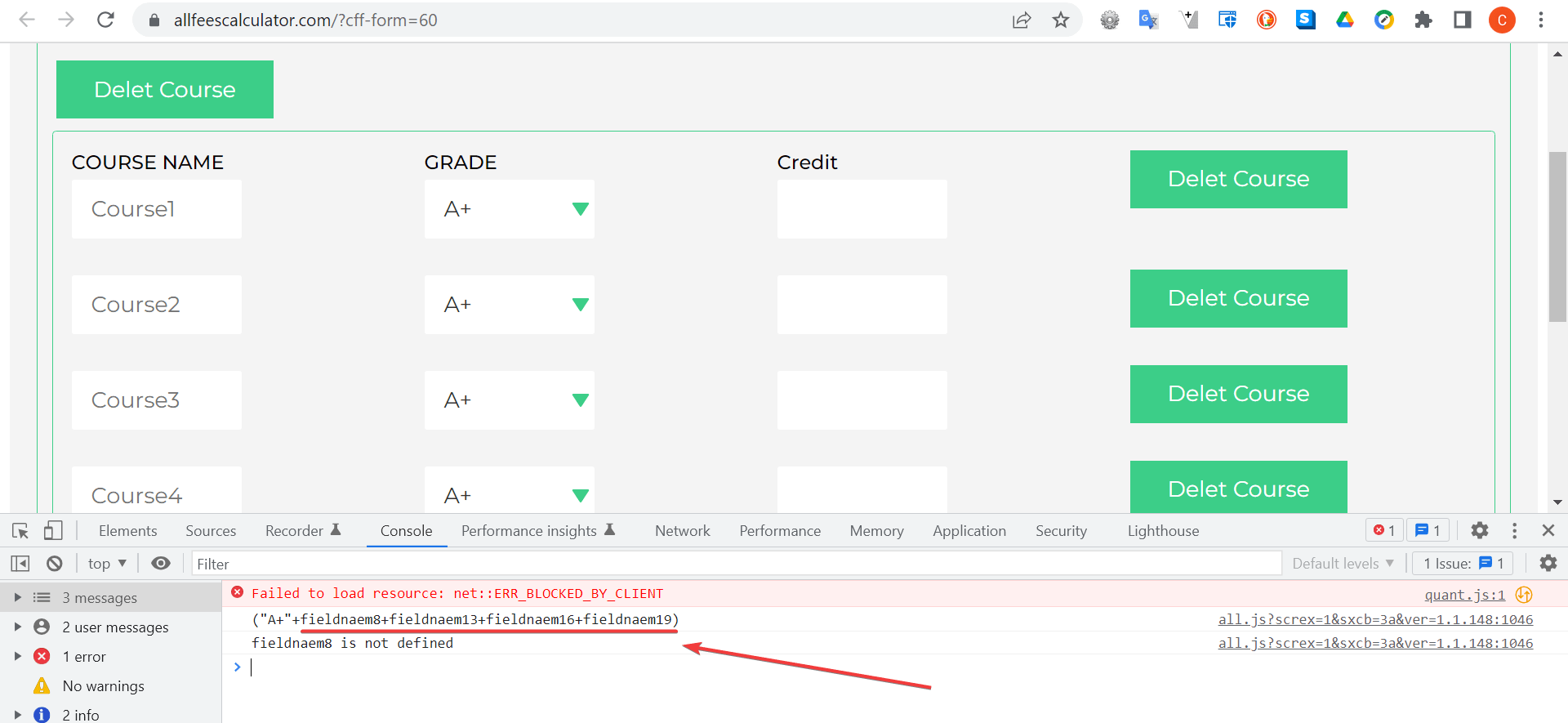
You have typed fieldnaem instead off fieldname.
Best regards.
i have put in the div field that contains and when we put additional-product ignorefield in the Add Css Layout Keywords then the class hide automatically but I want to click on the delete button after delete and hide
Hello @ajaysingh121
I don’t know where you are applying the modifications, but form 60 (https://allfeescalculator.com/?cff-form=60) does not include a DIV field per row or the class names.
Best regards.
Please check the url https://i.postimg.cc/L8yZJknY/Screenshot-21.png we have included in the div field
Hello @ajaysingh121
Excellent !!! But you have applied it to the first row only. You must apply it to every row.
Best regards.
I have applied every row, the screenshot is only for your verification additional-product ignorefield hides the row so now we have used to ignore field in the first row only.
Button also do not work
Hello @ajaysingh121
I’m sorry, but you are not applying the additional-product class names to the other rows. Also, the ignorefield class name should be assigned to the extra rows, and not the first one.
I emulated the process by assigning the class names manually to the container fields via the browser’s console. Please, watch the video by visiting the following link:
https://resources.developers4web.com/cff/tmp/2023/02/22/video_o.mp4
Best regards.
I want this function type of calculator URL https://gpa-calculator.com/college/mizzou possible to create this feature
like if delet the wor then automatiocally course name update like seir no,if press on add semeste then cresate all the tabel etc
Hello @ajaysingh121
The logic is the same as the demo I sent you in the previous entry, but with an additional level.
If you need someone to implement your project, you can contact us directly via the plugin website:
https://cff.dwbooster.com/customization
Best regards.
I want to show in the table 5 rows by defult and delet button only work for delet rows and add button add unlimited rows & addsemestar buttor add the samestar table who to do this
Hello @ajaysingh121
Unfortunately, you cannot create unlimited fields by pressing a button in the current version of the plugin.
Every field must be inserted in the form at the development time and activate/ignore (show and hide) at the runtime by pressing buttons.
Note the fields participate in the equations and dependencies, and the DS fields require a serve-side counterpart to read the information from the external data sources. Implementing these features with unexisting fields is not simple.
In your form, you can insert a maximum number of courses per semester, and a maximum number of semesters and show/hide them by pressing buttons as you’re doing now with the courses.
Best regards.

The topic ‘Add field by user’ is closed to new replies.
