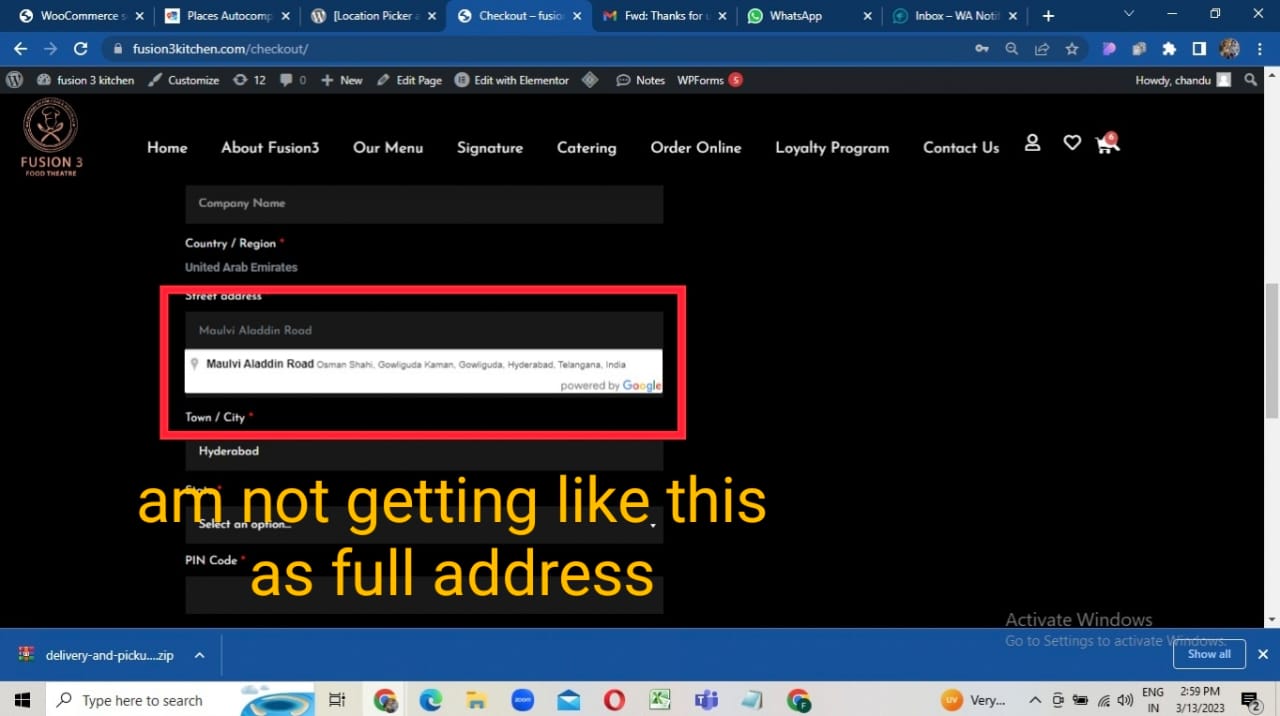
Here in the Street “address field”:The Complete Address is not showing in as auto filling ,please help me and “the address not coming as Hyperlinked” for to connect with map after getting Notification
like This am getting ,Please resolve my issue,
And please elaborate me how to get Address hyperlinked as notification
Hi, to get the full address displayed in Line 1, you can turn off the setting inside Settings->Map Behaviour->Dissect Street Address: https://prnt.sc/btNNJbAdW-Rb
Turn off the option if you want the full address to be dropped into Address Line 1 in addition to the other fields being filled out.
Hi, unfortunately the screenshots you shared have nothing to do with Kikote. This is a totally different integration from what I can see. Kikote saves the location details to the Order meta when the checkout takes place, so you need to contact WA Notifier and ask them how to extract that information into the WhatsApp message.
Based off your usecase, I can also let you know that I’m working on a similar product that might meet your needs and be tighter integrated into Kikote, you can sign up for the pilot here: https://lpacwp.com/saas-pilot/
Viewing 5 replies - 1 through 5 (of 5 total)
The topic ‘Address Not completely filled’ is closed to new replies.