• Resolved kdiebolt

    (@kdiebolt)


    Hello,

    I’m trying to find out if there’s a way to pull alt text automatically from our library catalog (Aspen Discovery – https://edcl.aspendiscovery.org/) to our already created bookshelves. We currently have 171 bookshelves saved in WordPress, with each bookshelf having about 18-30 books, and we often add new bookshelves, or add/remove titles to current bookshelves.

    Over the years I’ve created these bookshelves using the “Input items as a list” adding the ISBNs and not alt text data. The problem now is due to a new rule by the DOJ our county has to be compliant with ADA standards on our websites, and per WCAG 2.1 AA Success Criterion 1.1.1 (Non-text Content), we must ensure all images include alt text.

    Is there any way you can help us get the alt text data pulled from Aspen or elsewhere? I’ve reached out to ByWater (Aspen’s parent company) but as of yet they don’t have a good solution and they suggested I reach out to you. Our website is https://eldoradolibrary.org/ and has many bookshelves across multiple pages, but if you need one page as an example here’s one: https://eldoradolibrary.org/staff-picks/

    Please let me know if you need any more info.

    Thank you!
    Kimberly

    The page I need help with: [log in to see the link]

Viewing 9 replies - 1 through 9 (of 9 total)
  • Plugin Author photonicgnostic

    (@photonicgnostic)

    Going forward you can create Bookshelves using the Aspen API. This adds alt text automatically. There is a guide on the Aspen site: https://help.aspendiscovery.org/help/integration/enrichment#Cell-2709-PanelBody. One detail they don’t mention is the need to whitelist the IP address of the server hosting your website.

    Unfortunately, this won’t help you fix the existing Bookshelves, unless you recreate them from Aspen Lists or queries. Perhaps there is a way to run an SQL query for the items in a Bookshelf to return the desired alt text data in a form that you can copy & paste into the Bookshelf editor?

    Thread Starter kdiebolt

    (@kdiebolt)

    Thanks for that info! I’m hoping ByWater does have an easy solution to add in the missing data for the lists we currently have but I haven’t heard of a great solution yet. I’ll try recreating one of our lists on Aspen and follow the steps you provided to see how quickly that goes.

    Thanks again!
    Kimberly

    Thread Starter kdiebolt

    (@kdiebolt)

    Hi again,

    ByWater is asking for the ‘user agent’ string you will send with your requests. Do you have that or know where I would find it?

    Thanks!
    Kimberly

    Plugin Author photonicgnostic

    (@photonicgnostic)

    The user agent string is generated using your WordPress version and site URL:
    Default 'WordPress/' . get_bloginfo( 'version' ) . ‘; ‘ . get_bloginfo( 'url' ).

    Reference:
    https://developer.ww.wp.xz.cn/reference/functions/wp_remote_get/
    https://developer.ww.wp.xz.cn/reference/classes/wp_http/request/

    Thread Starter kdiebolt

    (@kdiebolt)

    Thanks!

    Thread Starter kdiebolt

    (@kdiebolt)

    Hi again,

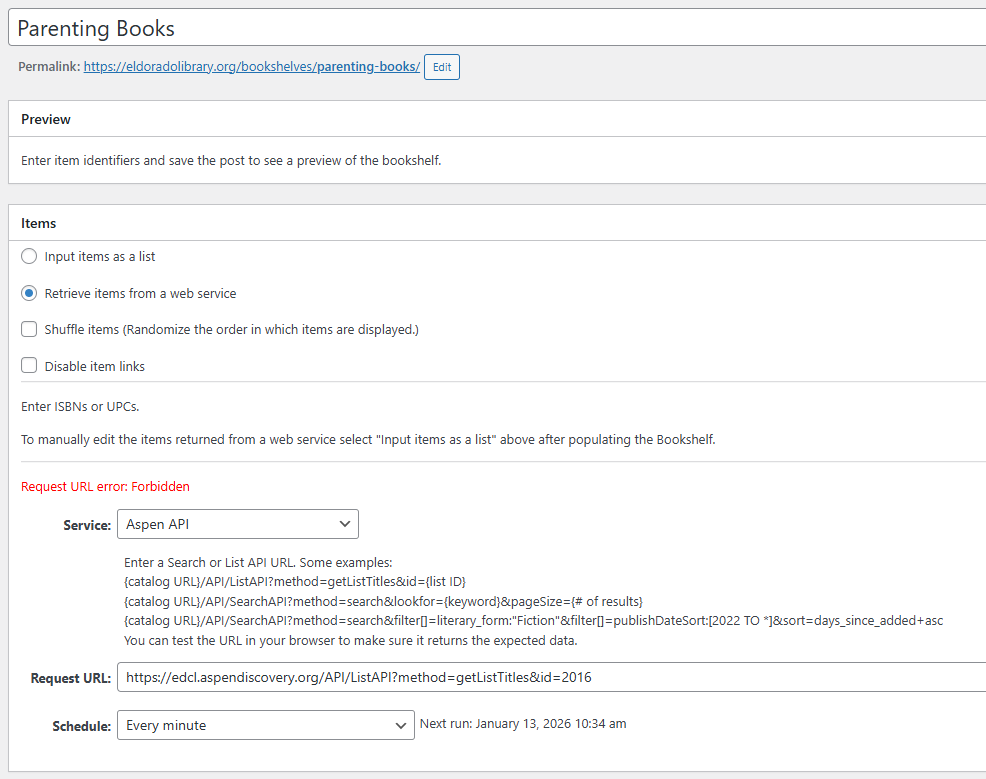
    I’ve set up a public list with Aspen and then a bookshelf using the setting “retrieve items from a web service” but I keep getting a “request URL error: Forbidden” and when I click the link for the bookshelf it says “this bookshelf is empty”. ByWater is asking that I check with you that all my settings are correct as they haven’t seen anything hit their server from the IP address I gave them. Here’s a screenshot of my current settings: https://eldoradolibrary.org/wp-content/uploads/2026/01/Bookshelf-settings-with-error.png

    Any help you can give to get this to work correctly would be greatly appreciated. I’m also not sure if I need to reach out to our website host for them to make setting changes or whitelist any IP addresses.

    Thanks again!
    Kimberly

    Plugin Author photonicgnostic

    (@photonicgnostic)

    Is the IP you gave ByWater 3.18.7.213? That is the WWW A record of your domain: https://intodns.com/eldoradolibrary.org

    If that is the IP they whitelisted then your web host may be sending API requests out from a different IP. Your web host should be able to tell you what it is, but if not there are ways to find out, provided you have permission to install plugins.

    Thread Starter kdiebolt

    (@kdiebolt)

    Good news, I was able to talk with someone who hosts our website and also works for ByWater, and Aspen does have it’s own API control. He was able to make a change so the error is no longer showing, but my book covers for that bookshelf showed as just grey books. After changing the Image Server setting the cover images did show correctly on this bookshelf, as well as the alt text, but all my other bookshelf covers disappeared. So at least I know what I need to do now, it’s just going to take some work to change all my bookshelves over.

    Thanks again for all the help in figuring this out!

    Plugin Author photonicgnostic

    (@photonicgnostic)

    That’s great to hear! Thanks for the update.

Viewing 9 replies - 1 through 9 (of 9 total)

You must be logged in to reply to this topic.