• Resolved donovantcl

    (@donovantcl)


    I am new to WordPress so there are a lot of technical terms I do not understand.

    Where am I able to view a list of appointments that are already booked? (For e.g. Booked by who, information that I collected.

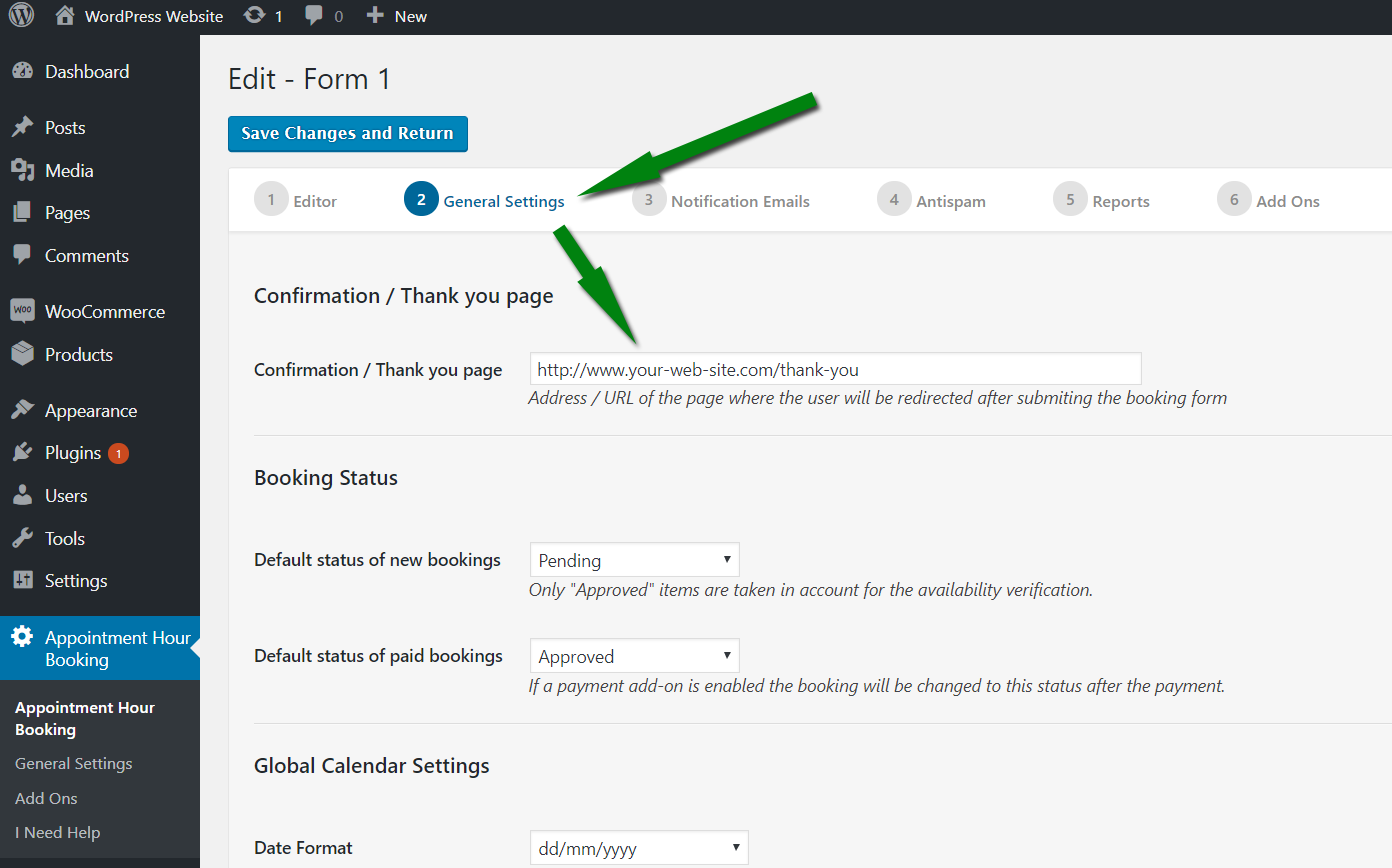
    Also, there isn’t a thankyou page appearing after clicking submit

Viewing 1 replies (of 1 total)
  • Plugin Author codepeople

    (@codepeople)

    Hi,

    You can check the list o appointments in the “Booking Orders” list, into the “Schedule Calendar View” and into the “Schedule List view”. Both the “Booking Orders” and “Schedule” buttons are located in the main settings page next to the “Edit” and “Publish” buttons.

    Regarding to the page with the “thank you” message, you should add that page and put its address into the following settings field:

    https://apphourbooking.dwbooster.com/images/articles/thank-you-page.png

    Thank you for using the plugin!

Viewing 1 replies (of 1 total)

The topic ‘Appointment booked’ is closed to new replies.