Plugin Author
 hupe13
(@hupe13)
Thread Starter
 sanjb
sanjb
(@sanjb)
Hi !
Thanks, that’s perfect. Sorry i didn’t see that before.
Take care.
-
This reply was modified 8 months ago by
 sanjb.
Plugin Author
hupe13
(@hupe13)
Sorry i didn’t see that before.
This is new since yesterday. 😉
Thread Starter
sanjb
(@sanjb)
This explains that 😀
Sorry to bother you (again), but I do have a question : i did what you explain in the link but the arrow isn’t showing. It seems the leaflet-arrowheads.js is not loaded (I uploaded it in the folder you indicate : msv-lumieres.fr/wp-content/uploads/leaflet-plugins/leaflet-arrowheads). But in the source code of the page https://www.msv-lumieres.fr/plan-interactif/, it is not visible
i set up the WPCode plugin with this : https://prnt.sc/FdiMQgltkxuE and the shortcode is : https://prnt.sc/YZBd8sOujHpD
Any idea why?
Thanks again !
Plugin Author
hupe13
(@hupe13)
You have not activated the snippet. Top right: “inactif”. Activate it.
Thread Starter
sanjb
(@sanjb)
Really sorry about that.
Thanks again for your time, your work.
Take care
Thread Starter
sanjb
(@sanjb)
Hi again !
I’m not sure how to do a Polyline.
Do I need to add the code “L.polyline([coords]).arrowheads({ frequency: 20 });” to your WPcode script?
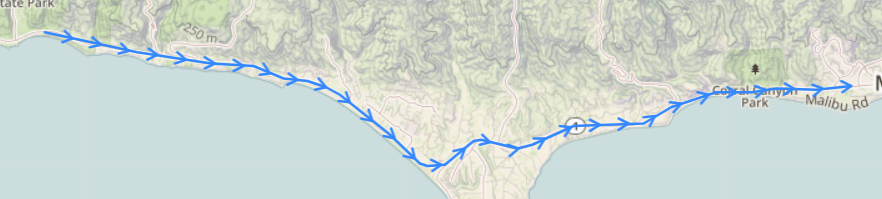
The idea would be to have some arrows (as on their exemple) on the bleu and red lines here https://www.msv-lumieres.fr/plan-interactif/
Thanks
PS : where can I make a donation for your work?
Plugin Author
hupe13
(@hupe13)
Do you mean, you would like to change the color of the polyline in the shortcode? I updated my code. (It is quick and dirty, if the code were in the plugin, I would have to be more careful.)
Thread Starter
sanjb
(@sanjb)
Plugin Author
hupe13
(@hupe13)
Do I need to add the code “L.polyline([coords]).arrowheads({ frequency: 20 });” to your WPcode script?
Oh, I’m sorry, I’ve only read half of your question. Yes you are right, write instead of
}).arrowheads({
	// Configure your options
	yawn: 20,
	fill: true
});
this
}).arrowheads({
	// Configure your options
	frequency: 20
});
And you can write more options here, (comma separated). It’s too complicated to set up that in the shortcode.
Thread Starter
sanjb
(@sanjb)
Thanks !
But it doesn’t go all the coordonate I indicated :
[leaflet-arrowheads latlngs=”46.618695,4.474029;46.618952,4.474477;46.620278,4.476009;46.620438,4.476156;46.621267,4.476419;46.622367,4.477527;46.622594,4.477940;46.622739,4.478264;46.623093,4.478755;46.623476,4.479085;46.623981,4.478879;46.624152,4.478669;46.624228,4.478527;46.624950,4.475639;”]
If possibile, I would lie the blue line to have arrows all the long. I can recreate the line if need with all the coordonates
Like this : https://prnt.sc/8k4xKXDY8w_y
The module indicates we can do it, but i’m not sure if you implemented this. If no, then no worries. If yes, how can I do?
Thansk !
PS :don’t forget to tell me where to make a donation !
Plugin Author
hupe13
(@hupe13)
That’s definitely possible, but I don’t have any code in the plugin or in my examples that I could easily and quickly adapt for this purpose.
For a line with an arrow I had such a code.
PS :don’t forget to tell me where to make a donation !
Write a review.
Thread Starter
sanjb
(@sanjb)
Do you plan do add it to your code? If so, I can wait, no worries, there’s no rush.
I’ll writte a reveiw.
Thanks !
Plugin Author
hupe13
(@hupe13)
https://leafext.de/extra/arrowheads/
I have changed a few things, both in the code and in the options. I have used the code from Bozdoz (Leaflet Map) for polyline/polygon.
-
This reply was modified 8 months ago by
 hupe13.
Thread Starter
sanjb
(@sanjb)
Hi !
Thanks for your work, that’s perfect.
I still have a last question. When I used the “leaflet-line” short code to have the bleu/red lines, I could hide or show them with the leaflet-featuregroup as you explained to me above : https://prnt.sc/FBWVOTovFNL2 and https://prnt.sc/wHCXjf3Bn0LK
But since I changed the “leaflet-line” to “leaflet-arrowheads” to match your new code, the hide/display function isn’t working anymore (see on the page https://www.msv-lumieres.fr/plan-interactif/).
Am I missing something?
Take care !
PS : sorry for the delay of my answer.