Plugin Author
 pipdig
(@pipdig)
Hi Matt!
That’s interesting, I’m not sure what would cause this issue. Would you be able to send a link to a page showing the form?
If you can also send the shortcode that you’re using it will help too.
Thanks,
Phil
Thanks Phil!
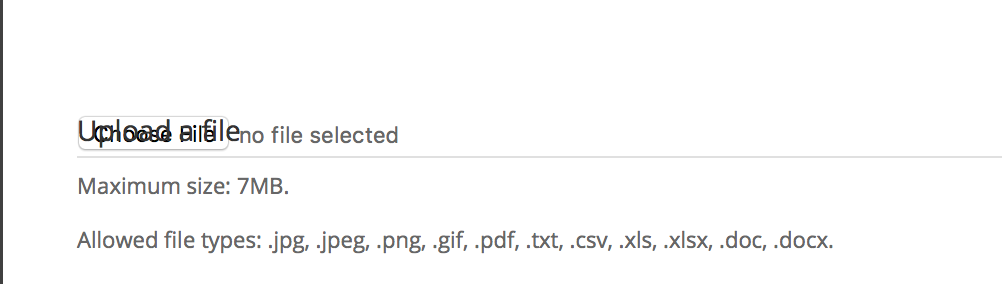
Here is what is looks like:
https://s3.amazonaws.com/workflownetwork-files/support/web/uploadButton.png
My shortcode:
[zendesk_request_form useragent=”no” group=”additions” attachments=”3″ attachments_max_size=”7″]
for now, I just made the button title blank..
[zendesk_request_form useragent=”no” group=”additions” attachments=”3″ attachments_max_size=”7″ label_attachments=” “]
– Matt
here is a page with it “broken”
https://workflow.network/app-support-contact-temp/
Also,
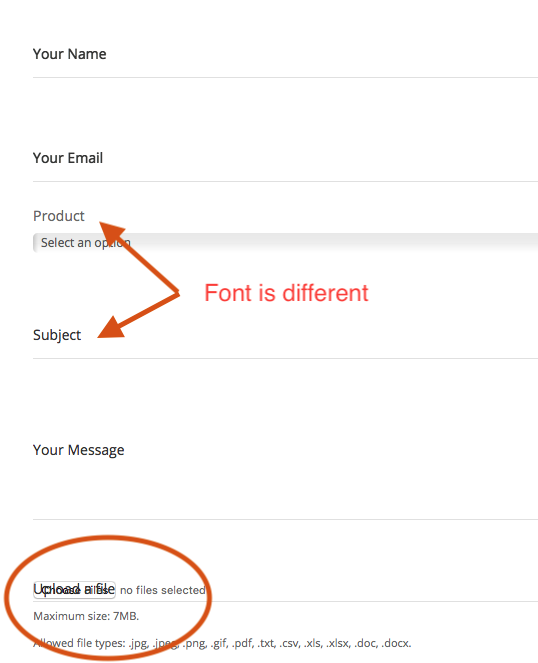
This could be a different ticket item, but the field titling does not match the automatic fields vs the “group” fields.
https://s3.amazonaws.com/workflownetwork-files/support/web/uploadForm.png
Plugin Author
pipdig
(@pipdig)
Hey Matt,
It looks like the form has some fairly custom CSS for form elements, which isn’t playing well with the Zendesk form for some reason. It’s strange, since there is not any styling on the form, so in theory it should take any styling from your theme automatically.
It should be possible to fix the “Upload” button by copying the following CSS to your theme:
#zendesk_field_zen_files label {
  display: none;
}
If you want to test it first, you could add that CSS to the Additional CSS tab in the Customizer.
Let me know if that works for you and we’ll move on to updating those font issues next 🙂
Thanks,
Phil
-
This reply was modified 8 years, 2 months ago by
 pipdig. Reason: edited CSS
Yes, setting that CSS fixed it! Thank you for the tip sir!
Now for the titles 🙂
– Matt
Plugin Author
pipdig
(@pipdig)
I think the following CSS will fix the titles:
.zrf-form label, .zrf-form input[type="text"], .zrf-form input[type="password"], .zrf-form input[type="tel"], .zrf-form input[type="email"], .zrf-form input[type="file"], .zrf-form textarea, .zrf-form select {
  color: #000;
}
Let me know 🙂
This fixes the color. but ideally, the font face and everything should match.
Plugin Author
pipdig
(@pipdig)
The font seems to be the same for me in Chrome and Firefox – https://i.imgur.com/nTKvnCQ.png.
From your screenshot, it looks like some of the labels are in bold. So the following CSS will hopefully fix that:
.zrf-form label, .zrf-form input[type="text"], .zrf-form input[type="password"], .zrf-form input[type="tel"], .zrf-form input[type="email"], .zrf-form input[type="file"], .zrf-form textarea, .zrf-form select {
  font-weight: 400 !important;
}
Thanks for your help. It seems to be an issue with the Salient Theme and Safari I would guess.
I would have to effectively restyle everything to make properly which is odd.