Hello @jcalart,
I hope things are going well for you.
When I get the resullts the page autoscroll to the bottom of the page so I got to scroll up to see the results.
I tried submitting a test forum on the Chrome browser, which isn’t autoscrolling to the bottom of the page. The results appear in the submission section. Please refer to this video:
https://monosnap.com/file/HxtqfBH3xbOp6siq0HAxRM8GbhoPeF
To investigate this further, could you share a few things with us?
— Forminator Form Export file
— Since there is no option to export leads quiz, we will create one on our end for testing.
— Any steps to replicate or a video recording showing the issue would be really helpful.
To share the form export
– Navigate to the “Forminator -> Forms” page in your site’s back-end
– click on a little “gear” icon next to the form in question
– select “Export” option
– copy given export code and paste it at https://pastebin.com
– include link to that paste in your response below.
Note: this export will not include any data that is already submitted – they’ll stay safely on your site and we don’t need them anyway.
Kindly respond to this topic after sharing the form export.
–
Kind Regards,
Imran Khan
Hi,
Thanks for reply.
It seems that you don’t replicate the issue cause you are on a big screen, so even if the page scroll down there is enough place to see the result. The issue is clearly visible on smartphones or compact laptop screens, I replicate it by resizing my browser as seen on this vidéo :
https://vimeo.com/1117768737?share=copy#t=0
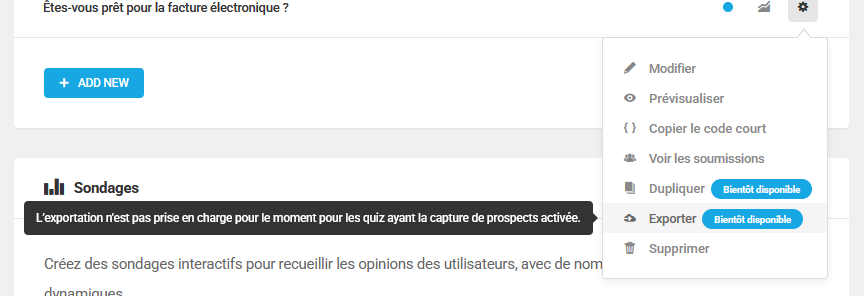
I can’t export the form it says that this is currently unavailable if the lead mode is activated :
https://netopen.fr/wp-content/uploads/2025/09/Image-378.png
Tel me if you want me to do something else to help you.
By the way here is also a vidéo to show you the time for the form to load on the page :
https://vimeo.com/1117770267?share=copy#t=0
Thanks again for your help.
Hi @jcalart
Based on your screenshot, it seems you use an outdated Forminator version. The current version allows exporting forms, quizzes, and polls. Can you update Forminator and then export your module?
Kind Regards,
Kris
Hi I installed it one week ago and I don’t have update available :
https://netopen.fr/wp-content/uploads/2025/09/Image-381.png
Hi @jcalart
I ran some tests and I was able to replicate this issue, it appears there is a conflict on your site that is causing this, because I can’t replicate it in my end.
I’m afraid that at this moment you can’t disable autoscroll in the quiz and its not possible to export leads quiz. These features are still under development and I don’t have an ETA about them.
I asked forminator team to review this issue in the meantime, could you please try running a conflict test? Its better to run the test on a staging site.
https://wpmudev.com/docs/getting-started/getting-support/#conflict-test
Best Regards
Amin
Hi I disabled all my plugins but the issue is still there, it seems that there is a conflict with the DIVI theme.
I disabled the footer on the page I need the form to be so it scrolls down but don’t hide the results.
By the way there is also this lag for the form to appear (3/4 seconds some times)
Is it normal ?
Thanks by advance.
Hello @jcalart
Hi I disabled all my plugins but the issue is still there, it seems that there is a conflict with the DIVI theme.
I disabled the footer on the page I need the form to be so it scrolls down but don’t hide the results.
I understand that this is how it should work, but it’s not functioning properly on your site. Have you considered temporarily switching to a different theme or adding the quiz to a page that wasn’t created with Divi to see if that resolves the issue? As you already tried disabling all the plugin it suggests that the issue is with the theme settings.
The delay is normal if the form using the Load with Ajax, you can check that in form/quiz editor -> behavior render settings.
Kind Regards
Amin
Hi @jcalart
We haven’t heard from you in a while, I’ll go and mark this thread as resolved. If you have any additional questions or require further help, please let us know!
Kind Regards,
Kris