Hi @rodrigoflausino ,
WP Offload Media Support Team here, Thanks for reaching out with your query we would be happy to assist.
I don’t see any errors in upload. The image its only upload directly to uploads folder and the image its stays inside original server.
I need install another plugin to see this ?
And the AVIF image don’t generate any additional crops, but i don’t know if its related to offload plugin or its from 6.5.
Hi @rodrigoflausino ,
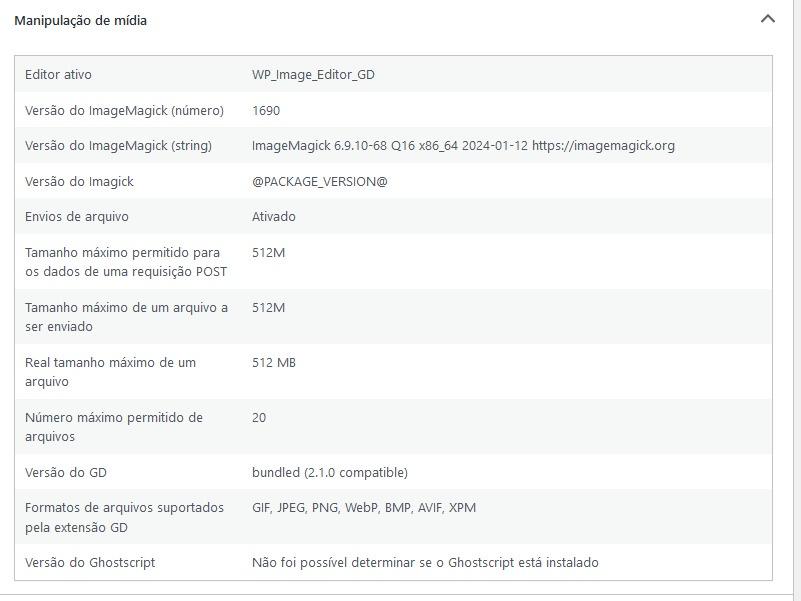
Thanks for the additional information. Please could you go to your WordPress dashboard, then Tools >> Site Health >> Info tab >> Media Handling section? Please expand the section and send us a screenshot. We’d like to check if your site can support AVIF.
WordPress 6.5 adds AVIF support Looking forward to your response.
Hi! Its shows this. Its in Portuguese Language, sorry:
Hi @rodrigoflausino ,
We can’t seem to view the image you shared. This is what we’re seeing: https://share.zight.com/yAuBwWpQ
If possible, can you please copy the text, and paste it in your next response? Otherwise, please share the image by using another service.
Hi Rodrigo,
Thanks for sending that in. It looks like your server should support AVIF upload.
May we know how you are uploading the AVIF file? Are you uploading it via the Media Library?
Also, would you be able to send us the diagnostic information from the Support tab on your install?
Go to the Support tab of your install
Scroll down to the “Diagnostic Info”
Copy the contents of the box, and paste it here. You may remove any sensitive info you don’t want to share.
Hi! Try this:
https://cdn.selectgame.net/outros/diagnostico-select.txt
I will delete the file in next hours.
And i find a WordPress core trac ticket too, but i don’t know if its related to send the file to S3.
https://core.trac.ww.wp.xz.cn/ticket/60902
Media data:
image_editor: WP_Image_Editor_GD
imagick_module_version: 1690
imagemagick_version: ImageMagick 6.9.10-68 Q16 x86_64 2024-01-12 https://imagemagick.org
imagick_version: @PACKAGE_VERSION@
file_uploads: 1
post_max_size: 512M
upload_max_filesize: 512M
max_effective_size: 512 MB
max_file_uploads: 20
gd_version: bundled (2.1.0 compatible)
gd_formats: GIF, JPEG, PNG, WebP, BMP, AVIF, XPM
ghostscript_version: unknown
Hi Rodrigo,
Thanks for the additional information. WP Offload Media should still be able to offload files even if additional sizes were not created for the file. For example, it is possible to offload video files uploaded in the Media Library.
Perhaps your site is encountering an error when uploading AVIF files. Would you please try editing your wp-config.php file and replace this line –
define( ‘WP_DEBUG’, false );
With these lines –
define(‘WP_DEBUG’, true);
This means that any errors are logged to /wp-content/debug.log, because some errors are not visible on screen. More details about that at https://ww.wp.xz.cn/support/article/editing-wp-config-php/#wp_debug
Kindly check the debug.log file created and look for any messages that mention WP Offload Media, or “AS3CF”, or maybe the AVIF file you uploaded.