Hi @temovision,
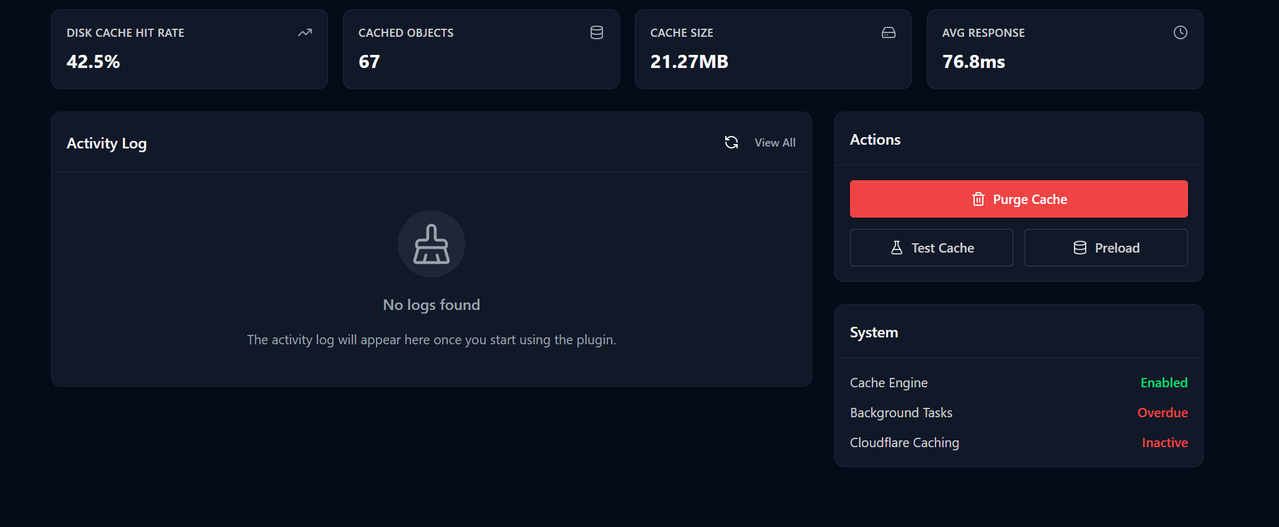
Thanks for the screenshot! The “Background Tasks: Overdue” warning means that some scheduled background jobs (like cache preloading or cleanup) have been queued but haven’t run in over an hour. This is separate from cache writes — so your cache is still being updated, but these background tasks are sitting idle.
This is almost always a WordPress Cron issue. Here’s how to fix it:
1. Check if WP-Cron is disabled – Open your wp-config.php and look for:
define('DISABLE_WP_CRON', true);
If this line exists, WP-Cron is disabled and you’ll need a real server cron to replace it.
2. Set up a server-side cron job – Replace the unreliable WP-Cron with a true server-level cron. You can ask your hosting provider to set up a real cron.
3. If you don’t have server cron access – Remove or comment out DISABLE_WP_CRON from wp-config.php to re-enable the default WP-Cron behavior.
After making the change, the warning should clear on the next dashboard load once the pending jobs run. If it persists, you can go to Tools → Scheduled Actions in your WordPress admin to see exactly which jobs are stuck.
Let us know if you have other questions.
Thanks for your response. I have set up a server side cron job.
Hi @temovision,
Great, let us know if you still face any issues.