• Resolved peterpitlock

    (@peterpitlock)


    We are using WordPress as an internal Wiki.

    We are using SQL Server. I know WordPress is geared towards MySQL.

    An article will not post if there is a backslash in the article. It will just save the article as “auto-draft” but it will then clear your submission page and all your work will be done . Other than this, we have posted many times and all works well, but we really need to post backslashes.

    You can use a forward slash, but when a backslash is entered, all is lost.

    I know that frontier press is used. frontier to post), and it is definitely something to do with frontier.

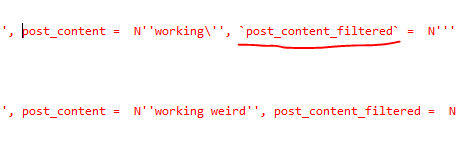
    I used SQL Server Profiler. When there is a backslash, the SQL parameters incorrectly get enclosed by a

    `
    This does not work and SQL Server fails.
    backtick sql-server wordpress
    How do I get rid of the backtick?

    Is it WordPress that processes the SQL or Frontier?

    Could I report this supposed bug somewhere?

    Would a plugin be possible or does a plugin exist already?’

Viewing 5 replies - 1 through 5 (of 5 total)
  • Plugin Author finnj

    (@finnj)

    Wordpress process the SQL, Frontier Post does not do any direct SQL.

    There must be backtics in the text submitted by you users.

    To get rid of back ticks, you can check the content before it is saved, and also remove them, by using

    Filter: frontier_post_pre_update
    https://wpfrontier.com/frontier-post-actions-hooks/

    This will require WordPress skills

    Thread Starter peterpitlock

    (@peterpitlock)

    Hi finnj

    Thanks for reply

    I can assure you, I’ve recreated this 100 times over, there are no backticks submitted by users at all. Also the backticks are added in the SQL statement itself and not in the parameters that get updated.

    I’ve also just found this:
    After the first column that had the forward slash, all columns following thereafter in the SQL statement, erroneously get the backticks – I don’t know if this will mean anything.

    SQL statement

    Thanks

    Thread Starter peterpitlock

    (@peterpitlock)

    http://stackoverflow.com/questions/11321491/when-to-use-single-quotes-double-quotes-and-backticks-in-mysql

    http://stackoverflow.com/questions/261455/using-backticks-around-field-names/261476#261476

    These threads definitely confirms it is the standard MySQL / PHP behaviour, and that

    BACKTICKS(`) are used around identifier names.

    It also states

    The only problem with backticks is that they are not ANSI-SQL compliant, e.g. they don’t work in SQL Server.

    If there is a chance you would have to port your SQL to another database, use double quotes.

    I do not know where in WordPress to set this unfortunately

    Plugin Author finnj

    (@finnj)

    Hi,

    One can never be a 100% sure, but I am almost certain it isn’t Frontier Post that causes this.

    What happens if you post the same text from the back-end (admin area) ?

    If it only relates to the post content you can add the following to functions.php to remove backtics

    
    //***************************************************************************************
    // Test remove backticks
    //***************************************************************************************
    
    function my_test_remove_backtics($tmp_post, $tmp_task_new, $_POST)	
     {
     $tmp_post['post_content'] = str_replace("backtick", "'",  $tmp_post['post_content']);
     return $tmp_post;
     }
    
    add_filter('frontier_post_pre_update', 'my_test_remove_backtics',10,3);
    

    – replace “backtick” with the actual backtick charakter (as backtick is used to enclose code, it can not be in the above code sample)

    one note, backtics is sometimes used to enclose code, but should be replaced on save by <code></code>

    • This reply was modified 9 years, 1 month ago by finnj.
    • This reply was modified 9 years, 1 month ago by finnj.
    • This reply was modified 9 years, 1 month ago by finnj.
    Thread Starter peterpitlock

    (@peterpitlock)

    Thanks again for help

    I followed your advice and created a quick draft in the admin section – it created the same result and did not post successfully.

    I can now take Frontier out of the equation and focus on the SQL_Server drivers on PHP, which I have updated, but no success

    Thank you so much for your time and assistance.

    Fantastic work on this plugin!!

Viewing 5 replies - 1 through 5 (of 5 total)

The topic ‘Backtick (MySQL norm) added to SQL Server Query causing error’ is closed to new replies.