• Resolved WilmaW

    (@wilmaw)


    Hi,

    Since enabling the Broken Link Checker plugin on my website wilmade.com, my site has been going down at least once a day. After checking with my host, they found the plugin is causing a lot of server load by hitting admin-ajax.php very frequently.

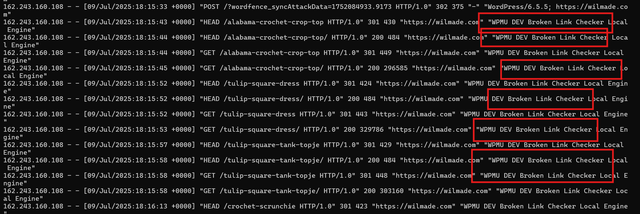
    Here’s a screenshot from the logs showing the repeated hits:

    Has anyone else run into this issue? Are there any ways to optimize the plugin or reduce how often it runs?

    Thanks in advance for your help!

    • This topic was modified 10 months, 3 weeks ago by WilmaW.

    The page I need help with: [log in to see the link]

Viewing 5 replies - 1 through 5 (of 5 total)
  • Thread Starter WilmaW

    (@wilmaw)

    Plugin Support Imran – WPMU DEV Support

    (@wpmudev-support9)

    Hello @wilmaw,

    I hope things are going well for you.

    I am sorry to hear about the issue. The screenshot you’ve shared is small and blurry.

    Would you mind sharing the access logs with us so we can review them fully?
    You can upload the logs file to Google Drive and share a publicly downloadable link with us.

    So we can review it thoroughly and gain a clearer perspective for the investigation.


    Kind Regards,
    Imran Khan

    Thread Starter WilmaW

    (@wilmaw)

    Hi Imran,
    Thanks for your reply! Sorry, I don’t have any other info than what I shared in my original post.

    Here’s a Google Drive link in case the image is easier to view that way: https://drive.google.com/file/d/1GVJLK8vWF0vQbxtk7gbqEGQlZdGD6AD8/

    Hopefully this helps, and hopefully you can provide some insights based on the description of the issue. Thank you!

    Best,
    Wilma

    Plugin Support Nithin – WPMU DEV Support

    (@wpmudevsupport11)

    Hi @wilmaw,

    The way the “Local” versions work it can consume server resources. Could you please try reducing the resources in the plugin side, ie, under  Settings > Link Checker > Local > Settings > Advanced.

    You can reduce the percentage for Target resource usage, for example, to 15% or less, and also change the Server load limit to 1. This may help reduce the load.

    You can also increase the hours set for “Check each link” under Link Checker > Local > Settings > General and see if that also helps.

    In case the above doesn’t help much, can you try switching to Cloud version and see if makes any difference?

    Broken link checker has two engines, Cloud and Local. The Cloud version should use fewer resources. You can refer to the plugin documentation for more info:
    https://wpmudev.com/docs/wpmu-dev-plugins/broken-link-checker/

    Regards,

    Nithin

    Plugin Support Nithin – WPMU DEV Support

    (@wpmudevsupport11)

    Hi @wilmaw,

    Since we haven’t heard from you for a while. I’ll mark this thread as resolved for now. Please feel free to re-open this thread if you need any further assistance.

    Kind Regards,

    Nithin

Viewing 5 replies - 1 through 5 (of 5 total)

The topic ‘BLC Plugin causing daily downtime’ is closed to new replies.