blog widget does not work properly
-
Hi,
I wanted to use “blog post” widget to show all post-types named “magazine” in my website. Although the widget supports “products” and “other post-types” in the “display options” -> “post type” section, But that settings does not work at all. All of them list only the posts in my website (not product or custom post types or …). I am using “ACF” plugin for creating custom post types in my site that is compatible with elementor. Here is the image of widget that does not work:

Why this happens?-
This topic was modified 5 months, 3 weeks ago by
hamiddavodi.
The page I need help with: [log in to see the link]
-
This topic was modified 5 months, 3 weeks ago by

-
Hello @hamiddavodi,
Thank you for reporting the issue. We will resolve it as soon as possible. We will let you know when the issue is resolved.
Hello @hamiddavodi,
We have fixed the issue in the “display options” -> “post type” section of the “blog post” widget. Please update the plugin and check. If you still find any issues, please let us know.
ThanksThanks for your response.
The problem of “post-type” fixed. But the pagination of this widget does not work properly also!
you can see that only 3 post-type are in the page. But the pagination is showing! I set the pagination “on” in the plugin. But also set “posts per page” to 8. So when the number of all post-types are less than 8, the pagination must be disappear!Hi @hamiddavodi,
We’ve fixed the issue and pushed update.
Please let us know if you face any issues.Hey @hamiddavodi,
I hope your “post-type” and pagination issue has been fixed. If you still face any issues after this, please let us know.
Thanks a lotThanks a lot for your reply.
Yes, those issues were fixed. I also have a friend that uses the pro version of plugin. It seems that this latest update was not applied to the “pro” version of plugin. The pro version is still 2.0.9.9. I hope your team update the pro version also to the latest one.
Thanks for solving previous issues about this widget. I want to report two other problems about this widget!
The first one is about tags and categories in the widget. As you can see from the link and from this image, tags and categories do not work when using “ACF” plugin or even “Woocommerce products”.

I set tags or taxonomies for my custom post-types in the ACF plugin:

But those tags do not show by the blog-post widget!
The second problem is about “date”.
As you can check from the URL, when we click on the date label, the original article or post-type page is showing. But I think with clicking on that we must go to the archive page of that date or month on our websites:
I hope that these two problems about this widget also be considered and fixed in future days.
ThanksHi @hamiddavodi,
Thanks a lot for taking the time to report these issues so clearly, and I really appreciate your patience and detailed explanation.
You’re absolutely right on both points. The behavior you described with tags and categories not working properly for ACF based custom post types and WooCommerce products is a valid issue, and I understand how important this is when building dynamic blog layouts. The same goes for the date link behavior – redirecting to the single post instead of the date or monthly archive is not the expected experience, and your suggestion makes perfect sense.
I’ve noted both problems and can confirm that they are related to the widget itself. I’ll start working on fixing them as soon as possible and will aim to improve compatibility with ACF taxonomies and WooCommerce, as well as adjust the date link to point to the correct archive pages.
Thank you again for reporting this and for helping make the plugin better. Your feedback is genuinely valuable, and I’ll keep these fixes a priority in the upcoming updates.
Hi @hamiddavodi,
We’ve pushed update today.
Please update your plugin.Note: If you’re using Premium Version, then you need to install it separately.
Account Page link is on our website Header.Hi again,
Thanks for your update. Currently, I am using master addons version 3.0.9 in my website. I checked it in my website. Unfortunately, still there are problems with the “blog posts” widget of “master addons” plugin!
1- The tags related to the “taxonomies” of the “ACF” plugin could not be loaded in my website. You can see the issue in the page below:
https://websiteinspiration.ir/moasese/magazine/
I mean the tags shown before in the image!
2- Another problem that I mentioned before (linking to the “date archive page”) also still exists. The link of “date” tags below each article redirects users to the original article (but should show the archive page of that month for example).
3- Also I checked the widget in a “date archive” elementor template. You can see the December and October month archive pages of my website in the links below:
https://websiteinspiration.ir/moasese/2025/12/
https://websiteinspiration.ir/moasese/2025/10/
As you can see both of them are showing all articles. There are no way to detect articles related to each month. I think the widget should understand the month automatically, because the widget is used in a template in “elementor theme builder” part. So I think the developers of the plugin should change the widget to be able to detect each month articles.
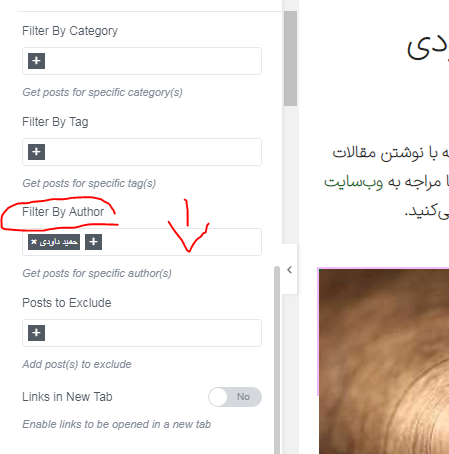
4- The same problem exists in “author archive” pages. Although in the “Advanced settings” part of the element there is “Filter by author” part:
image-1
link: https://websiteinspiration.ir/moasese/wp-content/uploads/2026/05/image-1.png
But there is no option to detect the “current author” automatically! Again because this widget is usually used in “elementor theme builder” templates, This detection is necessary in my opinion. You can see the two pages of two “different” authors in my website from the links below:
https://websiteinspiration.ir/moasese/author/moasese/
https://websiteinspiration.ir/moasese/author/ahadi56/
Both of them show the same articles. Because I could only set “one” author name in the filter part and there is not “current author” option to detect author automatically. Probably this issue (not configuring automatically according to each archive page content) could be seen for categories and tags also.
5- From two last links above you can see the pagination is not working perfect. I set the “8” as the number for “Posts per page” option in the widget. But the pagination still exists when the number of total article of one author is below 8 or exactly 8!
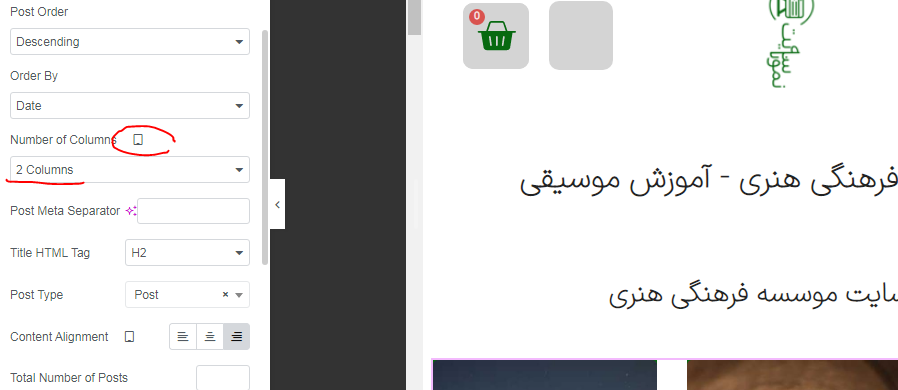
6- Another important problem about this widget is “number of columns” option that is useful for “responsive” design.
https://websiteinspiration.ir/moasese/wp-content/uploads/2026/05/image-2.png
You can see I set the 2 columns for “Tablet Portrait” for this page:
https://websiteinspiration.ir/moasese/blog/
But still “3” columns are appearing in the tablet resolution for that page. I hope you read the problems I mentioned exactly and this time the problem would be solved completely.
Thanks-
This reply was modified 3 weeks, 2 days ago by
Hi @hamiddavodi,
Thank you again for all the details you shared.
I understand the issues you’re facing with the Blog Posts widget of Master Addons. We’re taking this seriously and will update the plugin as soon as possible to fix these problems.
I really appreciate your patience and thorough testing.
Thanks a lot-
This reply was modified 3 weeks, 2 days ago by
Kakon Barman.
-
This reply was modified 3 weeks, 2 days ago by
-
This reply was modified 3 weeks, 2 days ago by


You must be logged in to reply to this topic.