Plugin Support
 Laca
Laca
(@lacadev)
Hi @ryankline
Please send us the troubleshooting text, which you can copy from the “Advanced” tab of the plugin, in the “Troubleshooting” box, by clicking “Copy to clipboard,” so we can assist you further.
https://snipboard.io/WuKrRG.jpg
Best regards,
Laca from Trustindex
-
This reply was modified 1 year, 7 months ago by
 Laca.
Laca.
URL: https://www.theaestheticblend.com
MySQL Version: 8.0.37
WP Table Prefix: wp_
WP Version: 6.6.2
Server Name: http://www.theaestheticblend.com
Cookie Domain: http://www.theaestheticblend.com
CURL Library Present: Yes
CSS path: /nas/content/live/aestheticblend/wp-content/uploads/trustindex-feed-instagram-widget.css
PHP Info:
Version: 8.2.23
Memory Usage: 90.27MB
Memory Limit: 512M
Max Upload Size: 50M
Max Post Size: 100M
Allow URL fopen: On
Allow URL Include: Off
Display Errors: Off
Max Script Execution Time: 43300 seconds
WP_HTTP_BLOCK_EXTERNAL: not defined
WP_ACCESSIBLE_HOSTS: not defined
Plugin: Widgets for Instagram Feed
Plugin Version: 1.4.5
Options:
active: 1
activation-redirect:
proxy-check:
notifications: Array
(
[rate-us] => Array
(
[active] => 1
[timestamp] => 1729794743
)
    )

rate-us-feedback:
cdn-version-control:
version-control: Array
    (
        [update-version-check] => 1.4.5
    )

preview:
source:
feed-data:
feed-data-saved:
public-id:
token-expires:
load-css-inline:
layout:
template:
CSS:
Active Theme: Hello Elementor 3.1.1
Plugins:
Advanced Custom Fields PRO (6.3.9 – active)
Change WordPress Login Logo (1.3 – active)
Classic Editor (1.6.5 – active)
Dynamic.ooo – Dynamic Content for Elementor (3.1.1 – active)
Elementor (3.24.7 – active)
Elementor Pro (3.24.4 – active)
Imagify (2.2.2 – active)
Mailgun (2.1.0 – active)
Unlimited Elements for Elementor (Premium) (1.5.125 – active)
Widgets for Instagram Feed (1.4.5 – active)
WPCodeBox 2 (1.1.1 – active)
WP Engine Smart Plugin Manager (5.18.0 – active)
WP Rocket (3.17.1 – active)
Plugin Support
Laca
(@lacadev)
Hi @ryankline
Thank you for providing the troubleshooting details.
We will look into the issue and get back to you shortly.
Best regards,
Laca from Trustindex
Plugin Support
Laca
(@lacadev)
Hi @ryankline,
Try removing the Trustindex app from your Facebook account settings, then reconnect your Instagram account within the plugin. This should help resolve the issue. Here’s how to do it:
- Log in to the Facebook account which manages the Facebook Page connected to the Instagram Business Profile.
- Go to the personal profile of that Facebook account
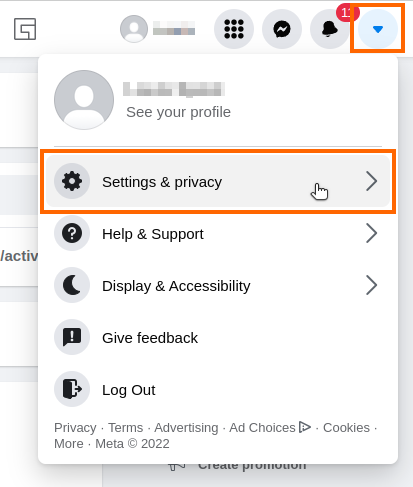
- Go to the following location: “Your Profile” dropdown (top right of page) > Settings & privacy > Settings
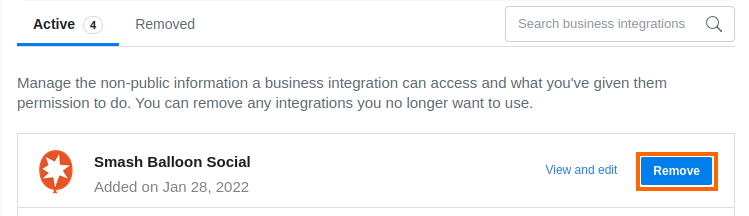
- Go to Business Integrations from the settings menu on the left side of the page.
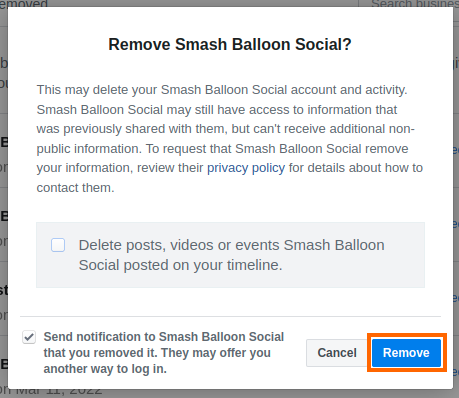
- Find the “Trustindex” app and click Remove.
- Return to your WordPress Site, go to Instagram Feed > Connect Instagram, and reconnect your Instagram Business Profile to reauthorize the Trustindex app.
Could you please let us know if this solved your problem?
Best regards,
Laca from Trustindex