Viewing 7 replies - 1 through 7 (of 7 total)
  • Plugin Support AR Rasel

    (@arrasel403)

    Hi @rijans,

    Sorry for the late reply.
    Using BetterDocs you can create a multi-level topic/sidebar like your shared URL.

    And you can create an incremental slug structure like the URL. URL will be like these:

    https://site_URL/docs/
    https://site_URL/docs/topic/
    https://site_URL/topic/single_doc/

    If you have multiple topics then you can create multiple KB. As multiple KB is a Pro feature. We can’t discuss this here. I have checked and got that our support team already replied over live chat. You should get an email. You can check and if you have any other queries, you can ask there.

    Hope you understand. Thanks!

    Thread Starter Jaber Al Nahian

    (@rijans)

    I am replying you email. The way you said, doesn’t work properly. Like:

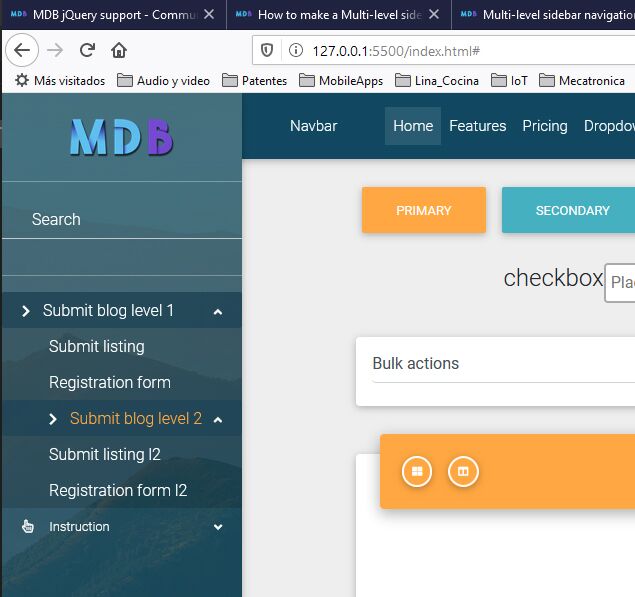
    Sub categories does not show us as nested child in sidebar. THey should show as nested sidebar like this https://usercontent.mdbootstrap.com/mdb-images/support/566874dc-a9f9-4614-b03b-a01bb8f598bf-Multi-level-sidenav.jpg . Instead they show up as parent category in sidebar. I am talking about If am talking about, if I am building a KB for PHP, then I should have sidebar like this:

    PHP Tutorial:
     Intro(top section)
       About PHP (sub section)
         What is PHP (Article under sub section)
         Why PHP (Article under sub section)
       History(sub section)
         History of PHP (Article under sub section)
     Basics(Top Section)
       asics(Article under top section)
       OOP(Sub section)
         What is OOP(Article under sub section)

    And this PHP doc should not show Java doc or anything related to JAVA.

    then Java doc page:

    Java Tutorial:
     Intro(top section)
       About Java (sub section)
         What is Java (Article under sub section)
         Why Java (Article under sub section)
       History(sub section)
         History of Java (Article under sub section)
     Basics(Top Section)
       Basics(Article under top section)
       OOP(Sub section)
         What is OOP(Article under sub section)

    Also notice that I have common terms like Intro, History, Basics, OOP, etc. How do I segregate the Terms per Different tutorial under your Admin UI? your Admin US does not distinguish which OOP is of what, which Intro is of what? Your system and Admin UI should be like this: https://ps.w.org/docspress/assets/screenshot-3.png?rev=2402700 . Can I achive this architecture in your Admin UI and doc view? Even if I purchase?

    Still if you don’t understand, can we make replica of followings?

    Tutorial 1: https://nextjs.org/docs/getting-started

    Tutorial 2: https://nextjs.org/learn/basics/create-nextjs-app

    Assume that above two tutorials and their sidebar sections can be easily distinguished and managed from admin Ui.

    Can we do these with your paid plugin?
    help or email me at rijans . x @ gmail . com

    Plugin Support Abid Hasan

    (@abidhasan112)

    Hi @rijans ,

    Hope you’re doing good today.
    You can simply enable the Nested Subcategory option to get this done. Have a look at this video: https://d.pr/v/dFQPCc

    Regarding the Admin UI – We have this feature in the BetterDocs Pro: https://betterdocs.co/docs/switch-back-classic-modern-ui/

    Our support member will discuss about the PRO feature on your support ticket.

    Thank you!

    Thread Starter Jaber Al Nahian

    (@rijans)

    We I got partial answers. But how do I get UI like this? https://ps.w.org/docspress/assets/screenshot-3.png?rev=2402700

    Because suppose we have a section “Basics” for PHP Tutorial and also have a section “Basics” for Java tutorial. How do view sections, sub-sections per Tutorial is this way? https://ps.w.org/docspress/assets/screenshot-3.png?rev=2402700

    So that we can clearly understand which section is of which, in admin panel?

    Plugin Support Abid Hasan

    (@abidhasan112)

    Hi @rijans ,

    Regarding the Admin UI – We have this feature in the BetterDocs Pro: https://betterdocs.co/docs/switch-back-classic-modern-ui/

    This kind of UI is available on BetterDocs Pro version. We call it BetterDocs UI

    Note that, In BetterDocs UI we don’t have an option to display the subcategories in a hierarchy format like your screenshot.

    Thanks!

    Thread Starter Jaber Al Nahian

    (@rijans)

    Hi, I have tried a nulled version of your pro version, and I can confirm you that, you don’t have or you didn’t understand my points.

    Look at my Admin UI Screenshot: https://www.screencast.com/t/MiY091MC5Cd

    Here Category 1.1 is created under Category 1. But it’s showing in separate place! Why? It should be under Category 1 in nested way like this: https://www.screencast.com/t/P4zb3pnjAx . Sub categories should not be scattered right?

    Another this is, Category 1 if JS Tutorial. If I create Category 1 for PHP Tutorial, shouldn’t it show in grouped way?

    Still if you don’t understand, can we talk over phone? Because we need to purchase this.

    There are more problems with your plugin exist that we shall discuss.

    Thanks

    Moderator Steven Stern (sterndata)

    (@sterndata)

    Volunteer Forum Moderator

    >> Hi, I have tried a nulled version of your pro version, and I can confirm you that, you don’t have or you didn’t understand my points. <<

    If you’re using a nulled version, your site may now be hacked. You should check.

    As you’re (attempting to) use a pro version,please use their official support channel. We feel they are best equipped to support their products.

    Commercial products, whether properly obtained or not, are not supported in these forums.

Viewing 7 replies - 1 through 7 (of 7 total)

The topic ‘Can we create multi-level topic/sidebar like this?’ is closed to new replies.