• Resolved mdotk

    (@mdotk)


    I turned debugging on briefly to fix something.

    Now I turned it off, by the message like

    HOMEPAGE

    NO JAVASCRIPT ERRORS

    Still show in all my pages. Reset cache etc. Turned settings on and off againb.

Viewing 2 replies - 1 through 2 (of 2 total)
  • Plugin Author Spacetime

    (@spacetime)

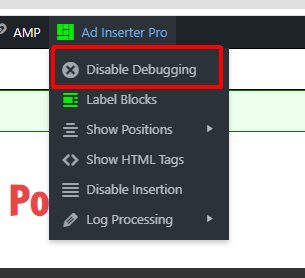
    The should be a menu item Disable debugging in the debugging menu in the admin bar:

    This should disable debugging. You didn’t post any address so I can’t check.

    You can also check if cookie AI_WP_DEBUGGING is present – delete it.

    Thread Starter mdotk

    (@mdotk)

    Thanks, I had to clear my cookies, that fixed it.

Viewing 2 replies - 1 through 2 (of 2 total)
The topic ‘Can’t disable debugging output’ is closed to new replies.
