Hi,
Please share the snapshot of the issue.
Go to Theme Panel > Scripts & style, and try to disable/enable all the files, and clear the cache and check.
Thread Starter
 Jim
Jim
(@kernix)
Snapshot? There isn’t really a way to take a snapshot of clicking the visual tab and NOT having it activate.
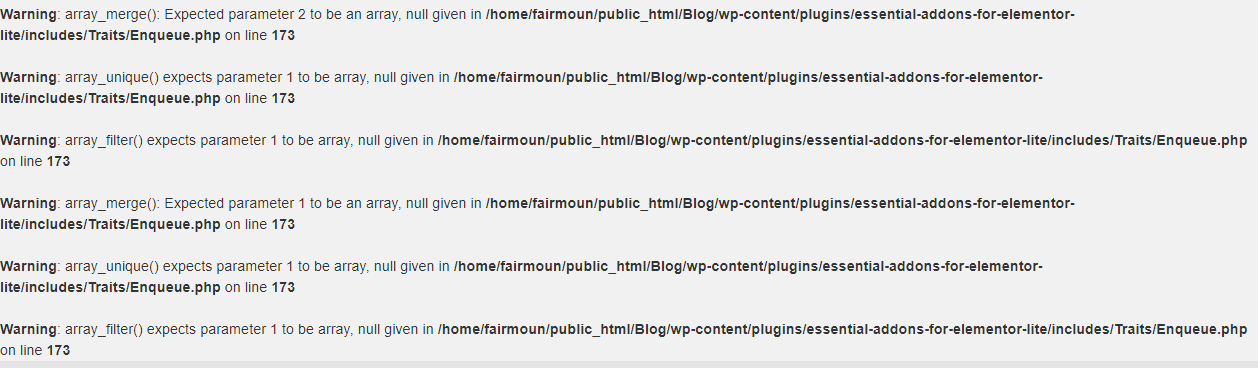
It seems I’m now getting a lot of errors from Essential Addons for Elementor. I thought I deactivated both Elementor plugins yesterday but apparently not. I did on my other site that is using OWP.
What do you man disable \ enable the scripts? You want me to turn then all on then off or vice versa?
Thread Starter
Jim
(@kernix)
Thread Starter
Jim
(@kernix)
Fixed – did the scripts things, was able to remove Elementor, ran WP-Optimize then cleared my cache for the past week – thanks! However, the errors are still there (image above) and I don’t see my admin bar on my site when I am logged in. What is going on? Should I create a new post for those issues?
Hi,
Since the error is coming from the essential addons plugin, please try to contact the concerned plugin support.
Hi @kernix,
This is Tushar from Essential addons for Elementor team. Sorry to hear that you’re facing this error. Please make sure that you’re using latest version of both Elementor and Essential addons for elelemtor. Afterwards, regenerate assets from Essential addons -> tools and check back.
If the issue still persist, please create a ticket on our support forum with details so that we could investigate and resolved this as soon as possible.
Support forum link: https://wpdeveloper.net/support/new-ticket/
We will check and get back to you soon, dont worry.
Thank you !
Thread Starter
Jim
(@kernix)
I got rid of both plugins – it was image gallery classes that were creating the problems – I got rid of the classes so the problem is fixed