• Resolved kfutter

    (@kfutter)


    I’ve become aware that credit/debit card payment options had disappeared from the cart and checkout pages of my site. I’d had issues previously with trying to replace the default PayPal option with Advanced Card Processing, and both had remained enabled. Now I’ve discovered that Advanced Card Processing is not only not enabled, but it won’t let me enable it.

    Initially when I selected the “Manage” option, it warned me that ACP “supported” (not “required”?) the block functionality, while I was still using the old shortcodes (for reasons related to the previous issue). I’ve sorted that now, and had hoped this would solve the problem, but it hasn’t. What’s odd, though, is that ACP itself reports as being enabled:
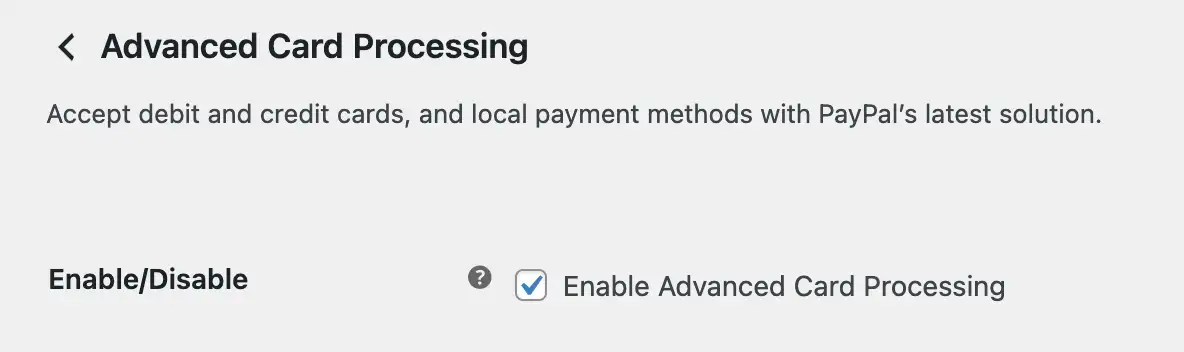
    However, this appears to be false, as it’s definitely not showing on the cart or checkout pages.

    Can anyone assist in solving this issue?

    Kevin

    The page I need help with: [log in to see the link]

Viewing 9 replies - 1 through 9 (of 9 total)
  • Thread Starter kfutter

    (@kfutter)

    I’m pleased to report that I’ve managed to sort this out. Simply disabling ACP on the management page (second screenshot in my post above), saving the change, and then re-enabling using the button on the Payments page (first screenshot in my post above) seems to have fixed the problem.

    Phew!

    Kevin

    Thread Starter kfutter

    (@kfutter)

    Looks like I spoke too soon! Since making these changes, I’ve started to have some draft orders appear, which I normally never get (except the spammy bulk kind). So I decided to make a purchase myself, and have discovered that the “Place Order” button on the Checkout page doesn’t work after selecting the credit/debit card payment option. Nothing happens other than a draft order being created. I really should have tested this first before publicly announcing it! I’ll have to disable it again until someone can assist me in getting it resolved.

    Kevin

    • This reply was modified 10 months, 2 weeks ago by kfutter.
    Plugin Support Krystian Syde

    (@inpsydekrystian)

    Hello @kfutter

    Thanks for the detailed overview.

    To clarify, Advanced Card Processing is specifically designed to work on the checkout page, not the cart or product pages. So if you’re expecting card fields to appear outside of the checkout, that would be outside the intended behavior. I’ve checked your site and currently see no sign of hosted fields being loaded.

    To investigate further, please share your system status report by following these steps:

    1. Go to WooCommerce > Status
    2. Click Get system report, then click Copy for support
    3. Paste the contents into PrivateBin
    4. Share the link with us here so we can review it in full

    Alternatively, we also suggest you contact us directly for further assistance. We may need to examine your system report or might need a few screenshots from your backend. You can open a ticket with our service desk. Here’s how you can request support: Request Support. Please make sure to include the URL of this thread in your ticket for reference.

    Kind Regards,
    Krystian

    Thread Starter kfutter

    (@kfutter)

    Yes, the Checkout page is one I’m referring to that has the problem. To restate: the “Place Order” button on the Checkout page is currently non-functional after choosing the credit/debit card payment option. It merely creates a draft order, and for a new or not logged-in customer, all other details are blank.

    I’ve disabled that option for now to limit the damage.

    @inpsydekrystian I’m not sure what you mean by “hosted fields”. I’ll submit a support request as you suggest.

    Kevin

    Plugin Support Krystian Syde

    (@inpsydekrystian)

    Hello @kfutter

    By hosted fields, I mean the actual card input fields (card number, expiry, CVV) that are loaded by PayPal onto the checkout page. These fields are required for the credit/debit card payment method to work.

    Since those fields weren’t present (as we can see on your screenshot), the checkout process couldn’t proceed, which matches what you observed. The Place Order button won’t respond because the payment step is technically incomplete.

    I’ll watch out for your support request and take care of it as soon as it comes in.

    Kind Regards,
    Krystian

    Thread Starter kfutter

    (@kfutter)

    Ah, thanks for the explanation! You shouldn’t see anything related to ACP at all on the live site right now, as I’ve disabled the feature for the moment. I assume you’ll want it re-enabled for testing in order to follow up the support request?

    Kevin

    Thread Starter kfutter

    (@kfutter)

    OK, support request submitted!

    Is it possible that I was meant to configure something after enabling ACP?

    Kevin

    Thread Starter kfutter

    (@kfutter)

    Krystian has been helping me with this via a support ticket, and we’ve concluded that for now, it’s best to stick to the Classic checkout, based on shortcodes. The newer, block-driven checkout page just doesn’t work on my site, for reasons that currently remain a mystery. For now, everything seems to be working, so I’ll mark this as resolved.

    Kevin

    Plugin Support Krystian Syde

    (@inpsydekrystian)

    Hello @kfutter

    Yes, I’d say it’s semi-resolved for now. Hopefully, we’ll still manage to track down the root cause of the issue with the Blocks checkout. If this solution helped and you’re happy with the support, feel free to leave a quick review on WordPress — it means a lot to us.

    Kind regards,
    Krystian

Viewing 9 replies - 1 through 9 (of 9 total)

The topic ‘Can’t Enable Advanced Card Processing’ is closed to new replies.