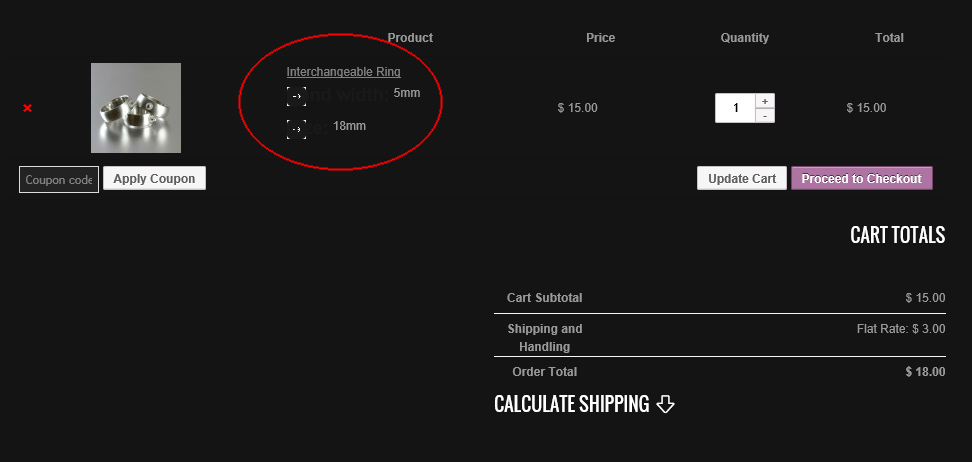
It may be possible to get an improvement with some custom css, but to be able to advise you please post the link to the page so the markup can be examined with browser tools. Different themes have different markup. If you are shy about posting a link, you could use the format: www dot my site dot com
Thread Starter
 t3x66
t3x66
(@t3x66)
Hi Lorro.
This store is not currently live on my website, what do you mean post the link to the page? the link I provided is my website.
Thank you,
The link is to an image which is no good for this purpose. To be able to help you with some custom styles anyone would need to see the live store page so they can examine the markup code-behind. Please come back after you have a live store page.
Thread Starter
t3x66
(@t3x66)
Hi again Lorro, I understand what you mean.
Here is the link to the page, you will have to add this product and then view the cart to see the problem 🙂
http://www.magmabeads.com/product/interchangeable-ring/
Thank you again.
Try this in your custom css:
.shop_table.cart th,
.shop_table.cart td
{border:1px solid #404040}

.woocommerce td.product-name dl.variation dt,
.woocommerce-page td.product-name dl.variation dt
{background:none}

.shop_table,
.shop_table a,
.woocommerce td.product-name dl.variation dt,
.woocommerce-page td.product-name dl.variation dt,
.woocommerce td.product-name dl.variation dd,
.woocommerce-page td.product-name dl.variation dd,
.cart_totals
{color:#d0d0d0; font-size:12px; line-height:18px}

.woocommerce #content table.cart td.actions .input-text,
.woocommerce table.cart td.actions .input-text,
.woocommerce-page #content table.cart td.actions .input-text,
.woocommerce-page table.cart td.actions .input-text
{width:84px}
1st bit: put a border in the shop table to give it some shape
2nd bit: remove the little boxes with arrows
3rd bit: lighten the text color
4th bit: deal with the chopped-off text in the Coupon code button.
Check other pages for adverse side-effects.
If it doesn’t work, leave it in so the problem can be diagnosed.
If your theme doesn’t have a place where you can enter custom css, you can use a plugin like this one:
https://ww.wp.xz.cn/plugins/simple-custom-css/
Thread Starter
t3x66
(@t3x66)
Hi Lorro, thanks a lot mate i’ll give it a go, i’ll be back soon to let you know what happens.
Thread Starter
t3x66
(@t3x66)
Wow, thank you so much for all your help, it’s amazing how you can just come up with all that like that.
I can’t thank you enough, you’re the best
I hope this helps others out there as well who have the same problem.
All the best
Thread Starter
t3x66
(@t3x66)
Just one more thing, should it have changed the layout of the cart tab plugin as well?
No, you need some more custom css for that:
.woocommerce ul.cart_list li dl,
.woocommerce ul.product_list_widget li dl,
.woocommerce-page ul.cart_list li dl,
.woocommerce-page ul.product_list_widget li dl
{padding-left:0}

dl dt,
.widget_shopping_cart_content,
.cart-tab a,
.cart-tab a.cart-parent span.contents,
ul li a:not(.button)
{background:none; color:#d0d0d0}
Thread Starter
t3x66
(@t3x66)
Once again, thank you so much for your help, everything is working really well.
All the best once more.