you should enter both origin and cdn url as example.com
Your plugin responds: “Not Found” when I try to input my CDN url.
Your answer in this thread: “you should enter both origin and cdn url as example.com”.
That answer implies it should look like this:
CDN URL: example.com
Origin URL: example.com
But that makes no sense as then there is no specified CDN for your plugin to connect to.
I would expect it to look like this:
CDN URL: smhttp.18063.nexcesscdn.net
Origin URL: example.com
When I input my Nexcess Edgecast CDN URL in this manner, your plugin dialogue responds: “Not Found”. But I know my CDN URL works because I can access the content by typing the url directly.
By the way, I am using the Premium version of WP Fastest Cache
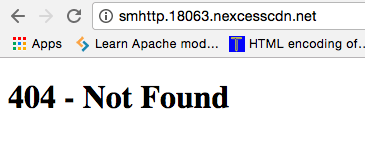
because smhttp.18063.nexcesscdn.net returns 404.
Thread Starter
 nene
nene
(@wpdreamer)
“That answer implies it should look like this:
CDN URL: example.com
Origin URL: example.com”
No, it does not. He meant that you should insert both URL’s without http://
Example:
CDN URL: yoursite.cdnsubdomain.com
Origin URL: yoursite.com
So make sure you get your CDN url right.
-
This reply was modified 9 years, 6 months ago by
 nene.
nene.
I cannot understand your last post. Did you ask something on your last post?


