Hello @mira404
You have two alternatives. You can use the predefined class names described in the following videos and post:
https://youtu.be/G8Of-V49pAQ
https://cff.dwbooster.com/blog/2019/01/06/columns
Or you can redefine the styles the DIV tags apply the fields to preserves the columns on small screens. If you prefer this alternative you can enter the style definition below through the “Customize Form Design” attribute in the “Form Settings” tab:
#fbuilder .fields.column3{float:left !important;width:33.3% !important;clear:none !important;}
Note that you are using a plugin to manage the website’s cache. You should purge the cache after editing the form.
Best regards.
Bro, I try both but not working. What I’m looking for?
#fbuilder .fields.column3{float:left !important;width:33.3% !important;clear:none !important;}
col-lg-1 col-md-3 col-xs-12
I want the mobile version looks like this: https://prnt.sc/cRYkgHPNv_8F (Single column)
on the mobile:
Score 1 to Score 5,
Course Rating 1 to Course Rating 5 and
Course Slope 1 to Course Slope 5
Hello @mira404
I’m sorry, but you did not follow my instructions.
You did not enter the style definition below through the “Customize Form Design” attribute in the “Form Settings” tab.:
#fbuilder .fields.column3{float:left !important;width:33.3% !important;clear:none !important;}
To demonstrate the style definition is correct, I entered it through the browser’s console emulating a small screen:
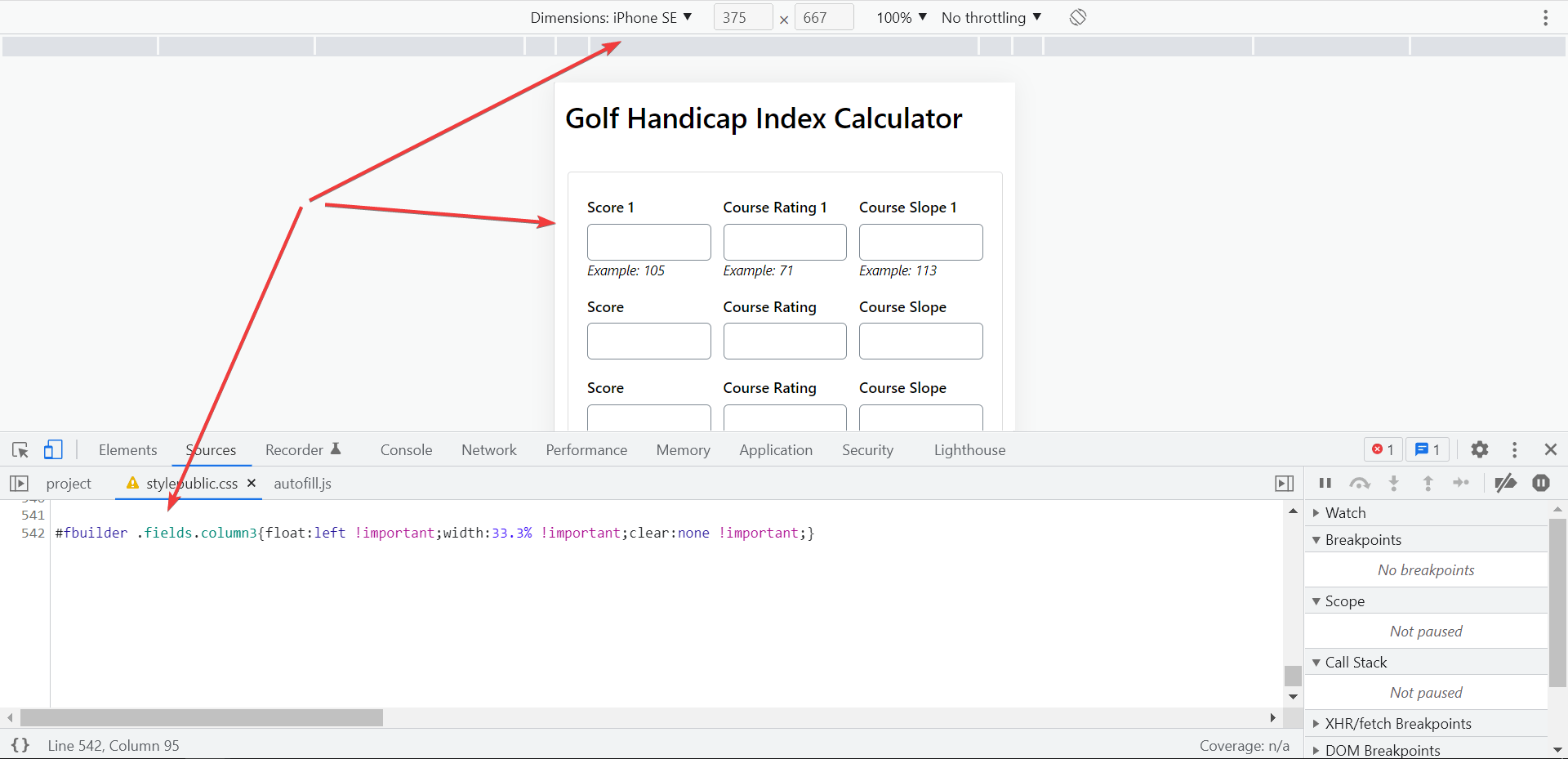
Best regards.
I already put this CSS and delete it. Because it shows 3 columns on mobile I want to show a single column.
why not check this: https://prnt.sc/yzFJYa_lk_EU
The same link you found this form.
Hello @mira404
You are requesting the default behavior of the plugin. In your first post, you requested to preserve the columns structure on mobile devices too. In this case, you must redefine the styles. If you want only one column on mobiles, you don’t need to do anything.
Best regards.
Yes, I want one column on mobiles but serial-wise.
First show the Score column (score 1 to score 5 columns) then show Course Rating (Course Rating 1 to Course Rating 5 columns) and lastly show the Course Slope (Course Slope 1 to Course Slope 5) column.
1st column is Score 1 | 2nd column is Course Rating 1 | 3rd column is Course Slope 1.
The mobile device shows the same format but I want mobile device to show:
score 1
score 2
score 3
score 4
score 5 then
Course Rating 1
Course Rating 2
Course Rating 3
Course Rating 4
Course Rating 5 and then
Course Slope 1
Course Slope 2
Course Slope 3
Course Slope 4
Course Slope 5
Hello @mira404
In this case, you should configure the form differently:
* Insert a DIV field with the columns option configured as “3 columns.”
* Inside it, insert three DIV fields with one column.
* Finally, in the first of the three interior DIV, insert all the score 1, score 2, score 3, score 4, and score 5 fields.
In the second interior DIV, insert the Course Rating 1, Course Rating 2, Course Rating 3, Course Rating 4, and Course Rating 5 fields.
And in the third interior DIV, insert the Course Slope 1, Course Slope 2, Course Slope 3, Course Slope 4, and Course Slope 5 fields.
Best regards.
I follow your all instruction but still not working, can you please check?
ss 1:https://prnt.sc/URwSksEBe22u
ss 2: https://prnt.sc/ZDg0HVupP2LZ
ss 3: https://prnt.sc/6eqxsSh-m5td
Hello @mira404
Please, you should follow the recommendations based on your requirements.
If you want to apply the last structure requested, you should not redefine the styles through the “Customize Form Design” attribute.
You should decide to apply one structure or the another, but not both.
Best regards.
Yes, I want to apply the last structure, but I have already followed your guide.
I didn’t put any CSS https://prnt.sc/LGtIc-ZgjxMG
Hello @mira404
The form is working now in the correct way. Please, watch the video by visiting the following link:
https://resources.developers4web.com/cff/tmp/2022/05/27/video-form_o.mp4
Best regards.
Yes, now working perfectly may be caching issues. Can I change the form field background color?
Hello @mira404
You can customize the forms and fields by following the instructions in the following post of the plugin’s blog:
https://cff.dwbooster.com/blog/2020/01/12/form-design
Best regards.
Thanks! Everything working perfectly!
Can I show the degree symbol output result?
Let, Result is 20 but I want to show it 20°
Hello @mira404
Enter the ° character through the “Symbol to display at the end of calculated field” attribute in the settings of the calculated field.
Best regards.


