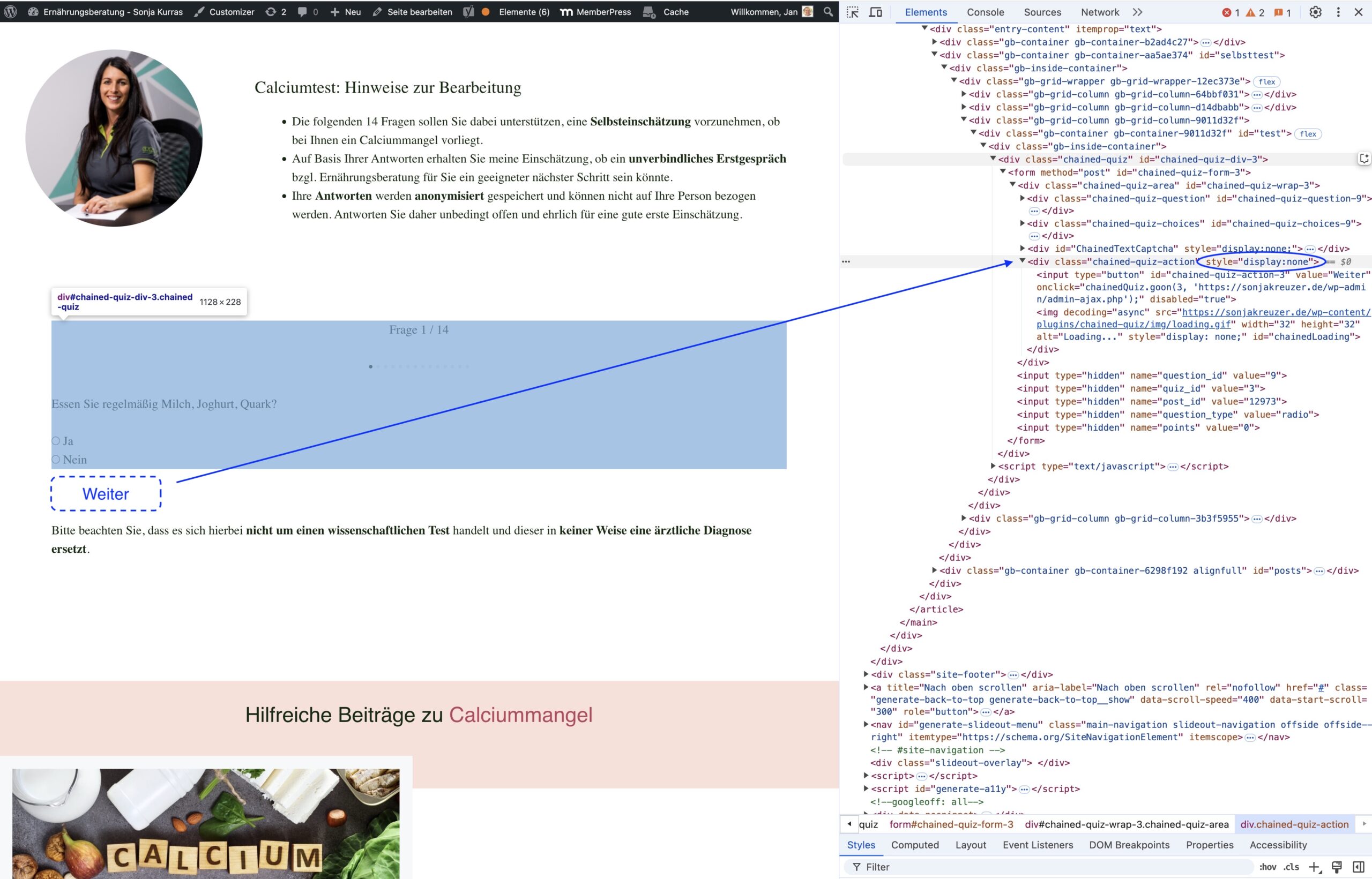
Chained-quiz-action / Button / Display none
-
Hi there,
the action-button (“go ahead”) is activated in the overall quiz settings, but the button does not appear in the front-end.
Troubleshooting steps taken:
(a) all plugins updated (Chained Quiz Version 1.3.3 / WP 6.6.2)
(b) Additional CSS checked for potential side effects (other display: none; visibility: hidden; opacity: 0; media queries) – nothing found
(c) Checked the function.php for any related filter, function or action – nothing found
(d) Additional CSS snippet added to overwrite the display parameter – w/o effect
/* Chained quiz - Overwrite Action Button non-display */

.chained-quiz-action {
display: block; !important

}
(e) Checked the “display: none” attribute in the Chrome Dev tool for the related stylesheet file – no css file linked / attribute set dynamically
element.style {
    display: none;
}
(f) Added a “Break on / attribute modification” point to identify the related JS that sets the display attribute – Sources / Call stack – not paused
(a – f) did not solve the issue. What would be your next step?
Any advice is much appreciated.
Best,
Jan
The page I need help with: [log in to see the link]


The topic ‘Chained-quiz-action / Button / Display none’ is closed to new replies.