Hi @gtphilup,
Sorry for extreme late reply
Currently we don’t have any implementation on changing the date format dynamically. But you can change to yours from includes/class-gs-service line 96.
Hope this helps. Let us know.
Thanks
 SK
SK
(@sooskriszta)
Ideally, this extension should use the same date format as declared in WordPress settings > general
https://codex.ww.wp.xz.cn/Formatting_Date_and_Time
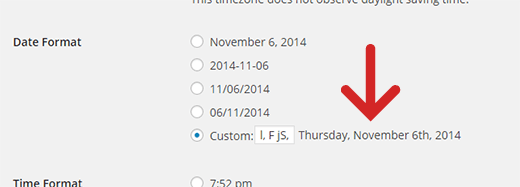
Then all anybody would have to do to change date format is change date format in WordPress admin settings.
Hello,
Thank you for your help! Now that I changed the format, zapier and prosperworks are working well with CF7.
I agree with @sooskriszta . It would be ideal/easier if the format matched the format in the WordPress settings by default.
Hello,
@sooskriszta & @gtphilup
Thanks for your suggestion, we will keep in mind to update this in future release..!
Thanks!!
Hi @gtphilup,
We have released a new version to track special mail tags that also includes date and time which would be displayed as of wordpress format. Check screenshot to setup your Google Sheet with special mail tags without underscores(_). Give a shot and let us know.
Thanks