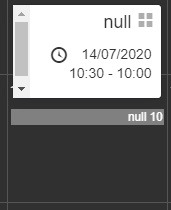
I see that if you leave the title of the event empty, I see “null”. So the solution is to add a title to the event.
-
This reply was modified 5 years, 11 months ago by
 michielve.
Hi,
The calendar configured in the plugin is public.
The event is shared from another calendar that is not public.
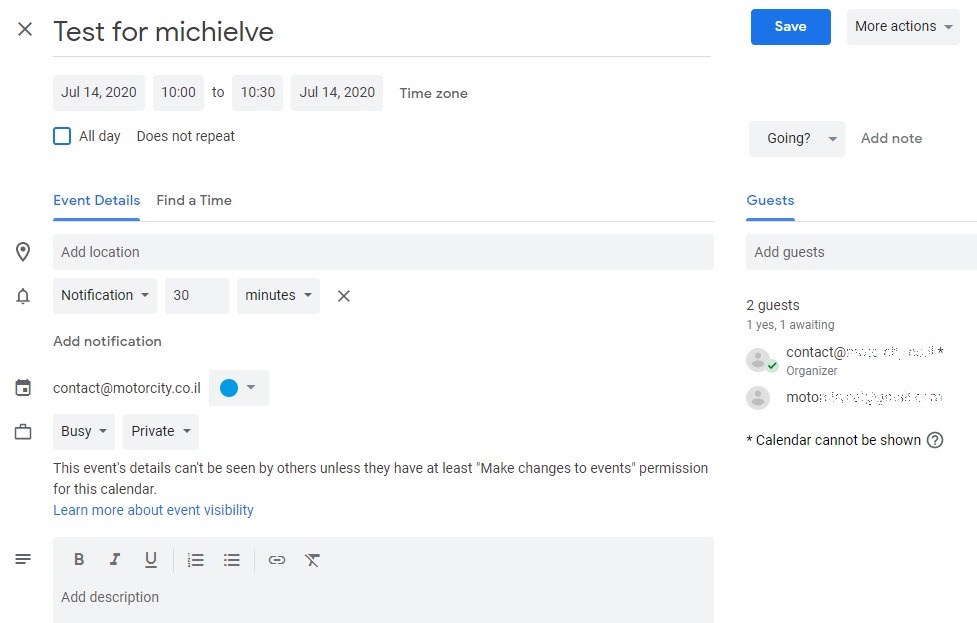
The event has a title.
The event itself is set to “Private” and “Busy”.
If I configure it as “Free” it doesn’t show on the calendar, which is fine.
If I set it to “Busy” it shows “null”.
If it’s an all day event no time is shown (which is fine).
If it’s a timed event, only the hour (6 from 6:00) number is shown next to “null”
Now while reproducing I realized that if there are two private events on the same day only one event shows and it shows as null of course.
Screenshots:
Event settings
Event on plugin
Thank you,
-
This reply was modified 5 years, 11 months ago by
 dewhead.
-
This reply was modified 5 years, 11 months ago by dewhead.
-
This reply was modified 5 years, 11 months ago by dewhead.
-
This reply was modified 5 years, 11 months ago by dewhead.
I think the reason the title isn’t displayed is because of your second sentence “The event is shared from another calendar that is not public.”. Because if I create an event and set it to private and busy in my own calendar, I see the title. But when I add your public calendar I also don’t see the title in the Google Calendar interface.
When I have time, I will add a new option to set the title in case it is “null”.
Your second issue (two private events on the same day and only 1 shows up) I cannot reproduce.
That would be great! Where should I follow to know about any update?
Thank you!
Hi,
In the new release of this plugin, you can set a default title in case the title is missing. Just add the following to your wp-config.php file:
define('PGC_EVENTS_DEFAULT_TITLE', 'My default title');
Best wishes,
Michiel
Hi Michiel,
Thank you.
It’s not working as expected. I might not be doing it correctly.
I’d like you to see the following video demonstrating what I see.
[video src="https://www.motorcity.co.il/wp-content/uploads/2020/07/2020-07-17-15-39-29.mp4" /]
Thank you,
Hi,
I’ve tested it myself and it’s working as expected. I think it’s not working in your case because in the wp-config.php file you have to put the line:
define('PGC_EVENTS_DEFAULT_TITLE', 'My default title');
above the the line that says:
/* That's all, stop editing! Happy blogging. */
After that make sure to clear the cache (in the plugin settings page) as well as the cache of the browser, otherwise you will still see the previous output.
Best wishes,
Michiel
Yes! it works!
Aren’t screen captures just the best? 😛
Works well with RTL language as well. Hebrew in my case.
Thank you @michielve
I still want to get you that beer. Actually 2 beers now.
@dewhead Good to hear it’s working! If I ever go to Israel, I’ll let you know and you can buy me a beer 😉