• Resolved jerbyjoober

    (@jerbyjoober)


    I am attempting to learn how to use this plugin. I have read through the previous questions and answers, but I am having problems getting a task done.

    Is it possible to change the color of the input boxes on Template 8, so that it is easier to see where to enter in the inputs? For instance, white?

    I have looked through the style.css file. I have changed some things hesitantly in there, but nothing ever changes. I am assuming I would need to change it in here. I “think” I saw where to change it, but I am not sure how to change it, or even if this is correct.

    {
    background: transparent;
    border: none;
    border-bottom: 1px dashed #83A4C5;
    outline: none;
    padding: 0px 0px 5px 0px;
    font-style: italic;
    }

    .cp_cff_dark_notebook #fbuilder textarea{
    font-style: italic;
    padding: 0px 0px 5px 0px;
    background: transparent;
    outline: none;
    border: none;
    border-bottom: 1px dashed #83A4C5;
    overflow: hidden;
    resize:none;
    }

    I was able to change a few things through the CSS input box on the Form Settings, but nothing like I am wanting to do.

    The page I need help with: [log in to see the link]

Viewing 4 replies - 1 through 4 (of 4 total)
  • Plugin Author codepeople

    (@codepeople)

    Hello @jerbyjoober

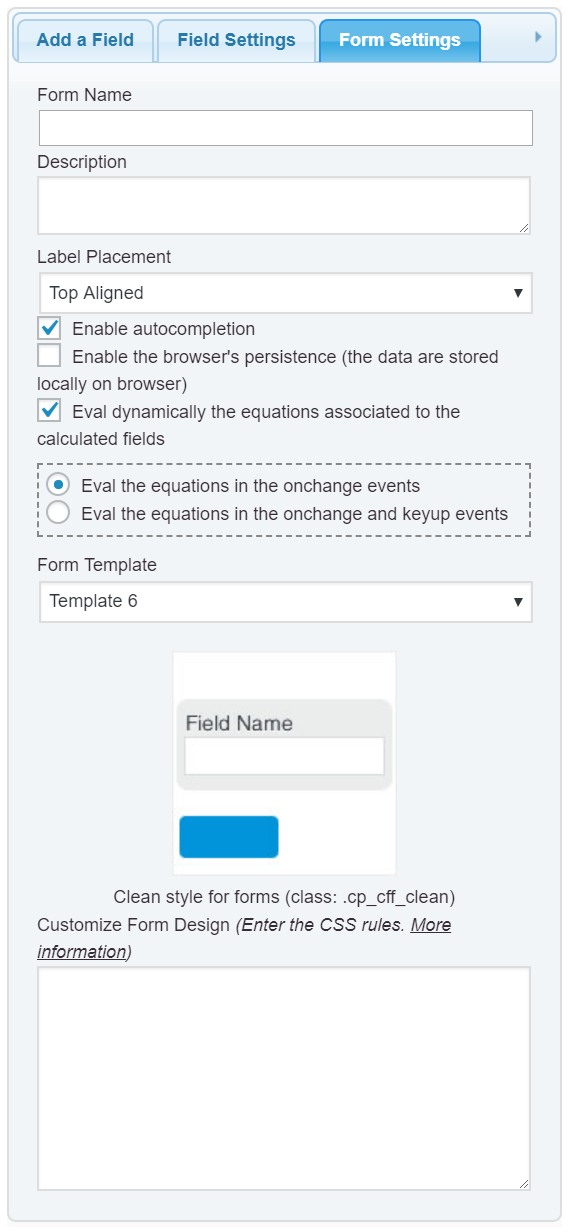
    First, I don’t recommend to edit the CSS files directly, because the WordPress replace the files when install the plugins’ updates. So, the preferred alternative would be redefine the styles through the “Customize Form Design” attribute in the “Form Settings” tab (https://cff.dwbooster.com/images/documentation/form-settings-tab.png)

    As you want assign the white color to the background of tags: input, textarea and select, furthermore, you need to edit the color of texts, you can enter the following style definition:

    
    #fbuilder input[type="text"],
    #fbuilder input[type="number"],
    #fbuilder input[type="password"],
    #fbuilder input[type="email"],
    #fbuilder textarea,
    #fbuilder select{
    background:white !important;
    color: black !important;
    }
    

    Pay attention to the use of #fbuilder in the selectors for affecting only the tags in the form, and the use of the !important; modifier in the css rules to increase the importance of these rules.

    Best regards.

    Thread Starter jerbyjoober

    (@jerbyjoober)

    I apologize, my changes were correct, at some point, I looked at it on another device, and the input fields had changed. Too much learning at one time. Sorry.

    Thread Starter jerbyjoober

    (@jerbyjoober)

    And thank you for your reply, I did not see it prior to closing it. Thank you so much. I LOVE this plugin and I am sure we will upgrade before much longer. Thank you again!!!

    Plugin Author codepeople

    (@codepeople)

    Hello @jerbyjoober

    It is a pleasure to help you.

    Best regards.

Viewing 4 replies - 1 through 4 (of 4 total)

The topic ‘Changing a pre-loaded template’ is closed to new replies.