I am having the same trouble. Does anyone have any advice on what we can do to get this fixed?
Plugin Author
 Josh
Josh
(@josh401)
Hello; sorry for my delay. Been swamped with updates lately.
If you are unable to switch between editors; then most likely there is a javascript error on the page somewhere. You’ll need to troubleshoot what is causing the error.
Please read the following article I wrote:
http://learn.wpeditpro.com/troubleshoot-blank-wordpress-editor/
Although your editor is not blank… it is still related.
Another option would be to diagnose the javascript via your browser. There is an article here:
https://codex.ww.wp.xz.cn/Using_Your_Browser_to_Diagnose_JavaScript_Errors
If you find any errors; let me know and I’ll try to help find their origin.
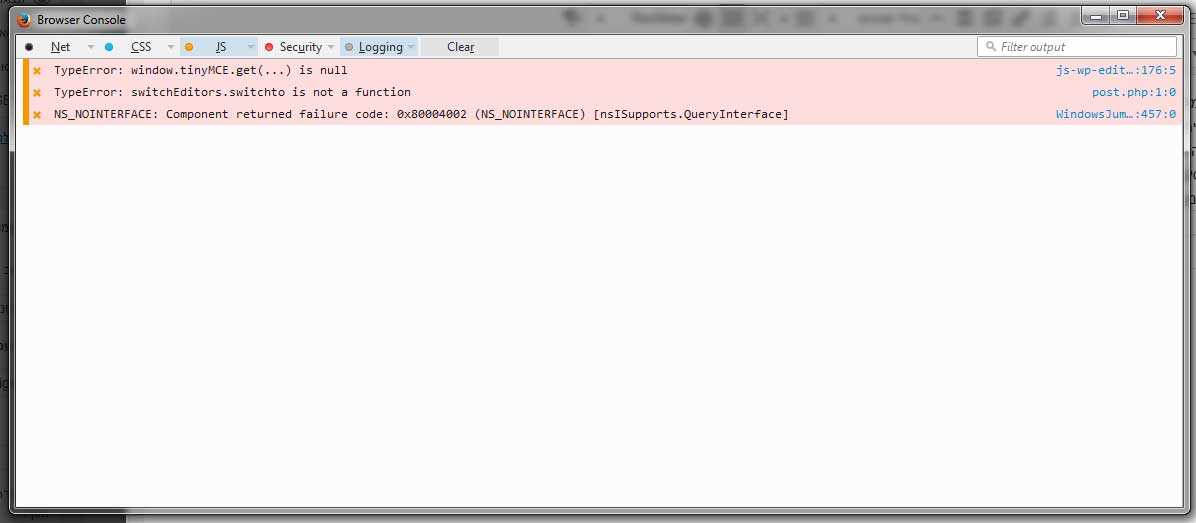
Hey, I used the Firefox Browser Console and got this errors:
When the page loaded:
TypeError: document.getElementById(…) is null overlay.js:7333:4
When I open the editing window:
TypeError: window.tinyMCE.get(…) is null js-wp-editor.js:176:5
NS_NOINTERFACE: Component returned failure code: 0x80004002 (NS_NOINTERFACE) [nsISupports.QueryInterface] WindowsJumpLists.jsm:457:0
When I clicked Text or Visual
TypeError: switchEditors.switchto is not a function post.php:1:0
Is this helping you?
I care about the last one
Plugin Author
Josh
(@josh401)
Can you take a screenshot for me to see the error console?
To the far right of the error (in the console); it will tell you what file is throwing the error. We need to check if it is a plugin file; or a main WordPress core file.
If it is the prior; we can disable the plugin and check again.
If it is the latter.. then the troubleshooting process is a little more involved; but completely outlined in the article I linked to above. Perform the steps in the article.. and figure out which plugin is causing the editor to not switch between tabs.
Where I can upload screenshot?
Can I post it here?
You need only the console screenshot or also the files the error lead to?
Plugin Author
Josh
(@josh401)
I just need the console screenshot.
You cannot upload images here.
You can upload to your server (or flickr, or whatever), and post the link to the image here.
Hey, here the link to the console, if you need more info please tell me
http://cpanel11.tempdomain.co.il/~otkidsco/err.jpg
Plugin Author
Josh
(@josh401)
Okay… hover over that top error… on the far right… where it tells you the file location. Can you paste that here?
(You don’t have to include the entire domain, just the location from the WordPress root folder is fine.)
Plugin Author
Josh
(@josh401)
By the way… do you still get these errors if you deactivate ALL plugins?
Plugin Author
Josh
(@josh401)
Did not tried with deactivate plugins, should I try it?
Plugin Author
Josh
(@josh401)
Absolutely.
I think there is a plugin (or theme) option that is interfering with the loading of the editor. You will need to switch to the default WordPress theme to test if it is a theme option.
I will try it and also contact the theme support.
Fixed it, it because of update to WordPress version 4.3
It did something with the theme, they released update to theme and problem is fixed.
Plugin Author
Josh
(@josh401)
Beautiful.
Thank you for the confirmation.