I’ve installed and configured the “WeeConnectPay – Clover Payment Gateway for WooCommerce” plugin on my website: https://e-motousa.com.
However, there’s an issue—every order placed through the site is failing. After reviewing the Clover logs, I found an error stating that the street address is missing, even though the address was properly entered during checkout.
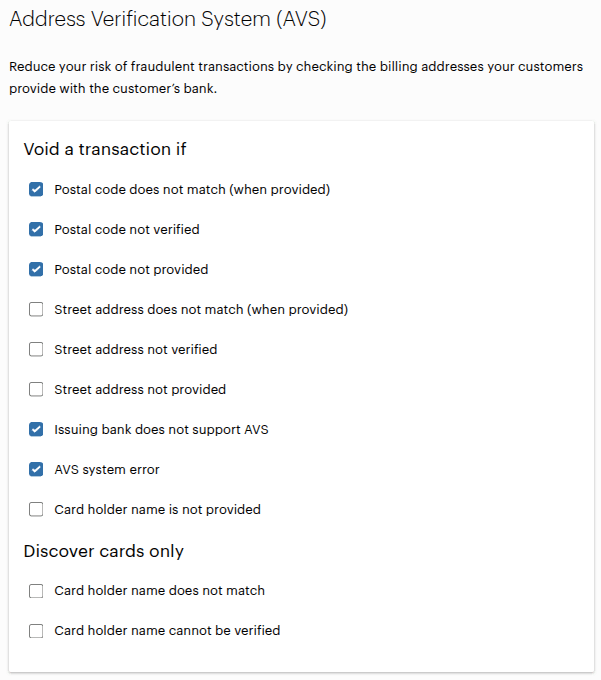
The reason you’re seeing a 100% decline rate is due to the Address Verification System (AVS) settings in your Clover merchant account.
With WeeConnectPay, our payment gateway securely integrates Clover’s iframe, significantly reducing PCI-DSS compliance burdens and keeping your customers’ data safe.
Currently, our Clover iframe includes these fields:
Card Number
Card Expiry Date
Card CVV
Card Postal Code
All of these iframe fields are validated by Clover. However, AVS (and all other Clover fraud tools) validates fields according to your chosen settings. Since the street address field isn’t enabled on our iframe but street address verification is enabled in your AVS settings, these transactions fail the street address validation and be declined. We’ve intentionally disabled this field because enabling it would negatively impact user experience—customers would have to enter their billing address twice: once for WooCommerce and again within the Clover iframe.
Also, due to Clover’s strict security protocols, neither WeeConnectPay nor any scripts can access the card or address data entered into the iframe. This safeguards card data from malicious scripts but also prevents automatic filling or transferring data from WooCommerce fields.
To resolve this issue, please review your Clover fraud tool settings and ensure the AVS checks align with these supported fields. You can safely enable other available anti-fraud options such as Google ReCaptcha, which we noticed isn’t activated yet.
We recommend removing any sensitive information, like screenshots containing detailed order notes, from your public posts to help protect your and your customers’ privacy.
If you need additional help optimizing your Clover fraud settings or enabling Google ReCaptcha, please reach out to our support team directly at [email protected] —we’re happy to help!