Hi @infotam ,
Thanks for choosing IntellyWP products.
Unfortunately you should disable the custom thank you plugin or feature for WooCommerce.
What happens is that WooCommerce basically redirects to your URL without sending the order information and without calling the “hook” that we use to insert the tracking code.
While if you test without the custom thank you page URL everything will work properly.
Anyway could you please send us more information about how could we reproduce this issue?
We need some screenshots of your plugin settings or about how you have defined the script.
Thank you
IntellyWP
Hi,
Thanks for your reply.
I’m not using Woocommerce, I’m using the plugin WP eStore which has an specific section where you can set the thank you page. Google told me that it’s necessary to use the event code in a thank you page to know the real conversion rate.
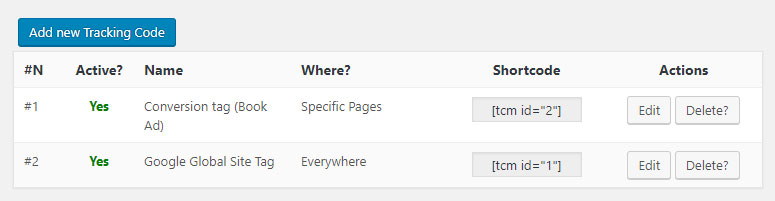
This is how the plugin is configured. If you need any other data, please tell me.
https://lifeinthemove.com/wp-content/uploads/2019/06/setting.jpg
Thanks in advance.
Regards.
Hi @infotam ,
Unfortunately we can’t test this plugin because is not available on ww.wp.xz.cn
Could you please send us the URL of final thank you page generated by WP eStore plugin?
Thank you
IntellyWP
Hi,
It is not a thank you page automatically generated by the WP eStore plugin. It is an standard wordpress page that we have set in the plugin to redirect users after a purchase has been made.
The thank you page where we have inserted the conversion code with your plugin is this one:
https://lifeinthemove.com/gracias-por-tu-compra/
Thanks in advance,
Regards.
-
This reply was modified 6 years, 11 months ago by
 Infotam.
-
This reply was modified 6 years, 11 months ago by Infotam.
Hi @infotam ,
Could you please send us a screenshot to see the settings of your first script called “Conversion tag (Book ad)“?
Have you installed a cache plugin?
Thank you
IntellyWP
Hi,
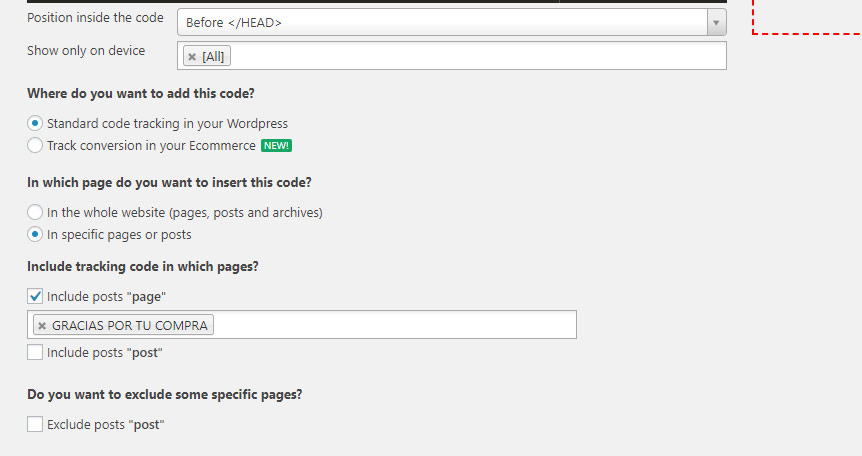
This is the screenshot of the settings of the “Conversion tag (Book ad)“.
https://lifeinthemove.com/wp-content/uploads/2019/06/setting-2.jpg
I’m using Cloudflare as CDN.
Thanks in advcance.
Regards.
Hey @infotam,
Could you please disable temporally the Cloudflare CDN or clear the cache from the Cloudflare settings and check again your website?
Could you also please send me the screenshot of Ace Editor where i can see the script added by our plugin?
Thank you
IntellyWP
Hi,
I have made the tests clearing the cache but it remained the same.
Is there any mail where I can send you the script with the code (without showing it here in public)?
Thanks,
Regards.
Hey @infotam,
I sent you an email right now
Please let us know
Thank you
IntellyWP