Colors broken
-
Hi.
Using Pen theme since at least a year, never had problem with it until now.
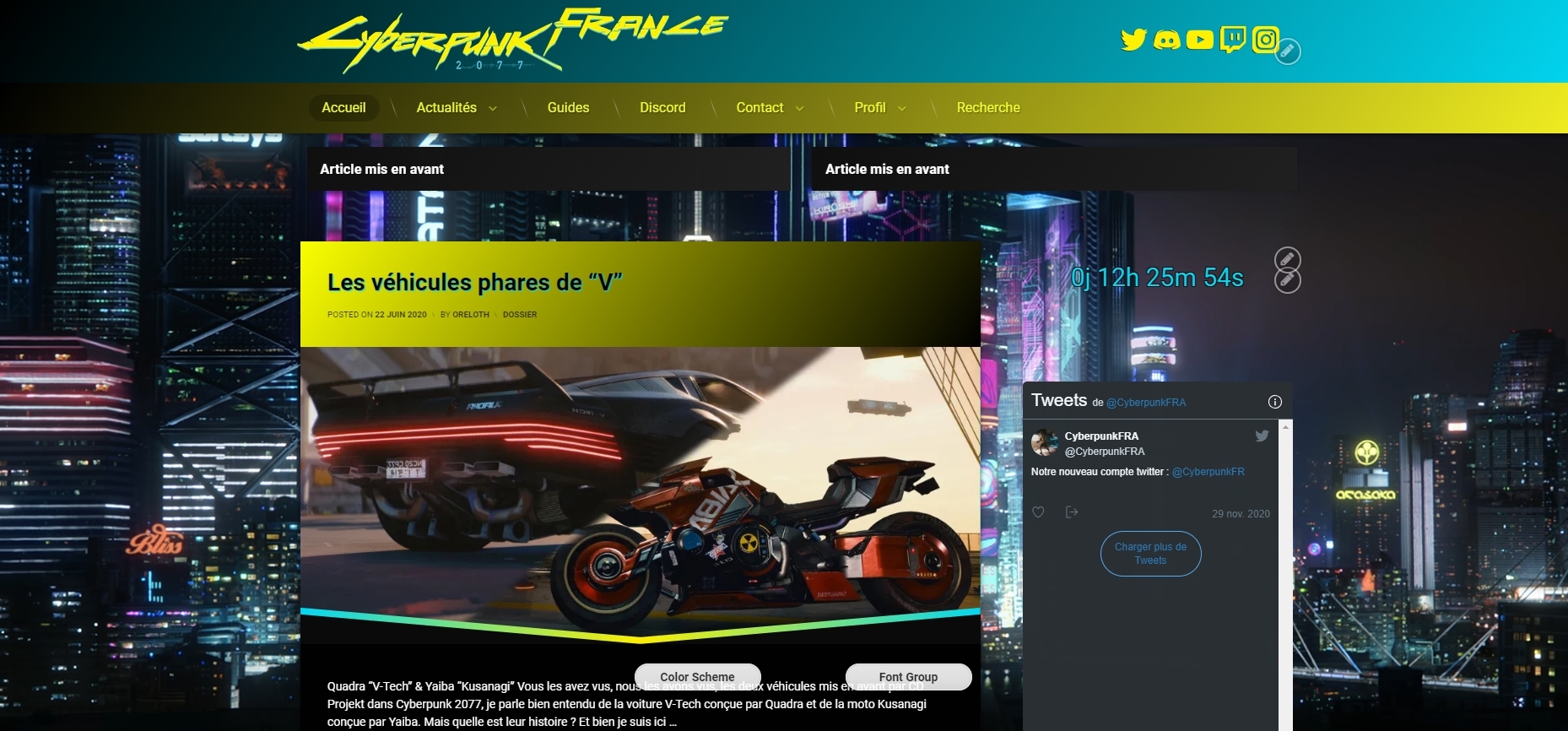
Since the last update, my theme seems broken and many colors and gradients are not correctly displayed. Here is a screenshot before the update :
https://i.gyazo.com/ef95a8e66e438f6dcda957b52c0ffde7.jpg
And after the update :
https://i.gyazo.com/35b028abb62688637ec1724806a6fbf5.jpgCould you tell me why this happened? I tried on others sites using Pen and this occurs on all my websites with the last version of Pen.
Just in case, there is my custom CSS :
body.pen_tiles_columns_5.visible-sidebar-left #pen_tiles .pen_article, body.pen_tiles_columns_5.visible-sidebar-right #pen_tiles .pen_article, body.pen_tiles_columns_4.visible-sidebar-left #pen_tiles .pen_article, body.pen_tiles_columns_4.visible-sidebar-right #pen_tiles .pen_article, body.pen_tiles_columns_3 #pen_tiles .pen_article, body.pen_masonry_columns_5.visible-sidebar-left #pen_masonry .pen_article, body.pen_masonry_columns_5.visible-sidebar-right #pen_masonry .pen_article, body.pen_masonry_columns_4.visible-sidebar-left #pen_masonry .pen_article, body.pen_masonry_columns_4.visible-sidebar-right #pen_masonry .pen_article, body.pen_masonry_columns_3 #pen_masonry .pen_article
{
	width:100% !important
}
#pen_left, #pen_right {
	  position: absolute !important;
    top: 1.5rem;
    width: 30%;
}
#main .pen_article .pen_content, #main .pen_article .pen_summary, #main .pen_article .pen_content_footer{
	background-color:rgba(0,0,0,0.9);
}
#main{
	width:85%;
}
.buddypress-wrap .bp-tables-user tbody tr, .buddypress-wrap table.forum tbody tr, .buddypress-wrap table.wp-profile-fields tbody tr{
	background:0;
}
.buddypress-wrap .profile.edit .editfield{
	background:none;
}
.buddypress-wrap .main-navs:not(.dir-navs) li.current a, .buddypress-wrap .main-navs:not(.dir-navs) li.selected a{
	background:#333;
}
.buddypress-wrap .bp-subnavs li.current a, .buddypress-wrap .bp-subnavs li.selected a{
	background:#333;
}
.buddypress-wrap .bp-navs li:not(.current) a:focus, .buddypress-wrap .bp-navs li:not(.current) a:hover, .buddypress-wrap .bp-navs li:not(.selected) a:focus, .buddypress-wrap .bp-navs li:not(.selected) a:hover{
	background:#333;
}
#page .widget-area .widget.pen_widget_light{
	background-color:rgba(0,0,0,0.5);
}
#page .widget-area .widget.pen_widget_dark{
	background-color:rgba(0,0,0,0.5)
}
body.pen_drop_shadow #page .widget-area .widget.pen_widget_not_transparent{
	box-shadow:none;
}
#page .widget-area .widget.pen_widget_dark{
	background-color:none;
}
#page .widget-area .widget.pen_widget_dark{
	background:none;
}
#page .widget-area .widget.pen_widget_light{
	background-color:none;
}
#page .widget-area .widget.pen_widget_light{
	background:none;
}
body.pen_sidebar_left_width_20 #pen_left, body.pen_sidebar_right_width_20 #pen_right {
	width:30%;
}
#pen_header .pen_header_inner .pen_header_main {
	background:linear-gradient(125deg,#000000 0%,#02d8f3 100%);
}
#pen_navigation, #pen_navigation_mobile{
	background:linear-gradient(125deg,#000000 0%,#f4f122 100%);
}
Regards.
The page I need help with: [log in to see the link]

Viewing 3 replies - 1 through 3 (of 3 total)

Viewing 3 replies - 1 through 3 (of 3 total)
The topic ‘Colors broken’ is closed to new replies.