Hi larzo,
Thanks for using my plugin and I apologize for the troubles you’re having. When you note your tabs aren’t working properly, could you explain a little bit more what you mean by that? In what way are they not functioning?
hi MR JHON , thanks for the support !!
the buttons works fine and this not the case of tabs
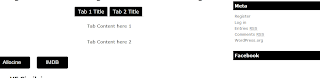
http://4.bp.blogspot.com/-U9UIa02adMA/VI_1KRrqATI/AAAAAAAAEIk/Eo9fKvcsYd0/s320/Sans%2Btitre.png
All content is displayed under the first tab and i can’t select the second tab !!
It looks like there’s some kind of javascript issue but I can’t tell from the image alone. Do you have a link to the site so I can take a look at what’s going on?
hey Jhon tnaks for the supoort , my website ison localhost .
is there any advices you recommend?
If you’re running Chrome or Firefox, open up the Developer Tools (usually F12) and look at the console. There’s likely some kind of error showing up there that may help narrow down the issue. Feel free to paste the contents here if you’re not sure.