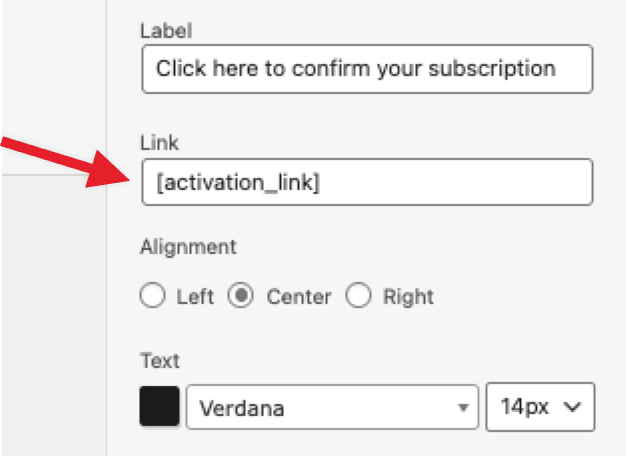
Whenever a user or myself press the Click her to confirm button, depending on email client you get net:err_file_not_found and in outlook it shows This location may be unsafe http://[activation_link]
I have used troubleshooter and only that plugin and mailpoet, and installed a default theme as well, and I still get this for my confirmations. I have attempted using your sender service as well, which I wouldn’t think would matter, and I get the same result so I am running out of ideas. I tried inputting the actual link into the field instead of the shortcode, but that isn’t allowed.
I created this page just for something other than the mailpoet LP for the confirmation. No matte rwhat page I tried, also including about and blog, all do the same thing
This topic was modified 7 months, 2 weeks ago by jackmeat.
The page I need help with: [log in to see the link]
Sorry to hear about the issue with the activation links not working as expected. Could you confirm for us if you are using only the shortcode as [activation_link] or are you using it alongside a http:// text. Could you try the instructions here on how to use the activation link shortcode in your emails and let us know if that works as expected? If you don’t see any improvements, could you share a screenshot of the issue in your emails?
Could you keep us posted on how the recommended suggestion works out for you?
I was using only the shortcode as [activation_link]. It is on your premade confirmation page, so it was only being used on top of a button. Those instructions are exactly what I used in the first place, and I used the Enable visual subscription confirmation emails option with minimal changes whatsoever. THis is the error in Outlook, and other clients show net:err_file_not_found (which I assume is the same problem.)
Thank you so much for following up and for explaining what you’ve already tried. I can imagine how frustrating it must be to see that net:err_file_not_found or Outlook’s security warning every time you or your subscribers try to confirm the subscription.
This may be related to a known rendering issue that can sometimes affect how confirmation links are displayed in certain email clients. You can read more about this here: Known issues in email rendering
Can you please confirm that your [activation_link] shortcode is set up exactly as shown in the screenshot below?
Also, when you mention that other clients are showing net:err_file_not_found, could you please confirm if that includes Gmail or other webmail clients as well?
As I said, I used YOUR webpage to guide the setup. Unless changing the text color screws this up, it is identical to yours. https://pasteboard.co/FQZ0RjuyCeBo.png
Yes, I mentioned other web clients such as Blue Mail give the net:err_file_not_found message, which is less info than the Outlook error. Gmail just negates the Confirm button from doing anything. So, yes I am confirming that other clients are giving the message, why are you asking redundant questions.
From what you’ve described, the confirmation link issue does appear to be related to how certain email clients particularly Outlook and some third-party mail apps like BlueMail handle links that are generated dynamically through shortcodes. In some cases, they may interpret the link as unsafe or fail to properly render it, resulting in the net:err_file_not_found message you’ve been seeing.
Please try the following steps so we can narrow down what’s causing Gmail and other clients to block or ignore the confirmation link:
Temporarily disable any plugins related to:
Link tracking or redirects
Security firewalls
Email optimization or replacements
These plugins can sometimes alter or strip dynamic links in outgoing emails, which could explain the issue you’re seeing.
Next, please check your WordPress Site URL under Settings → General → Site Address.
Make sure it starts with https:// and not http://.
If your website uses HTTPS but the link starts with HTTP, Gmail may treat it as unsafe and block it.
Once you’ve done both steps, please try sending yourself another test confirmation email and let us know if the button starts working correctly.
Looking forward to your update, and we’ll continue investigating from there.
As I said in my initial post “I have used troubleshooter and only that plugin and mailpoet, and installed a default theme as well, and I still get this for my confirmations.” In other words, I tested with NO other plugins active BUT yours.
Message sent to through that forum. Instead of wasting more time with a back and forth, why would you NOT just ask me those questions in email directly?
Anyways, look forward to potentially getting this resolved so I can go back to using confirmations instead of allowing everyone and their bot buddy to register.
Thank you for your message. You have already spent time trying to sort this out, and I appreciate you following the steps we shared earlier.
Just to clarify, the plan was to request temporary admin access so we could log into your site and take a closer look at why the confirmation shortcode is not working as expected. Since this involves private credentials and sensitive details, we are only allowed to request that information through our secure support form and not here on the public forum.
I have already reviewed the ticket you submitted, and I will share a few things I noticed there that should help us move toward a resolution more quickly.
Thank you again for your patience. We will continue the conversation in the email ticket you created so we can assist you more thoroughly.
Viewing 9 replies - 1 through 9 (of 9 total)
The topic ‘Confirmation email [activation_link] shortcode isn’t working’ is closed to new replies.