• Resolved ibiza69

    (@ibiza69)


    Hi, thanks for the plugin 😉

    We are trying to create the app at Facebook, but seems the screen captures given for creating the app are obsolete, as facebook doesn´t show those, same as in the plugin help page: https://help.xyzscripts.com/docs/social-media-auto-publish/faq/how-can-i-create-facebook-application

    Whats does it mean, upload an screen cast? What should we do in this case?

    What it seems it´s that the images shared from Facebook at instructions are the old ones, not the new facebook apps platform v3.0, so steps are confussing.

    We would really like to use the plugin, but we need some help for finishing steps to make it work. We are using too Linkedin plugin for autoposting, and this was easy and screeshots where easy to follow, but with Facebook it´s too confussing and seems other users are having same problems as us, that can´t finish creating the app.

    Maybe a new help tutorial would be a nice option, so we can know how to follow those terrible steps correctly with updated images.

    Thanks a lot for any support 😉

    • This topic was modified 7 years, 8 months ago by ibiza69.
Viewing 9 replies - 1 through 9 (of 9 total)
  • There are 2 options in the new plugin ,
    one is to submit your app for Facebook review(required permissions- manage_pages and publish_pages) and get it approved(See steps : https://help.xyzscripts.com/docs/social-media-auto-publish/faq/how-can-i-create-facebook-application/) ,which requires screencast while submitting to Facebook.
    For the App Review Process Submission go to apps settings page at developers.facebook.com/apps/,

    1: Click on the “App Review” and then the “Start a Submission” button in the “Submit Items for Approval” section.

    ďżź2: In the permissions page please select the login permissions manage_pages and publish_pages and click Add 2 items button.

    3.Click on the “Add Details” link and you can add the details of each item.
    Sample steps and details are provided at https://help.xyzscripts.com/docs/social-media-auto-publish/faq/how-can-i-create-facebook-application/
    You must submit a screencast that shows how your app uses the permission and Login to Facebook as shown in the sample screencast at https://youtu.be/EuA8BTzW-B0

    second is to use our pre-approved app (This is a hosted service and hence requires payment,starting at 10 USD ),this method only requires an app name (for tracking purpose and to create app album ,if the selected posting method is upload image to app album)
    Read more here : https://help.xyzscripts.com/docs/social-media-auto-publish/faq/how-can-i-use-the-alternate-solution-for-publishing-posts-to-facebook/

    Hope this helps.

    Thread Starter ibiza69

    (@ibiza69)

    Hi many thanks for the answer, but we still have a bit of problem resolving some things.

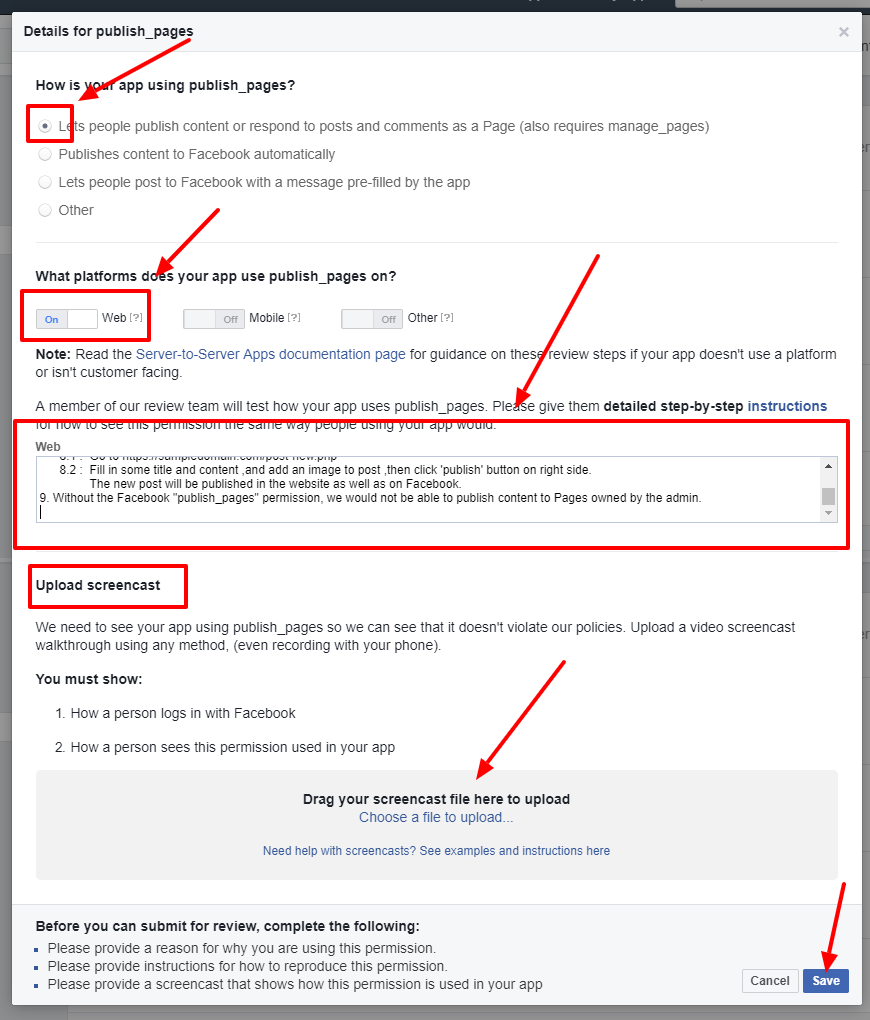
    In your attached image:
    https://help.xyzscripts.com/wp-content/uploads/2016/08/details-for-publish_pages.png

    – 1st step, we can´t see that option at facebook app details, ex: publish_pages
    “How is your app publisging pages” (this option, we can´t find it)

    – 3rd step: Text field “A member of our team will test hoy your app uses publish_pages…..”
    What should we include here?
    We have to write all this, changing our URL in fields options?

    +++++++++++++++++++++++++++++++++++++++++++++++++++++++++++++++++++++++
    A Sample detailed step-by-step instructions are given below:

    1. Go to https://DOMAIN.com/wp-login.php
    2. Login as an administrator with user name : <user name> and password: <password>
    3. Go to https://DOMAIN.com/wp-admin/admin.php?page=facebook-auto-publish-settings where user has to authorize the application from the plugin’s settings page. (This path is different for free and premium plugins)
    4. Enter the application name and save ,then click on the button ‘Authorize’. The “facebook login” is renamed as authorization here.
    5. It will take you to Facebook authorization procedure.
    6. Upon successful authorization ,if you manage Facebook pages, you will be prompted to select the facebook pages to which you need updates to be published.
    7. After selecting Facebook pages ,you will be returned to the website.
    8. After the authorization is complete,make a post in website by following below steps,
    8.1 : Go to https://DOMAIN.com/post-new.php
    8.2 : Fill in some title and content ,and add an image to post ,then click ‘publish’ button on right side.

    The new post will be published in the website as well as on Facebook.
    Without the Facebook “publish_pages” permission, we would not be able to publish content to Pages owned by the admin.

    +++++++++++++++++++++++++++++++++++++++++++++++++++++++++++++++++++++

    4th Step – Uploading a video of the steps taken, we have too to make a blanc or whatever post and send it, recorded in video and then go to facebook and check if the post was autoposted there? I mean, if we have to do all this and then check if the post is there, but the app hasn´t got yet facebook permissions, the post won´t be posted, no?

    Many thanks for the help ;)!

    The app review page’s interface has changed slightly but the procedures is same.
    In the add details section the setting is changed from How is your app publishing pages to Tell us how you’re using this permission or feature
    .

    – 3rd step: Text field “A member of our team will test how your app uses publish_pages…..”
    What should we include here?
    We have to write all this, changing our URL in fields options?

    You have to write this by changing the url fields and login credentials.

    4th Step – Uploading a video of the steps taken, we have too to make a blanc or whatever post and send it, recorded in video and then go to facebook and check if the post was autoposted there? I mean, if we have to do all this and then check if the post is there, but the app hasn´t got yet facebook permissions, the post won´t be posted, no?

    Permission is required for live apps, change the status of your app to development mode and you will be able to authorize and post to Facebook.
    Take the screencast of how your app login to facebook and use the permissions required,and submit it to Facebook. The screencast taken for publish_pages can be used for manage_pages ,since both are related permissions.
    App review is complicated and time consuming task.
    Please read the documentation at
    https://developers.facebook.com/docs/apps/review
    Hope this helps.
    Thank you.

    Thread Starter ibiza69

    (@ibiza69)

    Thanks a lot for your nice help!

    We went thru your steps, everything ok, but we had the app live and now doesn´t let us change it to developing mode… Any suggestion for this?

    Thanks again 😉

    Thread Starter ibiza69

    (@ibiza69)

    Well, we decided to cancel the submit for revision and to go over the process again in developing mode and send it back for revision, maybe this helps and solves the problem.

    Thread Starter ibiza69

    (@ibiza69)

    Ok, problem solved, post are being sended to facebook! Thanks!

    One question, if facebook reviews app and doesn´t accept the review, what will happend, it will stop working (autoposting)?

    Many tahnks!

    Thread Starter ibiza69

    (@ibiza69)

    Well, after testing, the autopost works well, but the posts being sended to facebook are private, only we can see them, they are not shown to public, so… we have to wai yes or yes, till facebook accepts or doesn´t accept the app? Thanks!

    One question, if facebook reviews app and doesn´t accept the review, what will happend, it will stop working (autoposting)?

    Yes.
    But publish_pages and manage_pages permissions are easily approved by Facebook if you submitted the review according to the procedures at our help documents.

    Well, after testing, the autopost works well, but the posts being sended to facebook are private, only we can see them, they are not shown to public, so… we have to wai yes or yes, till facebook accepts or doesn´t accept the app

    While in Development mode, apps are automatically approved for all login permissions, features, and product-specific features. This allows you to test new functionality and create screencasts, which you can include in your eventual app review submission.

    Once you switch your app to Live Mode, however, your app can only use permissions and features that it has been approved for. This means you will be unable to test or create screencasts that demonstrate usage of any unapproved permissions or features.
    So you have to wait till they approve your app.

    We went thru your steps, everything ok, but we had the app live and now doesn´t let us change it to developing mode… Any suggestion for this?

    The app’s status can’t be changed during the review process, if you want to make the status from live to development mode or vice versa ,you must cancel the app review submission.
    Hope this helps.

    Sorry for the delayed response.

    Thread Starter ibiza69

    (@ibiza69)

    Ok, many thanks for all your patience! All clear now 😉 We can only just wait…

    This is terrible how facebook changed things, I can´t imagine companies y freelancers that make comercial apps of give services, terrible!

    Well, it´s facebook…. hahaha!

    Thanks again for all your dedication and help.

    Have a very nice weekend.

Viewing 9 replies - 1 through 9 (of 9 total)

The topic ‘Confussing Instructions’ is closed to new replies.