Moderator
 t-p
t-p
(@t-p)
This may be a plugin or theme conflict. Please attempt to disable all plugins, and use one of the default (Twenty*) themes. If the problem goes away, enable them one by one to identify the source of your troubles.
If you can install plugins, install and activate “Health Check”: https://ww.wp.xz.cn/plugins/health-check/
It will add some additional feature under create a new menu position Tools > Site Health.
On its troubleshooting tab, you can Enable Troubleshooting Mode. This will disable all plugins, switch to a standard WordPress theme (if available), allow you to turn your plugins on and off and switch between themes, without affecting normal visitors to your site. This allows you to test for various compatibility issues.
There’s a more detailed description about how to use the Health Check plugin and its Troubleshooting Mode at https://make.ww.wp.xz.cn/support/handbook/appendix/troubleshooting-using-the-health-check/
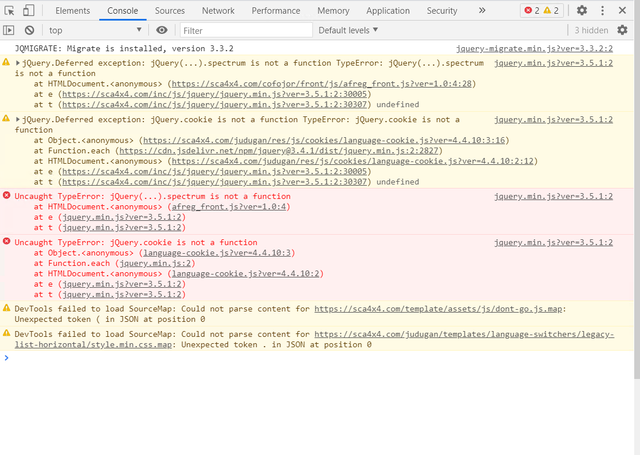
I’d suggest installing and activating Enable jQuery Migrate Helper https://ww.wp.xz.cn/plugins/enable-jquery-migrate-helper/
This should help resolve the jQuery errors you found. However, you might also want to contact the theme developer for assistance with this because it is likely issues with your theme that need to be fixed in order for the theme to work correctly with the latest version of WordPress.
Health Check is not working on my website. Enable jQuery Migrate Helper helped me fix some bugs. But some errors still remain. Eg:
DevTools failed to load SourceMap: Could not load content for https://website.com/wp-content/themes/onepress/assets/js/dont-go.js.map: HTTP error: status code 404, net::ERR_HTTP_RESPONSE_CODE_FAILURE
Why does it want .map?
Moderator
t-p
(@t-p)
That is from your onepress theme.
I recommend asking at https://ww.wp.xz.cn/support/theme/onepress/ so the theme’s developers and support community can help you with this.