CS file from download marked as UNSAFE ATTACHMENT
-
When a user downloads the .ICS file then uses it on their calendar- they are getting a warning that it is an unsafe attachment.
I am having a similar issue to this:(except theirs is an image)
https://theeventscalendar.com/support/forums/topic/ics-file-warning-unsafe-attachment/
However, I am using SSL and this ticket never seemed to have been resolved.
It is an error after they download it and then import it into their calendar.
You can view the error message here:
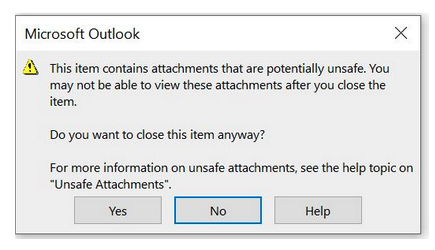
https://turningoftheages.com/wp-content/uploads/2022/08/screenshot-error.pngAlso see below:::
This item contains attachments that are potentially unsafe. You may not be able to view these attachments after you close the item. Do you want to close this item anyway? For more information on unsafe attachments, see the help topic on “Unsafe Attachments”.
This warning appears any time that calendar item is opened, not just when one downloads. So if I click on the item in my calendar, this warning resurfaces. I suspect this is a feature of the ‘export’ feature, as I never see this message when I download reminders for my calendar, such as with the typical Zoom registrations. I’ll attach a copy of what this looks like for your appreciation.
-
This topic was modified 3 years, 10 months ago by
.
-
This topic was modified 3 years, 10 months ago by
The page I need help with: [log in to see the link]
-
This topic was modified 3 years, 10 months ago by


The topic ‘CS file from download marked as UNSAFE ATTACHMENT’ is closed to new replies.