HI @fscbmwcca
Sorry to hear about this issue.
I just checked your calendar and it loaded well for me. Then clicked into an event and that gave me in internal server error at first, but loaded on the second try.
Did you manage to get it fixed?
If you are still having the issue then at first I would recommend clearing the caches and switching off cloudflare and any other type of caching you might be using. Re-saving the permalinks is also a good thing to do.
If that doesn’t help yet, then it might be worth doing a full conflict test, but it might not come to that.
Cheers,
Andras
Hi!
Hm, that is strange. (and frustrating!)
To add to Andra’s excellent suggestions:
Because they are likely related (1 & 3) – is the critical error on desktop or just mobile?
Also, have you added any filters as it seems odd that the value would be null.
I checked your site and I see you are using some caching plugins – while I’m NOT “shifting the blame” we have had some compatibility issues with some in the past, so worth considering.
I see you have events in the past – so this isn’t a new install. Can you reinstall the previous version and see if that corrects the issue (also a temp workaround so you visitors don’t get the error)?
Cheers,
Stephen
-
This reply was modified 5 years, 4 months ago by
 Stephen Page.
-
This reply was modified 5 years, 4 months ago by Stephen Page. Reason: typo
András and Camwyn, thanks for the prompt response:
The error I included was produced by WP-Optimize 3.1.6 log.
I disconnected from cloudflare and disabled caching as well as resetting the permalinks and the critical error still appears on my phone when I access https://fscbmwcca.com/events
I have not yet reinstalled the previous version.
Interestingly, I have a development site https://fscbmwcca.com/dev that does not have the critical problem on the phone. I have compared the all the settings and plugins and they are the same. The only difference is that on the dev site I had Enable the Month View Cache – off and Tribe Events Styles. So I changed them on my live site and still does the same thing.
How about 2)? It doesn’t work on the dev site either
Thanks
Hi again @fscbmwcca
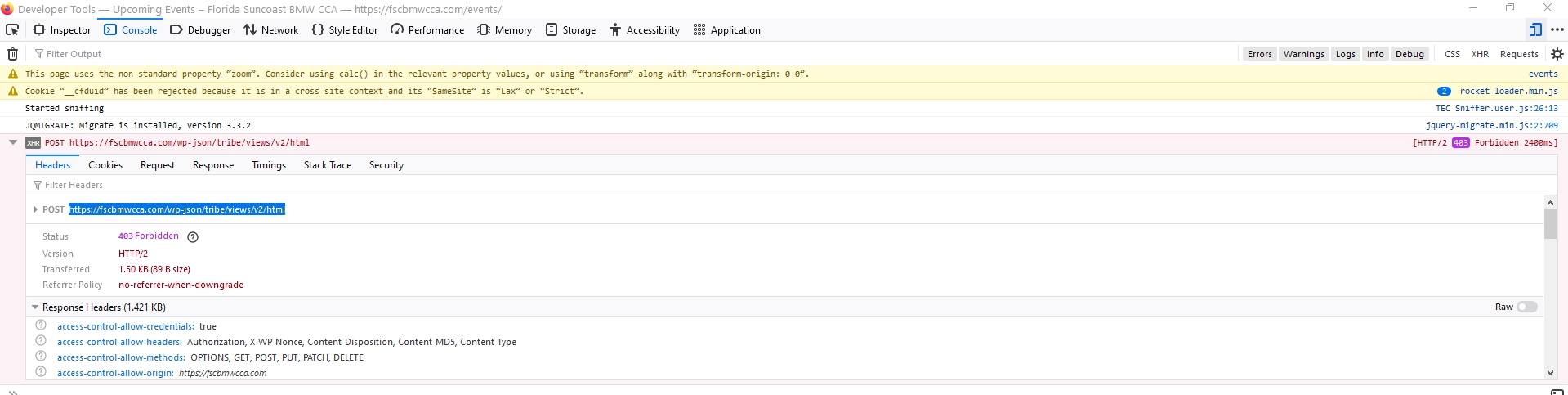
I checked your site with mobile view. When I try to navigate to the next month I get 403 forbidden response.
Screenshot: https://dl.dropbox.com/s/en715vzh8elppoj/shot_210213_110909.jpg
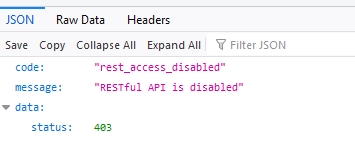
When I visit that link https://fscbmwcca.com/wp-json/tribe/views/v2/html
it reveals that the REST API is disabled.
Screenshot: https://dl.dropbox.com/s/n5ox5rganynxtx4/shot_210213_110956.jpg
Try re-enabling the rest API and check if that helps with the issue.
A.
Thanks for looking into this further.
I just found where a plug-in had it disabled. I enabled it again but still get the critical error on the events page on the mobile site.
I will wait to see if I continue to receive the “Uncaught TypeError” after having enabled REST API. I’ll keep you posted.
If you have anymore ideas let me know.
I went back to 5.3.1.1 and receiving the same critial errors in my log.
Is there any way how i can determine what is being passed that is null? What value should be being passed?
[CRITICAL] : Uncaught TypeError: Argument 1 passed to Tribe__Template::set_values() must be of the type array, null given, called in public_html//wp-content/plugins/the-events-calendar/src/Tribe/Views/V2/View.php on line 610 and defined in public_html//wp-content/plugins/the-events-calendar/common/src/Tribe/Template.php:1231
Stack trace:
#0 /public_html//wp-content/plugins/the-events-calendar/src/Tribe/Views/V2/View.php(610): Tribe__Template->set_values(NULL, false)
#1 /public_html//wp-content/plugins/the-events-calendar/src/Tribe/Views/V2/Template_Bootstrap.php(260): Tribe\Events\Views\V2\View->get_html()
#2 /public_html///wp-content/plugins/the-events-calendar/src/views/v2/default-template.php(18): Tribe\Events\Views\V2\Template_Bootstrap->get_view_html()
#3 //public_html//wp-includes/template-loader.php(106): include(‘/home3/flfujumy…’)
#4 /home
It just repeats
Thanks
Well I disabled updated designs for all calendar views and the error disappeared.
How I can determine what is being passed that is null? What value should be being passed?
Thanks
HI @fscbmwcca
I’m not quite sure, I’ll try to pull in an extra set of eyes for this. Hang in there.
Cheers,
Andras
HI @fscbmwcca
Checking your site now I didn’t see any of the errors. Could it have been some CloudFlare issue?
Nonetheless Stephen was checking it the other day and found this:
—
The HTTP response for me is 525:
https://d.pr/i/RtTg8K
Which is “handshake failed”
Maybe they could check https://community.cloudflare.com/t/community-tip-fixing-error-525-ssl-handshake-failed/44256 and failing that contact Cloudflare?
—
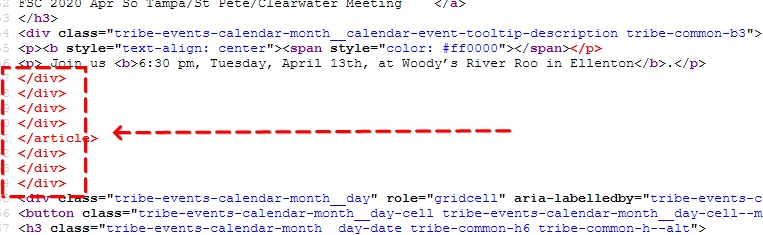
On a different note, your April month breaks on April 14th. Likely because there is some extra unneeded markup on the April 13 event. Here’s a screenshot to help:
https://dl.dropbox.com/s/thcyx6xhxh2c4m9/shot_210309_132247.jpg
Cheers,
Andras
I have looked through cloudflare and server SSL certificates and everything looks to be in order. Note: I had turned off cloudflare and still received this error.
I looked at my April 13 Event and I don’t see where that </article> reference in the code that you captured in your screen shot.
This error is coming from the WP Optimize plugin where I have set to “Log events into the PHP error log” as well as “Log events to email” and that’s the email I receive.
As noted, if I do not select “Use updated calendar designs Enable updated designs for all calendar views” the error does not come up.
Looks like this error started on February 2, 2021.
Hi @fscbmwcca
I checked your site on my phone and I see the error there.
But I don’t see it on my desktop.
The difference is that on my desktop I use Firefox and on my phone I use Chrome.
So I checked in Chrome on my desktop as well. Desktop mode loads fine. When I activate the responsive mode then it fails with the error. So somehow Chrome (based browsers) are involved.
What browsers are you using?
However I cannot reproduce this with my local test site.
I feel that there is more to this than our plugins.
You mentioned WP Optimize in the beginning. Did you also check with disabling minification and caching there?
A.
I also have only seen the error on Chrome on my iPhone when I go to https://fscbmwcca.com/events/ but if I go to https://fscbmwcca.com/events/month/ then the critical error goes away. But in Safari the critical error appears on both links.
The caching and minification is turned on in the theme and therefore not using those features in WP Optimize and only use image compression.
What other suggestions do you have?
Did you try switching off minification and caching in your theme?
Did you try this with using a default theme like twentytwenty?
Sorry, these are not clear from our conversation.
A.
I can’t remember. I will give it a try.