Hm… you mean that Custom Fields don’t appear on the product page or on the sidebar in filtering?
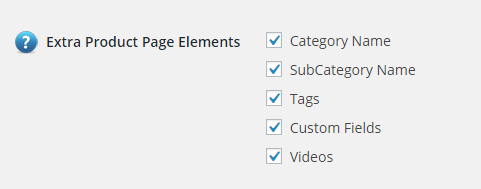
If it’s doesn’t appear on the product page, check “Extra Product Page Elements” in Options Tab (Basic settings)
https://i.gyazo.com/10fdb46de9f6d8d2a613702cabf9cf9b.png
Thread Starter
 Rad199
(@rad199)
I don’t even get that option.
http://pasteboard.co/1pN01a1S.jpg
The only custom filed that works is the inputs. If I have it as textarea or checkbox they don’t save.
Hi,
First of all, the “Extra Product Page elements” is found under the ‘styling (Default)’ tab.
Rad199, would it be possible to clarify what you mean by “the Custom Fields won’t save the data I enter in the products”?
If you simply mean that whenever you are uploading through spreadsheet, the custom fields that are checkboxes are not uploaded as well, please remove the spaces that you have put within the “Input Values” of your custom fields in your dashboard. You should as well remove the spaces that you have put in your spreadsheet values, if they do contain more than one value.
As for the custom page, you may change the custom CSS of it also. However, if you simply want your custom fields to be displayed, we suggest you using the Tabbed Layout instead of the Custom Product Page. Do not forget to set “Display in Tabbed Layout” for the Custom Fields you do wish to display.
Best regards,
Thread Starter
Rad199
(@rad199)
Hi Etoile,
I’ve managed to resolve the issues that I am having. I find the usability/user experience over complicated. If you even need any feedback let me know.
Thanks for your help!
Rad