Hi kerry1280,
If the original template is located in (/learnpress/templates/courses.php) so you have to stored your overrided template in your-child-theme/learnpress/courses.php.
Please check again and let me know.
Thanks for the suggestion. That location also did not work. The original template that is being used is in the plugins/learnpress-buddypress/templates/profile folder. I tried placing the courses.php file into the /learnpress/templates/ as well as the /learnpress/templates/profile folders in my child theme, neither of which worked. The text at the top of the courses file reads the following:
/**
* Template for displaying BuddyPress profile courses page.
*
* This template can be overridden by copying it to yourtheme/learnpress/addons/buddypress/profile/courses.php.
*
* @author ThimPress
* @package LearnPress/BuddyPress/Templates
* @version 3.0.0
*/
Hi,
I have checked again and it’s still working fine.
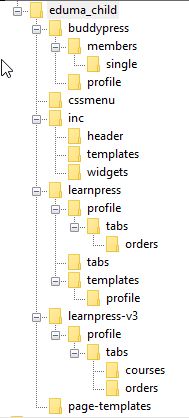
Can you share me a screenshot about the child theme folder tree?
Okay 🙂
I understand the reason why.
If the original template folder is /plugins/learnpress-buddypress/templates/profile
So the override folder will be /themes/eduma-child/learnpress-v3/addons/buddypress/templates/profile
Try again ;). Let me know.
Still didn’t work 🙁 I also tried putting the above path in the /themes/eduma-child/learnpress folder with no luck.
Did you try to ask in the theme forum? You are using our premium item.
Our team can check your site more carefully and help you out.
https://thimpress.com/forums/forum/eduma/
I haven’t yet, but I will do so now. Thanks!
Hope you can solve it asap.