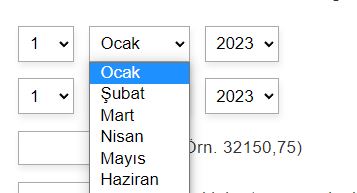
Date Calculator
-
Hello
I’m calculating the date of birth.
It prints the result to the cell. But it does not write to the result section that comes with html.
What could be the problem?(function(){ var o = DATEDIFF(NOW(), fieldname19, 'dd-mm-yyyy', 'y'); return o['years']+' Yıl'+ o['months']+' Ay'+ o['days']+' Gün'; jQuery('#calculation-yashesaplama').html(yashesaplama); return yashesaplama; })()<span id="calculation-yashesaplama" style="color:#ff6504;"></span>Your age : [10] – [283 days until your new age] – [You were born on a Saturday.]
How can we print like this?


-
Hello @klingbeil
Thank you very much for using our plugin. The “return” instruction stops the evaluation of the equation and returns the result. Please, edit the equation as follows:
(function(){
var o = DATEDIFF(NOW(), fieldname19, 'dd-mm-yyyy', 'y'),
yashesaplama = o['years']+' Yıl'+ o['months']+' Ay'+ o['days']+' Gün';
jQuery('#calculation-yashesaplama').html(yashesaplama);
return yashesaplama;
})()
Best regards.
The date calendar “dd/mm/yyyy” sounds in English.
Can we do this in Turkish? Can we at least remove the “dd/mm/yyyy” part above the date cell if it doesn’t come automatically above the cell?
thanksHello @klingbeil
If you want to remove the date format from the field’s label, you only should enter the style definition below through the “Customize Form Design” attribute in the “Form Settings” tab (https://resources.developers4web.com/cff/images/documentation/form-settings-tab.png):
#fbuilder label .dformat{display:none !important;}Best regards.
How do we calculate the day of the entered date?
For example :07/11/2010 “SUNDAY” Day
ThanksHello @klingbeil
You can use the WEEKDAYNAME operation as follows:
WEEKDAYNAME('07/11/2010','dd/mm/yyyy')Learn more about the date/time operations module by reading the following section of the plugin documentation:
https://cff.dwbooster.com/documentation#datetime-module
Best regards.
How should the necessary correction be here?
Also, what should I do to make the calendar in Turkish? I have no further questions for you, I’ve been very uncomfortable. Thanks in advance.
fieldname20 = Date entered by the user.
(function(){ var o = WEEKDAYNAME(fieldname20,'dd/mm/yyyy'); yashesaplama2 = o['days']+' Gün'; jQuery('#calculation-yashesaplama2').html(yashesaplama2); return yashesaplama2; })()Hello @klingbeil
The
WEEKDAYNAMEreturns the weekday name directly. So, you should useodirectly instead ofo['days']. Also, if you want to get the weekday name in Turkish, you must pass the locate (tr-TR) as the third parameter in theWEEKDAYNAMEoperation:(function(){ var o = WEEKDAYNAME(fieldname20,'dd/mm/yyyy', 'tr-TR'); yashesaplama2 = o+' Gün'; jQuery('#calculation-yashesaplama2').html(yashesaplama2); return yashesaplama2; })()Best regards.
I think I asked wrong. When I create a date cell by the users, an English calendar appears, how do we do it in Turkish?

Hello @klingbeil
Please, read the following entry in the plugin FAQ. It describes the different alternatives to translate the calendars:
https://cff.dwbooster.com/faq#q221
Best regards.
Hello
1) The date field is displayed to the user with the current date.
Can we replace this with a custom date?2) Where do we mark the required field that the user must fill?
3) Our last question is, is there a method to make the date field like this?
Thanks
Hello @klingbeil
Q: The date field is displayed to the user with the current date.
Can we replace this with a custom date?A: Yes, of course, that’s possible. The Date fields include two attributes to enter the default date.
“Default Date” allows you to enter a date directly with the same format selected via the “Date Format” attribute (Ex. 28/01/2023) or a relative date like X days, months, and years after or before today (Ex. +7m +1d).

“Predefined Value” is similar to the previous one. It allows you to enter a date directly or a field’s name to display the date of another field.
Another difference with the “Default Date” attribute is that you can use the “Predefined Value” to enter the field placeholder instead of the default value.
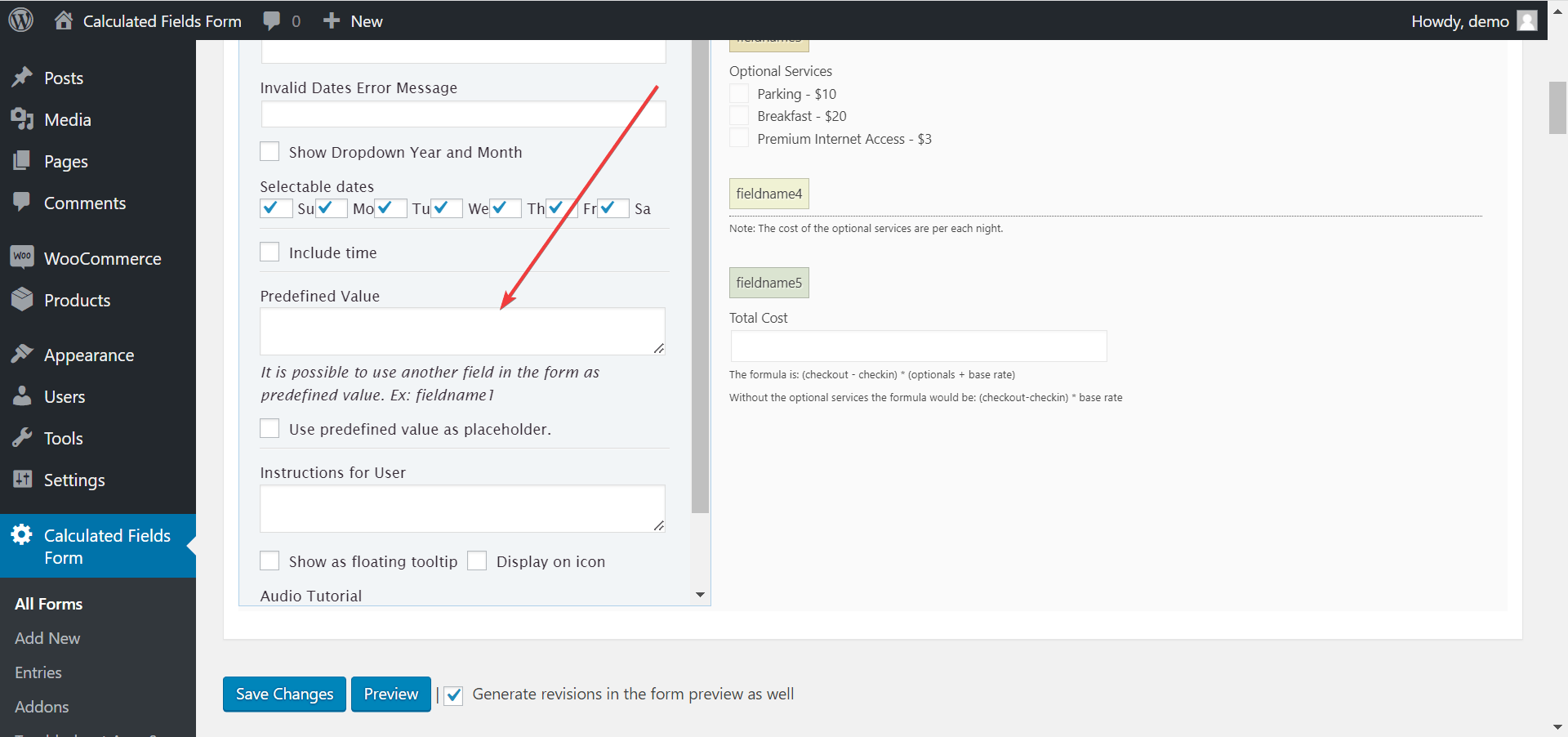
If you want to display the field’s value empty, leave empty the “Predefined Value” attribute and tick the “Use predefined value as placeholder” checkbox.
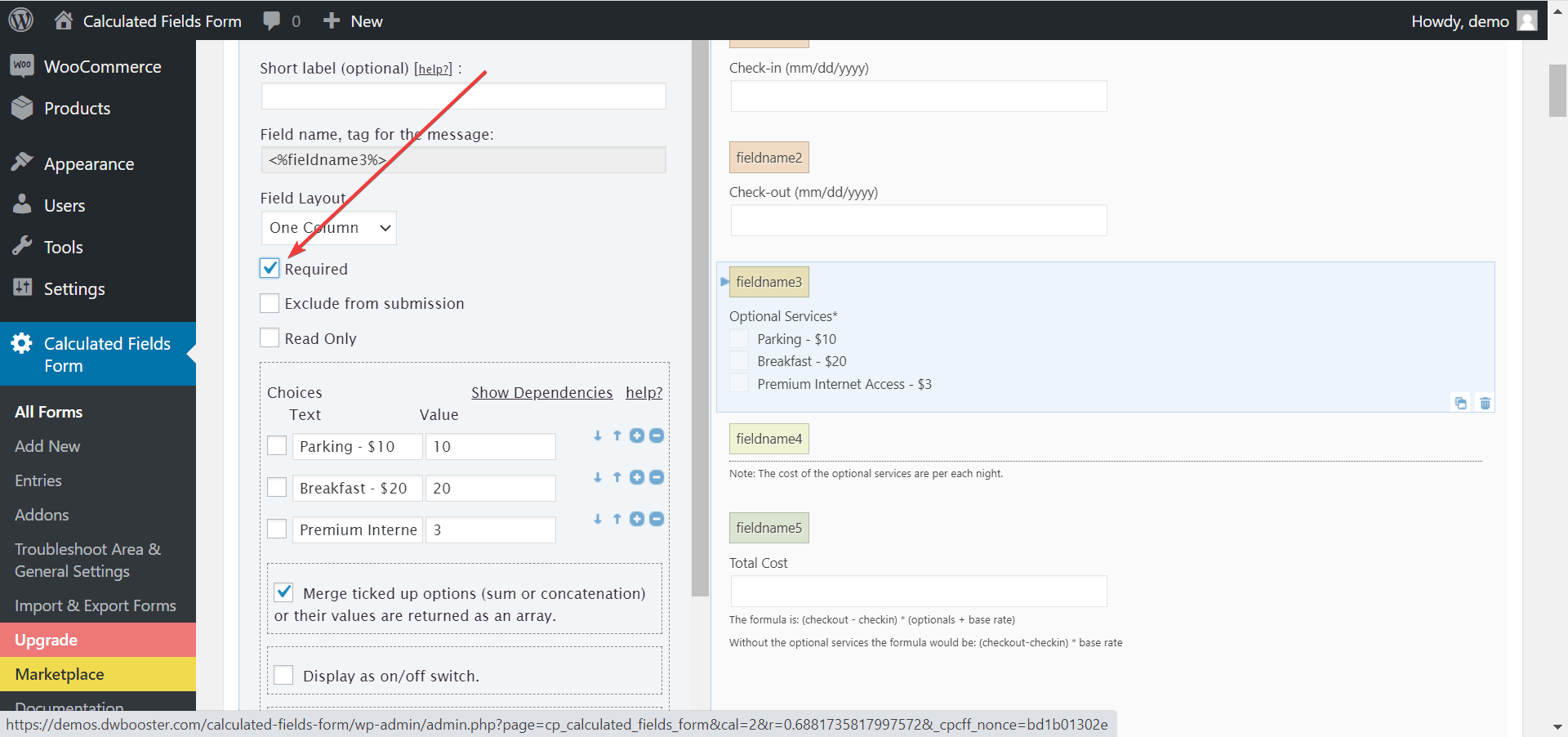
Q: Where do we mark the required field that the user must fill?
A: Tick the “Required” checkbox in the fields’ settings (The attribute is present in every entry field).
Q: Our last question is, is there a method to make the date field like this?
A: I’m sorry. You must emulate the date field with three separate controls.
You can insert a DIV field in the form and select “3 Columns” through its settings. Insert three controls into the DIV field: A Number field configured to accept digits only, with the value 1, and 31 as the min and max attributes, a DropDown field for months with numbers as the choices’ values, and the months’ names as choices’ texts, and another number field for years.
In this case, to use the date for calculation, you must concatenate the components:
(function(){
var d = CONCATENTATE(fieldname1, '/', fieldname2, '/', fieldname3);

return DATEDIFF(TODAY(), d, 'dd/mm/yyyy', 'd')['days'];
})()
The equation above concatenates the date components and returns the number of days between today and the date entered by the user.
Best regards.
Hello,
What could be wrong with this code? Actually it works without Criterion. However, if the criterion is A, we calculate it in the lower part, and if it is B, we calculate it as a function under B.
But it doesn’t print the result.
Thanks.(function() { var yillikizinucrethakki = 0; if (fieldname36 == 'A') { yillikizinucrethakki = Math.abs(fieldname31); if (yillikizinucrethakki <= 359 && fieldname28 <= 18 && fieldname28 >= 50) { yillikizinucrethakki = 20; } else if (yillikizinucrethakki <= 359) { yillikizinucrethakki = 0; } else if (yillikizinucrethakki >= 360 && yillikizinucrethakki <= 1799) { yillikizinucrethakki = 14; } else if (yillikizinucrethakki >= 1800 && yillikizinucrethakki <= 5399) { yillikizinucrethakki = 20; } else if (yillikizinucrethakki >= 5400 && yillikizinucrethakki <= 99999) { yillikizinucrethakki = 26; } if (fieldname28 <= 18 && yillikizinucrethakki !== 20) { yillikizinucrethakki = 20; } if (fieldname28 >= 50 && yillikizinucrethakki !== 20) { yillikizinucrethakki = 20; } } else if (fieldname36 == 'B') { yillikizinucrethakki = Math.abs(fieldname31); if (yillikizinucrethakki <= 359) { yillikizinucrethakki = 0; } else if (yillikizinucrethakki >= 360 && yillikizinucrethakki <= 3599) { yillikizinucrethakki = 20; } else if (yillikizinucrethakki >= 3600 && yillikizinucrethakki <= 99999) { yillikizinucrethakki = 30; } } jQuery('#calculation-yillikizinucrethakki').html(yillikizinucrethakki + ' Gün'); return yillikizinucrethakki; })();Hello @klingbeil
The equation structure is correct, but I don’t know the fields’ values. So, I cannot know if the fields’ values satisfy the conditions without checking the form in action.
Best regards.
Hello, the equation at the bottom of the form is actually correct, but it does not write the result.
This equation does not work while functions work in all our other calculations.Actually, when I remove the criteria of the equation, it works fine as one. What could it be?
Hello,
The equations in the URL provided are working fine, but the page does not includes a tag with
id="calculation-yillikizinucrethakki"Best regards.

The topic ‘Date Calculator’ is closed to new replies.