Its working but not 100%. For example, I entered a date as 05/28/1995, the output I am getting is ’27 year(s) 10 month(s) 8 day(s)’, but the correct one is 27 year(s) 10 month(s) 13 day(s).
P.S : Also if we can output the same date next year. For example in our case, calculatedfield = 01/04/2024 (when user enter 01/04/2023)
This reply was modified 3 years, 2 months ago by civilvicky.
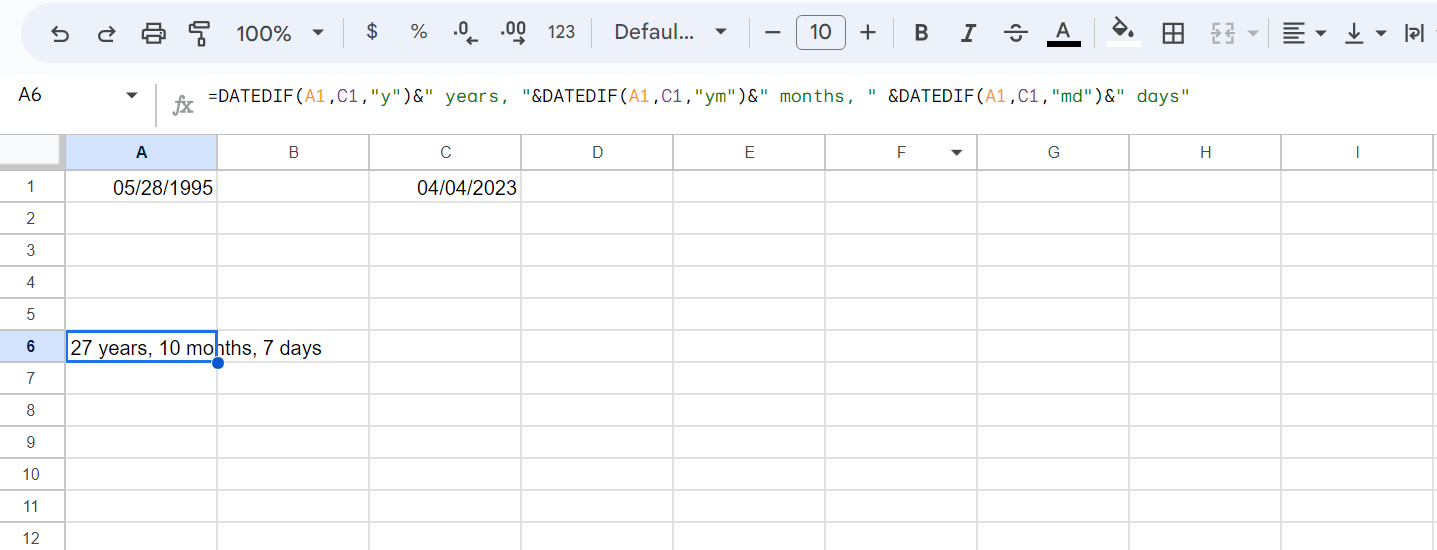
No, I’m sorry, you are confused. The difference between 05/28/1995 and today is 27 year(s) 10 month(s) 8 day(s)
I’ve calculated it with Excel:
There is a difference of one day because our plugin takes into account the first and the last day.
About your second question, you can use the DATETIMESUM operation to increase the date object and the GETDATETIMESTRING operation to get the date object as text in a specific format:
datetimesum() formula is displaying the result as “Sat Jun 03 2023 05:30:00 GMT+0530 (India Standard Time)”. I just need it to display date i.e “Jun 03 2023” or “Sat Jun 03 2023”
This reply was modified 3 years, 2 months ago by civilvicky.
The DATETIMESUM operation returns a Date object. The alternatives would be call the WEEKDAYNAME, MONTHNAME, and YEAR operations using the DATETIMESUM. For example:
(function(){
var d = DATETIMESUM(fieldname1, 'yyyy-mm-dd', 7, 'd');
return WEEKDAYNAME(d)+' '+MONTHNAME(d)+' '+DAY(d)+' '+YEAR(d);
})()
Best regards.
Viewing 5 replies - 1 through 5 (of 5 total)
The topic ‘date difference’ is closed to new replies.