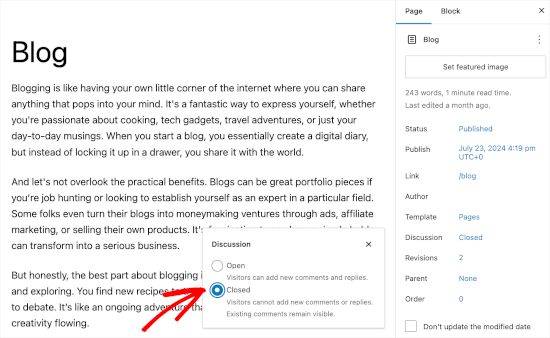
The global settings only apply to new pages or posts – not to existing ones if you change the global setting afterwards. Check where exactly the comments are stored and whether discussions are activated on this page or post. Change the setting there to avoid further comments.
Okay, got it. I have found the page concerned. Where can I deactivate the comments on this page?
This is a feature on the side. How this is displayed depends on the editor you are using. In the Block Editor, you can find it here on the right:
https://www.wpbeginner.com/wp-content/uploads/2019/05/wp-blockeditor-disablediscussion.png
In the Classic Editor it is in a similar place.
You should also be able to find it from the list of pages in the Quick Edit:
https://www.ionos.co.uk/digitalguide/fileadmin/processed/3/2/csm_EN-wp-disable-comments-quick-edit-3_e8d641bdcd.webp