Delete blue square
-
Hi,
could you help me to remove the blue square whitch is above the form (under the “cennik”)?
regards
MartaThe page I need help with: [log in to see the link]

-
Hello @maa821,
The blue square is not included by our plugin, this blue square is displayed by the style definitions:
	.popup_menu .line,
	.popup_menu .line:after,
	.popup_menu .line:before,
	nav.content_menu,
	#back_to_top:hover span,
	.blog_holder article.format-link .post_box_holder:hover,
	.blog_holder article.format-quote .post_box_holder:hover,
	.blog_holder.masonry_full_width article.format-link .post_box_holder:hover,
	.blog_holder.masonry_full_width article.format-quote .post_box_holder:hover,
	.blog_holder .flex-direction-nav a,
	.blog_holder.masonry article .post_info,
	.blog_holder.masonry_full_width article .post_info,
	.single_tags a:hover,
	.blog_load_more_button a:hover,
	.ls-nav-prev,
	.ls-nav-next,
	.projects_holder.standard article:hover .portfolio_description,
	.projects_holder article a.lightbox,
	.portfolio_slides a.lightbox,
	.portfolio_single h2:before,
	.portfolio_single .flex-direction-nav a,
	.filter_holder ul li,
	.filter_holder_mobile ul li.filter,
	aside .widget h4,
	aside .widget h6,
	.side_menu .widget h6,
	.side_menu .side_menu_title h4,
	#wp-calendar td#today,
	.footer_top .widget.widget_search input[type="submit"],
	.side_menu .widget.widget_search input[type="submit"],
	.header_top .widget_search input[type="submit"],
	.footer_top .widget.widget_search input[type="text"],
	.header_top .widget_search input[type="text"],
	.widget .tagcloud a:hover{
		background-color: #2196f3;
	}

	.breadcrumbs_title .breadcrumb .current,
	.breadcrumb a,
	.breadcrumbs_title .breadcrumb a:hover,
	.breadcrumb .delimiter,
	#back_to_top span,
	.blog_holder article .post_info .post_info_inner > span,
	.blog_holder article .post_info .post_info_inner > span a,
	.blog_holder article.format-quote .qoute_mark,
	.blog_holder article.format-quote .quote_author,
	.blog_holder article.format-link .link_mark,
	.blog_holder.blog_single .post_info_single,
	.blog_holder.masonry article .blog-share a,
	.blog_holder.masonry_full_width article .blog-share a,
	.comment_holder .comment_number_inner h4,
	.comment_holder .comment .read_more_reply i,
	.comment_form > .comment-respond > h4,
	.comment_holder .comment .text .comment-respond h4,
	.single_tags a,
	.single_links_pages a:hover span,
	.pagination ul li span,
	.pagination ul li a:hover,
	.blog_load_more_button a,
	.projects_holder article .portfolio_description,
	.projects_holder article .feature_holder,
	.portfolio_slides .feature_holder,
	.portfolio_single h2:before,
	.filter_holder ul li:hover,
	.filter_holder ul li.active,
	.filter_holder_mobile ul li.label,
	.portfolio_navigation .portfolio_prev:hover a,
	.portfolio_navigation .portfolio_next:hover a,
	.portfolio_navigation a.portfolio_button:hover,
	.widget.widget_rss li a.rsswidget,
	#wp-calendar caption,
	#wp-calendar tfoot a,
	.side_menu #wp-calendar td#today,
	.widget.widget_search input[type="submit"],
	.header_top .widget_search input[type="submit"],
	.widget.widget_search input[type="text"],
	.header_top .widget_search input[type="text"],
	.widget .tagcloud a{
		color: #2196f3;
	}
Into the file: http://yackoni.hekko24.pl/wp-content/themes/soho/css/style_dynamic.php?ver=4.9.8
of the theme active on your website.
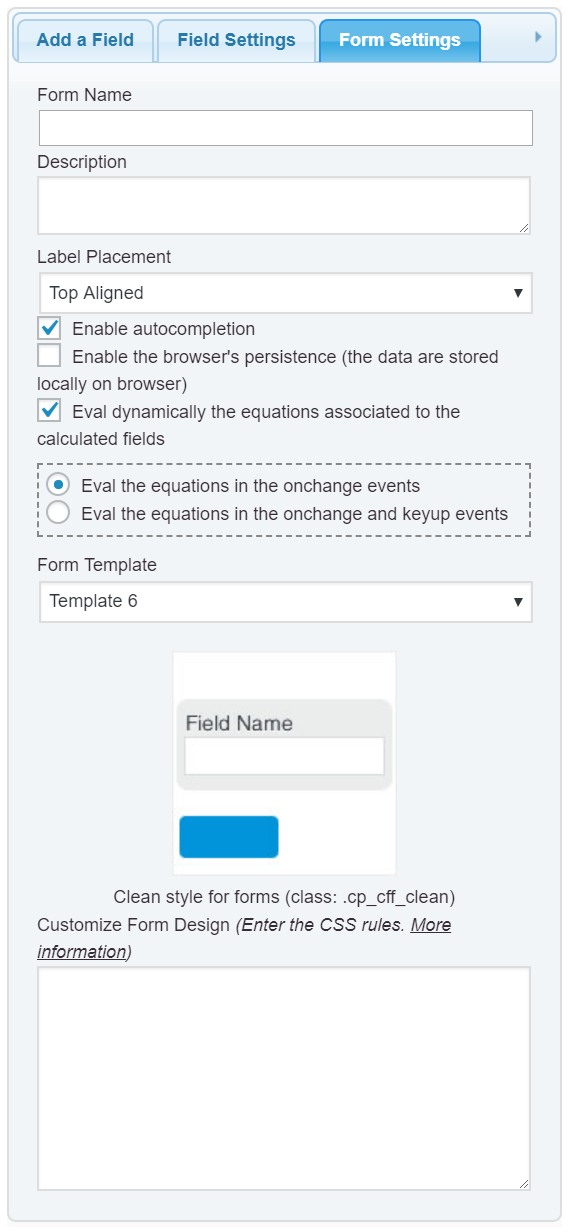
The alternative would be redefine these styles for the form’s elements. Please, enter the style definition below, into the “Customize Form Design” attribute in the “Form Settings” tab (https://cff.dwbooster.com/images/documentation/form-settings-tab.png):
#fbuilder .fform h2::before{background-color:transparent;color:transparent;}and that’s all.
Best regards.Hi,
thank you for your quick reply. Unfortunately I’ve seen another problem. Could you please go on page http://yackoni.hekko24.pl/ then choose from menu “Upominki” “Dlugopisy” and then choose “COSMO slim touch pen”. There is no calculated form 🙁 When I refresh the page it’s ok. Maybe you know why is that and how to fix it?
regards
Marta

The topic ‘Delete blue square’ is closed to new replies.