DIMENSION and uploadFile
-
Good morning!
Using IMAGE DIMENSION(fieldname 7|n);
fieldname 7 is the field where I upload the image. The return is [object Object]. is there any additional configuration required?
Another question.
Is it possible create a placeHolder for file upload > image?

-
Hello @rui9075918
Thank you very much for using our plugin. The IMGDIMENSION operation returns an object with the image width and height. If you want only to display the image information, the correct equation would be:
(function(){
var size = IMGDIMENSION(fieldname7|n);
return 'Width: '+size['width']+', Height: '+size['height'];
})()
Best regards.
Once again thank you very much for the quick response.
As for the second question I asked, is there anything that can be done? Put a temporary image as a placeholder?
Hello @rui9075918
No, I’m sorry. The HTML standard does not allow to pre-fill input tags with
type="file"Best regards.
I think I didn’t put the question correctly.
If I insert a file upload in an html field.
I point the load to a DIV, for the preview. Being possible to mark the space (first example in the image).
If I insert the ‘file upload’ field, the image selector will be: ‘#fbuilder .cff-file-field .files-list img’ (second example in the image).
My question is whether through the “upload file” field I can create something similar to the first example in the image, to mark the space before the upload is carried out.
Hello @rui9075918
If you insert an input tag with the type file into an “HTML Content” field, it would not be handled by the plugin.
So, the custom input tag would not include the preview images or be accessible from the plugin operations.
Best regards.
Good morning.
Using the “upload file” existing in the plugin. I have some way to mark the area where the file will be previewed. For example add a border in the area where the preview will occur?
After loading a file I already saw that it is possible.
Hello @rui9075918
Yes, that’s possible. The selector for the images preview is
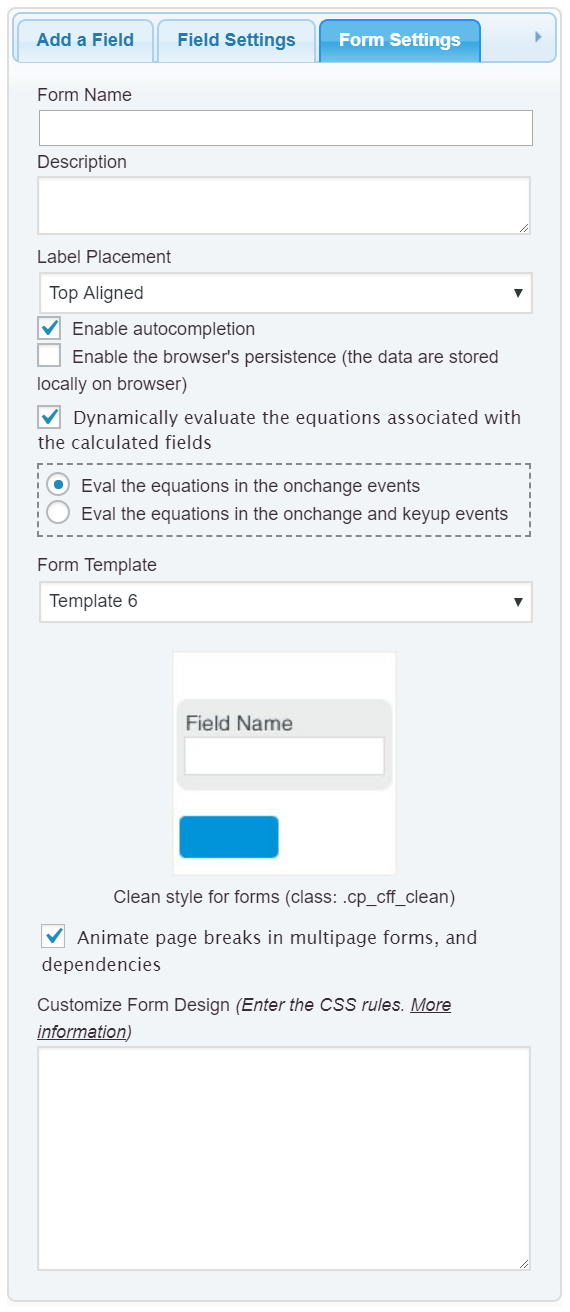
#fbuilder .files-list imgFor example, if you want to make the border of the images preview red and thicker, you can enter the style definition below through the “Customize Form Design” attribute in the “Form Settings” tab (https://resources.developers4web.com/cff/images/documentation/form-settings-tab.png):
#fbuilder .files-list img{border:2px solid red !important;}Best regards.
But in this case the border is only visible after loading a file. Right?
What I want is before loading a file (see example).
Is it possible to do something like the picture illustrates?
Hello @rui9075918
The files container is generated after selecting the files. To display the files container by default you will need additional code.
Please, insert an “HTML Content” field in the form and enter the following piece of code as its content:
<script>
fbuilderjQuery(document).one('showHideDepEvent', function(){
jQuery('.cff-file-field .uh').each(function(){
jQuery(this).before('<span class="files-list"><span></span></span>');
});
});
</script>
<style>
#fbuilder .files-list span{display:inline-block; width:120px; height:120px; border:2px dashed #ccc;}
#fbuilder .files-list span:empty::before{display:block;content:"Preview Here";text-align:center;margin-top:50%;transform:translateY(-50%);color:#ccc;font-weight:bold;}
#fbuilder .files-list span img{border:0 !important; width:110px; height:110px; margin:5px;}
</style>
If you need other customizations, please, contact us directly via the plugin website:
https://cff.dwbooster.com/customization
Best regards.
Yes this is what I was needing. Thank you very much.
As you mentioned if I need some customizations. Do you provide cost estimates?
Thanks again.
Hi!
I’m sorry. We are not allowed to support any customers in these forums.
For pro or commercial product support please contact us directly on our site. This includes any pre-sales topics as well.
Commercial products are not supported in these forums. We will happily answer this and any other questions you can have on our own site.
Thank you.

The topic ‘DIMENSION and uploadFile’ is closed to new replies.