• andrasch

    (@andrasch)


    Hello,

    I was about to fix an issue with the metaslider in Appearance > Customise, when I noticed that the menu in the customise section is completely missing. the page is completely blank, the only sentence on the left pane is “you are customising”. The menu is not there, I cannot click on anything.

    What do you think the problem can be and how can I fix it?

    MAny thanks

    Andras

    The page I need help with: [log in to see the link]

Viewing 9 replies - 1 through 9 (of 9 total)
  • Shahin

    (@skalanter)

    Hello @andrasch,

    Thank you for reaching out,

    Please check whether this issue also occurs with another theme that includes the WordPress Customizer, like Storefront.

    I noticed that the nav menu on your site isn’t part of the theme itself, so if there’s a conflict, it’s likely between the slider plugin and the nav menu plugin. Based on my checks, I didn’t find any issue: https://ibb.co/mFJGzdVC.

    However, if the issue only happens when using the OceanWP Theme, then please provide more detailed information so we can reproduce the issue on our end. Ideally, somewhere other than your live site, so we need to know the steps to reproduce the issue.

    Would you please provide us with screenshots or a short video, Images of the errors you’re encountering, step by step?

    You can upload your files to one of the following online services:
    https://postimages.org
    https://imgbb.com
    https://loom.com
    https://drive.google.com

    Please recheck your issue and keep us posted.

    I hope it helps,
    Best Regards

    Thread Starter andrasch

    (@andrasch)

    Hi Shahin

    Many thanks for checking.

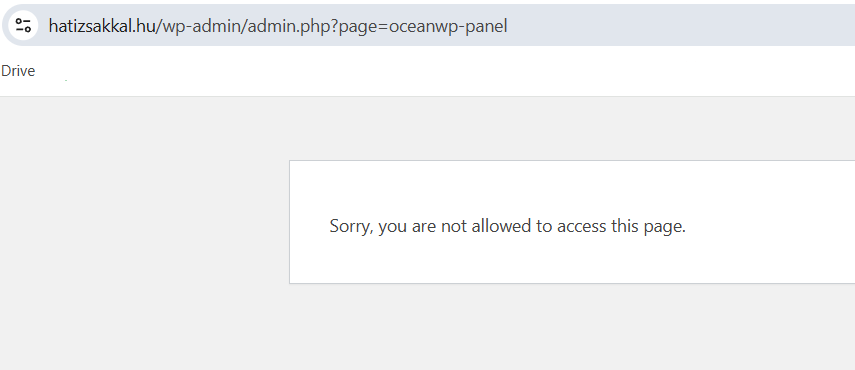
    When I changed over to Storefront , the menu appeared. However when I changed back to OCeanwp, I got the following message

    Screenshot 2025-05-28 182443.png

    But then I closed this window and when I returned to the dashboard, the OceanWP theme changed to active mode. And of course now the menu is not visible again.

    Please advise

    Many thanks

    Shahin

    (@skalanter)

    Hello @andrasch,

    Thank you for the update,

    I can’t see your screenshot: https://ibb.co/JjgD1h1h.

    The menu you have is not related to the theme and comes from a third-party plugin: https://ibb.co/zHTstrHf.

    Please get in touch with the author of that third-party plugin.
    Maybe they have a solution that we are not aware of.

    Hope it helps,
    Best Regards

    Thread Starter andrasch

    (@andrasch)

    Thanks @skalanter

    This is the message I try to get to the customise section

    https://i.postimg.cc/527ZW94q/Screenshot-2025-05-28-182443.png

    I deactivated and reactivated all the plugins but this didnt help me find out which plugin can cause the issue

    Are you sure that one of the plugins is the reason why I cannot get access to the customise section?

    thank you

    Shahin

    (@skalanter)

    Hello @andrasch,

    Thank you for the update,

    The versions you’re using for the OceanWP theme and Ocean Extra plugin are very outdated and no longer supported:
    https://ibb.co/jkm3y6nR

    To investigate properly, please update to the latest versions and recheck the issue.

    Important Note: Since the versions are quite old, do not update directly on your live site. Instead, follow these steps:
    – Set up a staging website.
    – Take a full backup before doing anything.
    – Read this article carefully: https://docs.oceanwp.org/article/875-how-to-safely-update-wordpress-website.

    After updating, you should be able to access the Theme Panel again:
    https://docs.oceanwp.org/article/810-introduction-to-oceanwp-panel.

    Please recheck the issue and keep us posted.

    Hope it helps,
    Best Regards

    Thread Starter andrasch

    (@andrasch)

    Thank you @skalanter

    I have updated the theme. one more question: could you please tell me how to add a CSS on the front-end?

    thank you

    Shahin

    (@skalanter)

    Hello @andrasch,

    Thank you for the feedback,

    Please follow the steps explained in this link:
    https://docs.oceanwp.org/article/354-add-custom-css-and-js-to-your-website.

    If you are looking for a custom CSSfor the menu, you can try this method:
    https://docs.oceanwp.org/article/506-menu-is-gone-when-using-bootstrap.

    Hope it helps,
    Best Regards

    Thread Starter andrasch

    (@andrasch)

    thanks very much for all your help @skalanter

    Shahin

    (@skalanter)

    You’re welcome.
    I’m glad we could help.

Viewing 9 replies - 1 through 9 (of 9 total)

The topic ‘Disappeared menu’ is closed to new replies.