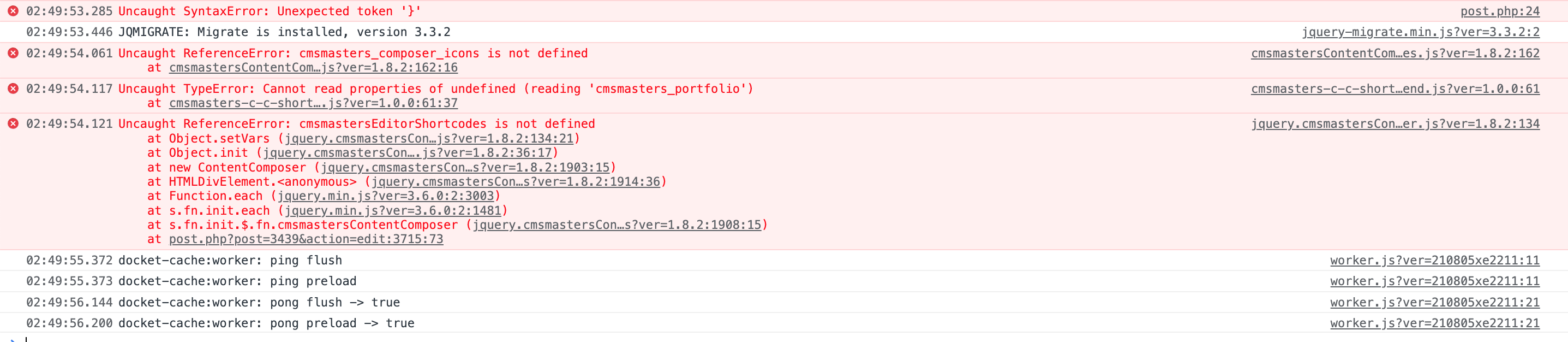
Hi,
From the error message, it seems like the issue came from the “CMSMasters Content Composer” javascript code.
You may try to disable/deactivate Docket Cache and see if the issue still appears.
I can send you the plugin directly if you have an email to give me because it is not available for free.
You can contact me here https://docketcache.com/contactus/, but there is no guarantee I will look into it. Thank you for offering me a premium plugin.
Thanks.
Ok I just sent you the plugin on your email available on the page you told me!
In fact, concerning the conflict, the buider is not a visual builder (front) but replaces the backoffice editor in the pages (post.php).
– If Docket cache inactive + CMSMasters Content Composer
= no conflict the plugin replaces the editor.
Conversely, when loading an article or page containing the editor, their builder does not replace the editor by default, so it displays simple text (the shortcode used by the CMSMasters Content Composer editor).
If I clear docket object cache, the builder replaces the default editor but once the object cache is created, the next time the conflict appears again.
For information, I replaced docket cache by another plugin (Object Cache 4 everyone) which is not developed any more unfortunately but there is no problem.
Thanks in advance 🙂 !
-
This reply was modified 4 years, 1 month ago by
 JibsouX.
Hi,
I’m confirmed received your e-mail and downloaded the said plugin. It will take me one or two days to test it, and if had spare time will do it quickly.
Thanks.
Hi @jibsoux ,
If possible, can you confirm the latest version 21.08.07 fixes the issue with CMSMasters Content Composer?
Thanks.
Hi,
I’m marking this thread as resolved. Feel free to open a new topic if you have further questions.
Thanks.
Hi,
Thank you for your response. You’re welcome to try and use it again when needed.
Thanks.