• Resolved presscode

    (@saschinger)


    Hello and good day to you πŸ™‚
    I have used your plugin a few times in the past successfully, but currently my browser console is showing that the site is still trying to connect with fonts.googleapis.com.
    How to prevent this?
    Thank you and kind regards,
    Sascha

    The page I need help with: [log in to see the link]

Viewing 4 replies - 1 through 4 (of 4 total)
  • Thread Starter presscode

    (@saschinger)

    Oh, found out myself … solved

    Plugin Author Daan van den Bergh

    (@daanvandenbergh)

    Hi!

    That’s great! Would you mind sharing the solution?

    Thread Starter presscode

    (@saschinger)

    Sure … well …

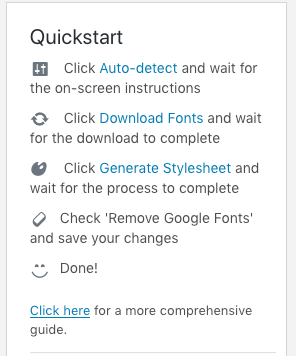
    First of all I have tried to follow the “Quickstart” as presented in Dashboard > Settings > Optimize Google Fonts (check this screenshot), but realized, that the 4th step “Check ‘Remove Google Fonts’ and save your changes” had no link, which could have lead to my confusion.

    So after performaing step 1-3 and not finding out about where to accomplish step 4, I have switched from the tab “General Stylesheet” to the “Advanced Settings” and there I have found the empty checkbox next to “Auto Remove”.

    After activating this checkbox I opened the frontpage in private browser-window again, checked the browser-network-tool and finally, no more connection to any Google Font Server πŸ˜€

    Plugin Author Daan van den Bergh

    (@daanvandenbergh)

    Yes! Thank you. This is great feedback! The quick start should be rewritten a bit, with references to the corresponding settings tabs.

    Thanks a lot!

Viewing 4 replies - 1 through 4 (of 4 total)

The topic ‘Does not work with GeneratePress Theme properly’ is closed to new replies.