Doesn't work on Google Chrome
-
Yes, I read the install instructions and even disabled the PepperFlash version of Flash. I get an error dialog in Yosemite about unknown installation.

-
Hi Daniel,
Thanks for checking out EasyRotator, and I’m sorry you’re experiencing trouble. No configuration changes are needed in Chrome; can you please confirm the specific error message you’re receiving?
Sincerely,
Drew O’NeillInstalling EasyRotator throws this error:
Welcome to EasyRotator! You’re almost ready to start creating rotators!
It appears that you’re using Google Chrome. There’s a new issue that may break auto-installation in Chrome. Please click here to learn more about how you can avoid this problem.
You need to install the EasyRotator editor application. Click the Install button below, then choose Open if prompted:Clicking the Install button:
Adobe Flash
A download error occurred. Try to download again?In my Google chrome browser: chrome://plugins
Find Adobe Flash Player and disable the file with pepperflash in the pathname:
/Applications/Google Chrome.app/Contents/Versions/39.0.2171.99/Google Chrome Framework.framework/Internet Plug-Ins/PepperFlash/PepperFlashPlayer.plugin
Now the EasyRotator plugin finished installing.
EasyRotator setup is complete and you’re ready to start creating rotators!
To get started, use the new EasyRotator button in the Post Editor to add a rotator to your post/page. Or, use the EasyRotator Rotator widget on the Widgets page.
Detailed Help DismissI Edit a Post, then click the EasyRotator icon in the toolbar. A dialog appears: Select a Rotator to Insert.
I click: New Rotator
An error dialog appears:
“EasyRotator.app” can’t be opened because it is from an unidentified developer.
I just don’t have the time or patience to get around all of your plugin issues. As a freelance web developer time is money, and you cost me too much money already.
Hi Daniel,
Again, I’m sorry for any inconvenience or wasted time; I definitely understand that’s annoying! It sounds like you’re on the cusp of getting things running if you change your mind – you should only need to go to your Applications folder and right-click (command+click) on the EasyRotator application and select Open. You’ll then be given the option to continue and the “unidentified developer” error won’t appear again in the future. This error can appear depending on how the app is installed.
Sincerely,
Drew O’NeillWith Finder I opened the Applications folder on my MacBook Pro, found EasyRotate, right-clicked, then a dialog said:
“EasyRotator.app” is from an unidentified developer. Are you sure that you want to open it?
Opening “EasyRotator.app” will always alway it to run on this Mac.I clicked the button: Open
Now in WordPress when I edit a Post and click the EasyRotator icon i get a dialog:
Select a Rotator To Insert
Use the manager below to create or select an existing rotator to embed in your post:
The dialog is basically empty, there is nothing for me to select. This is getting tiring.
Hi,
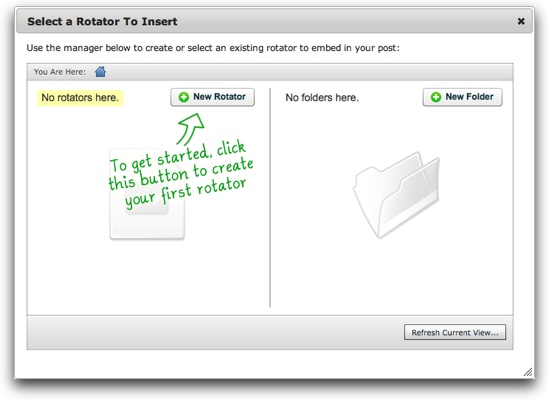
You should see the option to click the “New Rotator” button like this:
[Image link: http://www.dwuser.com/images/products/easyrotator/support/erwp/posts_pages/insert_dialog1.jpg ]
(Detailed instructions here: http://www.dwuser.com/support/easyrotator/wordpress/#insert )
Sincerely,
Drew O’NeillYes, I used to see that dialog content, but now it’s empty.
If you’re wanting to proceed any further with this (I understand if you choose not to), please open a support ticket at http://www.dwuser.com/ and send a screenshot of what you see -and/or- temporary WordPress login credentials so I can attempt to reproduce the issue.
Sincerely,
Drew O’NeillJust tried one more time and the EasyRotator dialog finally showed up and worked, however I already installed another slideshow plugin that was much easier to install.

The topic ‘Doesn't work on Google Chrome’ is closed to new replies.